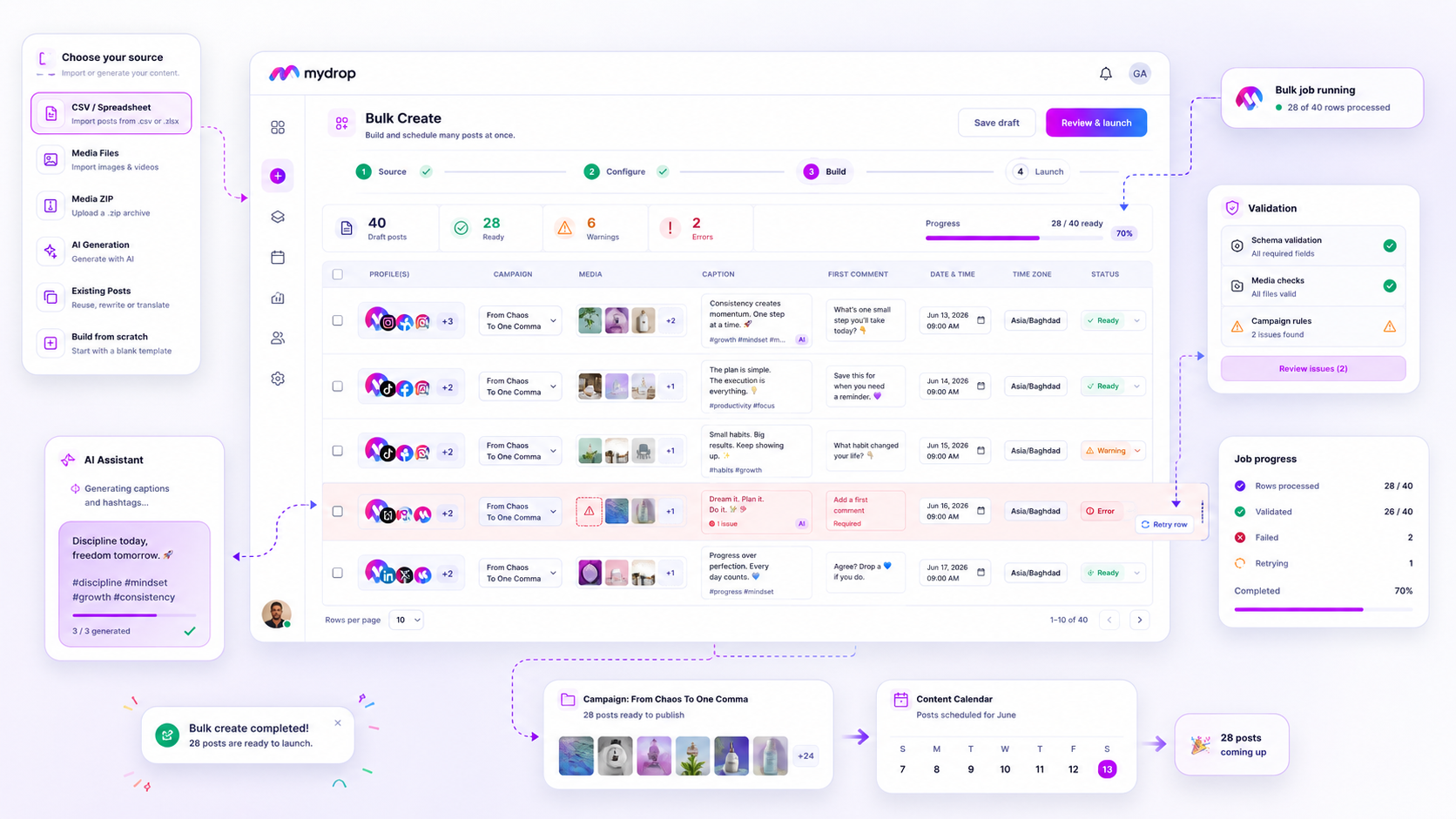
The most effective bulk scheduling tools for high-volume agencies are not defined by how many rows they can ingest per second, but by how cleanly they isolate and recover from the inevitable 5% of rows that fail validation. If your team is still spending Friday afternoons manually re-cleaning spreadsheets because a "bulk upload" tool treated a 500-post campaign as a single, indivisible brick, you are paying a hidden tax in coordination debt.
We have all been there. You hit that upload button, the progress bar flickers, and then the screen turns red. You are left staring at a vague error message, forced to choose between manually rebuilding dozens of posts or re-uploading the entire batch and risking duplicate content across your brand profiles. It is a classic trap: software that prioritizes raw throughput over individual post integrity. To move faster, you need a system that treats every post as a distinct, recoverable entity from the moment it enters the pipeline.
What the best tools need to handle

When you are managing hundreds of brand profiles across multiple markets, a "bulk" tool that lacks row-level granularity is essentially a liability. You need to stop asking "How many posts can I upload?" and start asking "How does this system behave when the connection drops, the API hits a rate limit, or a single row has a typo?"
The best platforms act as a safety net. They don't just move data from a CSV to a database; they validate, track, and provide an audit trail for every single item.
Here is the functional baseline you should demand from your scheduling stack:
| Capability | Why it matters for your team |
|---|---|
| Atomic Row Validation | Fails only the specific row with a bad date or missing tag, allowing the rest of the campaign to proceed. |
| State Persistence | Keeps the job running even if your browser crashes or you close the modal, ensuring you never lose progress. |
| Row-Level Retries | Provides a simple "Retry Failed Rows" button that targets only the items that didn't make it, rather than forcing a full re-upload. |
| Visual Progress Tracking | Shows you exactly which posts are queued, processing, completed, or stuck in error state in real time. |
Operator rule: If you have to re-upload a CSV more than once to fix a row-level error, the tool has failed you. The system should offer an interface where you can see, edit, and fix the specific failing post right inside the application, without ever touching the source file again.
When you look for your next tool, prioritize this resilience over raw speed. A tool that uploads 1,000 posts in seconds but forces a complete restart on a single error is slower in practice than one that takes a minute longer but requires zero manual intervention for cleanup. You are looking for a system that absorbs the friction of campaign management so your team can focus on strategy, not data entry.
Where basic tools start to break

Most entry-level schedulers treat a bulk upload like a single, unbreakable glass pane. If one row has an invalid date, a broken image link, or a character count mismatch, the entire batch-often hundreds of posts-simply crashes or refuses to ingest. You are left staring at a vague error message that says something unhelpful like "Upload failed."
It is the classic "all-or-nothing" trap.
We have seen this across hundreds of brand profiles. An agency manager spends two hours perfecting a CSV for a major launch, hits "Upload," and watches the progress bar freeze because post #142 had an extra space in the platform handle. Because the tool isn't built to handle partial failures, the manager has to manually hunt for the error, fix the file, and pray the system doesn't duplicate the 141 posts that actually succeeded. It is a massive tax on your team's sanity, and frankly, it is avoidable.
If your tool forces you to rebuild a campaign because of one formatting error, it isn't a management platform; it is a glorified pipe that expects perfect data.
Common mistake: Treating "Batch Finished" as the only success metric. Real efficiency is measured by how many clicks it takes to remediate a single row failure.
The buying criteria that matter
Stop evaluating tools by how fast they ingest your CSV and start looking at how they manage the lifecycle of the job. You need a tool that treats every row as an independent unit of work.
Use this scorecard when evaluating whether a scheduling platform can actually handle enterprise scale.
| Feature | The "Brittle" Tool (Avoid) | The "Resilient" Tool (Buy) |
|---|---|---|
| Atomicity | One row error stops the entire batch. | Row-level failures are isolated. |
| Persistence | You must keep the tab open until done. | Jobs run asynchronously in the background. |
| State Tracking | "Success" or "Failure" for the whole file. | Detailed status per row (Pending, Done, Failed). |
| Remediation | Delete everything and re-upload. | One-click retry for failed rows only. |
| Safety | No way to undo a partial mess. | Automatic cleanup of created assets on cancel. |
The Bulk Resilience Checklist
When you are on a demo with a potential vendor, don't just ask "Does it support CSV?" Ask these five questions to see if their engineering team actually understands agency workflows:
- State Persistence: If I close my browser mid-upload, does the server finish processing the job, or does it abort and leave me with half-finished work?
- Row-Level Atomicity: If I have 500 rows and 10 fail, can I view the errors for those 10 specifically and correct them without touching the other 490?
- Conflict Handling: Does the system check for permission or character limit conflicts before it tries to publish, or does it only fail when it hits the API wall?
- Bulk Cleanup: If I realize a job is misconfigured, is there a way to cancel it that deletes the posts it just created, or am I stuck manually deleting 500 posts one-by-one?
- Audit Trail: Can I see a log of who launched the bulk job and the status history of every single item, or is the process a black box?
The hard truth is that most teams do not have a content problem; they have a coordination bottleneck. If your tool requires you to babysit the import process, you aren't saving time-you are just moving your workload from "creative" to "data janitor."
At Mydrop, we designed our Bulk Create engine to act as a factory floor, not a data chute. We assume things will go wrong-an API rate limit, a missing asset, or a stray character-and we build in the resilience to let you fix the specific row without stopping the campaign.
How Mydrop supports this workflow
At Mydrop, we approach bulk creation not as a data dump, but as a campaign factory. When you have hundreds of posts across dozens of markets, you cannot afford to manage individual rows like you are babysitting a toddler. You need a system that assumes things will occasionally go sideways and builds that reality into the process.
Our bulk engine works by decoupling the intake from the execution. You upload your CSV or media set, and Mydrop turns those raw inputs into a queue of validated, isolated tasks. If a row fails-say, the AI-generated caption exceeds a character limit or an image link times out-the rest of the job keeps running. You are not left with a broken partial upload; you get a clear report of exactly what finished and exactly what needs your attention.
Decision check: Never settle for a "total job" failure. If a tool doesn't let you see the status of individual rows in real-time, you are essentially flying blind.
Once the job processes, the Bulk Jobs listener keeps you updated. You don't have to keep the browser tab open or babysit the loading bar. If you find errors, you fix just those specific rows and hit retry. The system resets only the failed items, leaving your successful posts exactly where they belong: scheduled and ready to go.
A simple shortlist checklist
Before you commit to a new scheduling tool, run it through this assessment. If the answer is "no" to more than one of these, you are just buying yourself a new set of manual labor headaches.
| Criteria | The "Brittle" Test | The "Resilient" Standard |
|---|---|---|
| Atomicity | Entire batch fails if one row is invalid. | Rows process independently; failures are isolated. |
| Persistence | Job status vanishes on browser refresh. | Status tracks in the background; job survives disconnects. |
| Retry-ability | Must rebuild the CSV to fix one typo. | One-click retry for specific failed rows only. |
| Validation | Errors appear only after attempted publish. | Validation runs pre-launch; errors flagged immediately. |
| Cleanup | Manual deletion of partial job posts. | Cancelled jobs automatically rollback created posts. |
Conclusion
Most teams do not have a content production problem. They have a coordination bottleneck. When you are managing high-volume social calendars, your tool should act as a shock absorber, not a fragile glass pipe that shatters at the first sign of a malformed row.
Stop measuring success by how quickly you can hit the "Upload" button. Real efficiency is measured by how few minutes it takes to clean up a messy import on a Friday afternoon. Find a system that treats your time with respect, isolates your failures, and lets you focus on the strategy instead of the status bars. Your team, and your sanity, will thank you.