

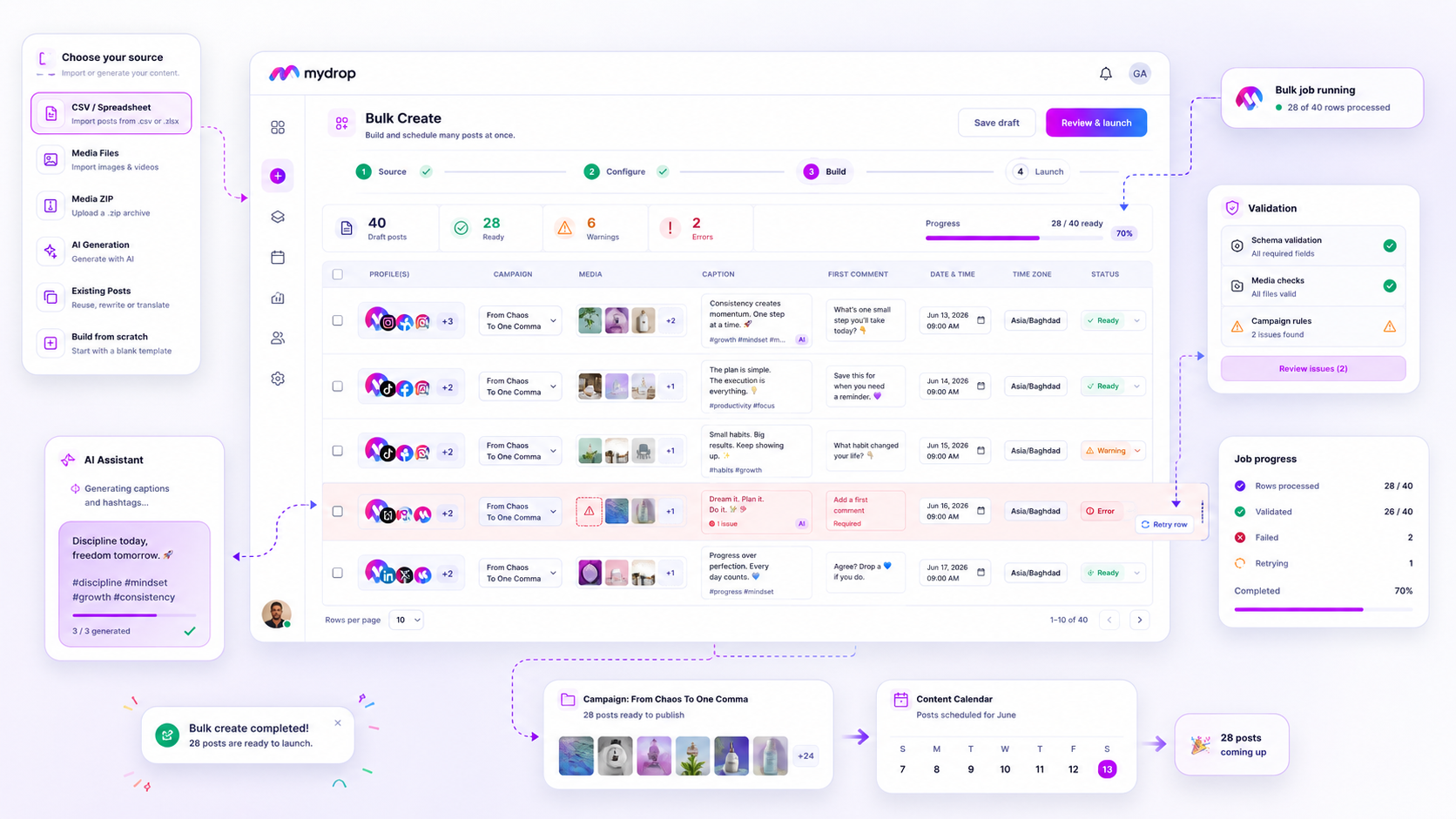
The only reliable way to measure bulk campaign health at scale isn't the total number of posts scheduled, but the granular, row-level Done vs. Failed status of each individual creation job. Most teams lean on vanity metrics like "total posts created," which masks partial failures: those silent, missed rows that turn a launch into a manual cleanup nightmare. If you cannot see exactly which row in your 500-post CSV failed and why, you haven't scaled; you've just created more work. We know the pressure: hitting "launch" on a massive campaign and holding your breath, hoping nothing broke. We are here to fix that. This guide provides the Reliability Scorecard for your bulk production tools, helping you demand the precision required to keep your team out of the weeds.
What the best tools need to handle

When we look at how agencies and large brands manage hundreds of posts, the most common point of failure is treating a bulk launch as a single, indivisible event. You upload a massive CSV, hit go, and wait for the status bar. When that bar turns red or stalls halfway through, you have no idea what survived and what died. This is where coordination debt builds up.
The best tools in this space treat bulk creation as a managed job pipeline, not just a file import. If you are shopping for a tool to manage this, you need to look for features that handle the reality of modern campaign production: high volume, tight timelines, and messy data.
At Mydrop, we approach bulk creation through an asynchronous engine that prioritizes row-level accountability. Instead of failing an entire batch because of a single misformatted row, the engine processes each entry independently. It validates against the post schema before attempting the publish, and it tracks progress in real-time. If a row fails, you get the specific error, whether it is an asset issue, a platform permission quirk, or a missing requirement, allowing you to address just that specific row.
Operator rule: If you cannot retry only the failed rows without re-uploading your entire source file, your tool is holding your time hostage.
This row-level visibility is the difference between a tool that scales and a tool that creates more work. When you can isolate the "Failed" status, your team stops hunting for errors across 500 posts. You simply filter for failures, fix the specific row data, and hit retry.
Beyond just processing, you need tools that offer persistent async tracking. If you close your browser or your network dips during a 1,000-post upload, your tool should not just lose the progress. A robust system maintains the bulk job state, allowing you to return, check on the remaining items, and verify completion without losing any work. When you combine row-level resolution with persistent background processing, you gain the confidence to treat bulk launches not as stressful events, but as standard operations.
Where basic tools start to break

Most tools treat bulk jobs as a single, indivisible event. You upload a CSV, click submit, and it is either "done" or "failed." If you have ever spent a Tuesday night manually hunting for the one misformatted row in a 300-post campaign because the entire job hung at 99%, you know exactly why this is a problem. The issue is visibility opacity. When a tool fails silently, it hides the reason, forcing you to treat the entire campaign as broken rather than just the three rows that had a bad URL.
This is where the "invisible rework" cost hits. You are left guessing. Did the post actually schedule, or did it just silently fail? Is the image still linked, or did the API return a cryptic error? In basic setups, the only way to be sure is to manually verify the resulting calendar, which defeats the point of bulk creation in the first place. You are essentially paying for a tool that creates more work.
The breaking point usually happens when you mix different sources, like an AI-generated caption, a CSV import, and a manual edit in the same batch. Basic tools often lack the pre-launch validation to catch these discrepancies. They try to process everything at once, fail the whole job when one row hits an API limit, and then offer no clean way to salvage the rest. It is a fragile process that turns the agency campaign manager into a glorified error log reader.
The buying criteria that matter
If your team manages hundreds of assets, you need a different standard for reliability. You should move away from asking## Where basic tools start to break
Basic tools often treat bulk creation like a magic trick. You hit the button, wait for the progress bar to fill, and pray the rabbit appears. If the tool simply reports a generic "100% Complete" without showing you exactly which rows failed and why, you are flying blind. This is where the coordination debt hits hard.
Imagine you are managing a 200-post launch for a retail client. You have your CSV, your media assets, and your team’s hard-won approvals. You hit launch, go get coffee, and come back to a screen saying the job is finished. But it is not. Because of one misformatted cell in row 42 or an unsupported media file in row 89, those posts never made it to the platform.
Most tools keep you guessing. You now have to manually cross-reference your spreadsheet against the scheduled content calendar to find the missing pieces. This is the "invisible rework" that kills team productivity.
At Mydrop, we built our job listener to treat every row as a standalone, verifiable event. When you see a bulk job progress, you are not just watching a bar move across the screen. You are watching a real-time stream of status updates for every individual item. If row 42 fails, the system doesn't just stop. It reports the error, allows you to fix the specific issue in the interface, and lets you retry just that single row without re-running the entire campaign.
The moment a tool hides these failures, it shifts the burden of quality control back onto your staff. If you cannot see the failure, you cannot fix it, and the quality of your campaign inevitably suffers.
The buying criteria that matter
When evaluating tools, including our own, you need to demand more than a simple "import" checkbox. You need an operational guarantee that your campaign logic will survive the production process.
Use this scorecard to grade the tools you are currently testing. If a platform cannot provide row-level visibility, it is not built for serious agency scale.
| Feature | Why it matters | Decision Threshold |
|---|---|---|
| Row-Level Status | Prevents silent failures and invisible rework. | Must provide individual Success/Failure state per row. |
| Async Retries | Saves hours on manual reconstruction after minor errors. | Must support single-row retry without re-processing the whole file. |
| Persistence | Ensures work is safe even if the browser closes. | Job status must survive session timeouts and UI refreshes. |
| Cancellation Cleanup | Prevents platform clutter when a job goes wrong. | Tool must cleanly remove partial posts created by an interrupted job. |
The "Reliability" Mini-Audit
If you are demoing a new solution, do not take the salesperson's word for it. Ask these three questions to see if their "Bulk Create" is actually enterprise-grade.
- "If I upload a 500-row CSV and row 150 fails, how do I find out exactly why, and can I fix just that row?" (Watch for the answer: "You have to re-upload the whole file" is a red flag.)
- "If I close my browser after launching, will the job continue processing in the background, and how do I get notified when it is actually finished?" (Expectations: Background processing and persistent notifications are non-negotiable.)
- "Can I see a detailed log of every post created, updated, or failed in this specific job?" (Look for: An accessible job history UI, not a cryptic text log.)
We have seen teams switch to Mydrop precisely because they got tired of being the human error-checking layer for their software. A simple, robust rule helps here: if your bulk tool creates more work than it saves, it is not a tool, it is a liability. Your team should be focused on campaign strategy and creative excellence, not hunting down missing posts in a 200-row spreadsheet.
How Mydrop supports this workflow
We built Mydrop with a simple philosophy: if a bulk job isn't observable, it doesn't exist. You should never have to guess whether a campaign launch succeeded or where it broke.
When you use Mydrop’s Bulk Create engine, we don't just dump your CSV into a black box and cross our fingers. We break the process into actionable, granular events. You get immediate, row-level validation before the job even launches, ensuring you aren't wasting cycles on misformatted dates or broken asset links.
Once you hit "Launch," the job moves into an asynchronous, persistent worker. If you close your laptop, grab coffee, or navigate away to deal with a crisis, the system keeps churning.
Decision check: Every row is treated as its own independent unit. If row 402 fails because of a platform-specific character limit, row 403 (and the other 498 posts) continue without issue.
You aren't left with a "job failed" notification that hides the truth. You get a detailed breakdown of successes, failures, and granular reasons why, allowing you to click a single button to retry just those specific, failed rows once the issue is patched.
A simple shortlist checklist
If you are demoing tools this week, don't let the sales deck distract you. Keep this checklist handy to quickly cut through the noise and find out if a platform can actually handle scale:
| Capability | The "Must-Have" Requirement |
|---|---|
| Row-Level Visibility | Can I see the status of individual posts in a 500-row job? |
| Atomic Retries | Can I retry only the failed rows without re-uploading everything? |
| Persistence | Does the job continue processing if I close my browser? |
| Validation | Does the tool catch CSV errors before the job hits the live platform? |
If the answer to any of these is "no," you aren't buying a campaign factory. You’re buying a manual labor machine that just happens to use a CSV input.
Conclusion
At the end of the day, social media scale is almost always broken by coordination debt, not a lack of creative ideas. When you rely on tools that treat bulk creation as an all-or-nothing gamble, you are essentially trading your team's time for "hope-based" operations. That is an expensive trade to make.
Stop accepting the hidden cost of "silent failures" in your publishing pipeline. Demand tools that treat every single post as a first-class citizen, prioritize granular visibility, and turn that Tuesday night detective work into a simple, automated, and-dare we say-boring process. Your team’s sanity, and your brand's consistency, depend on it.




















