





























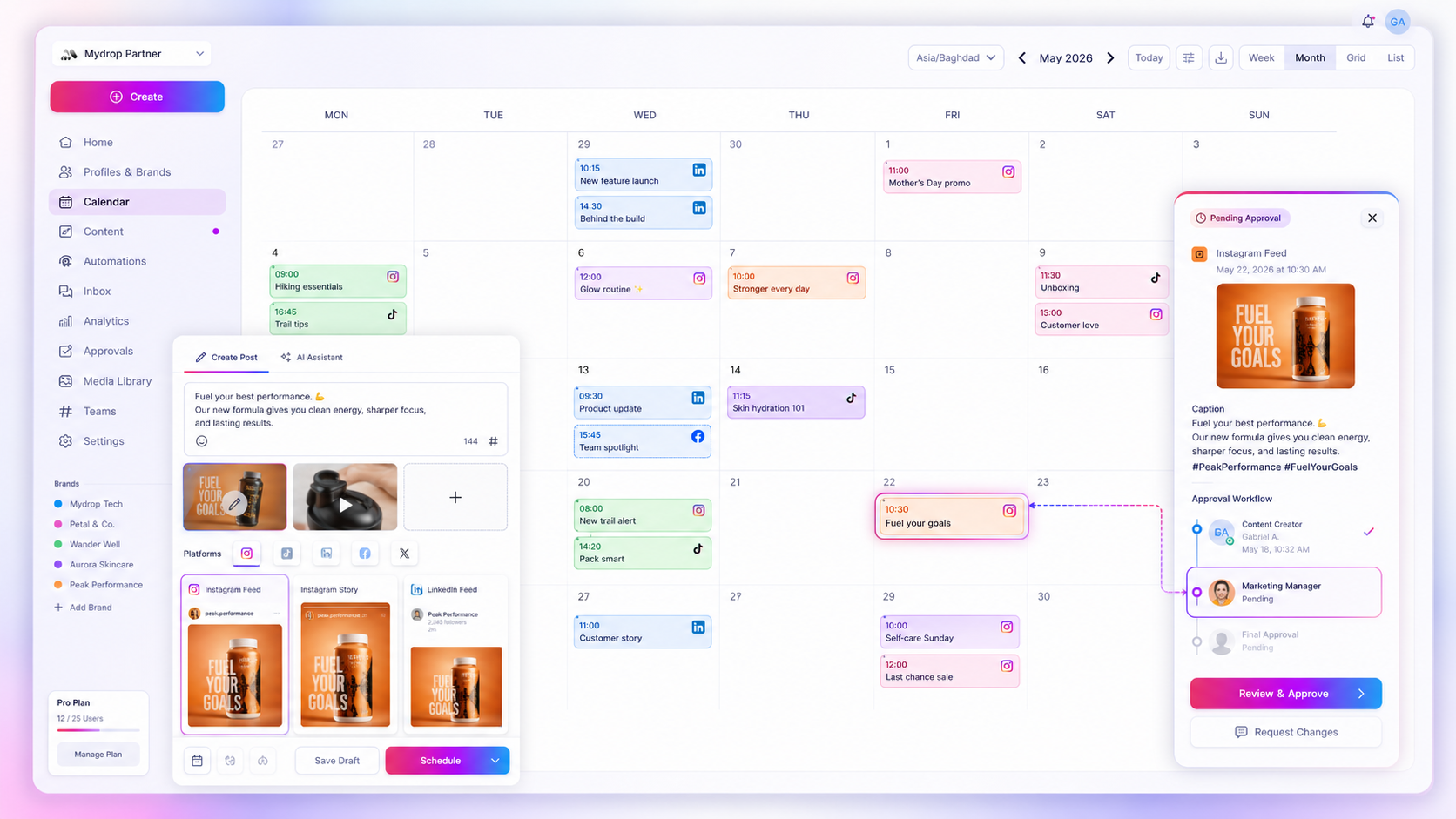
The best way to sync your social media calendar with Google is to stop treating it as a notification feed and start using it as an operational planning bridge. If your agency's content calendar lives only in your scheduling tool, you aren't running a workflow, you're running a silo. The right integration makes your content schedule the single source of truth for everyone involved, so your social strategy becomes part of the calendar rather than a detached list of tasks.
We get it. Your team is juggling fast edits, last-minute client requests and the constant "wait, where is this live?" Keeping spreadsheets, calendars and dashboards in step by hand is exhausting. Worse, it's where human error eats into your credibility and managers end up acting as human sync engines.
Operator rule: If a calendar sync tool doesn't let you choose which profiles to show, it isn't an agency tool. It's a personal scheduler.
Mydrop pricing check, September 2026: the entry paid plans of the eight tools most often compared with Mydrop run from $6 per channel (Buffer) and $25 a month (Later) to $99 per user (Hootsuite) and $199 per seat (Sprout Social), read on each vendor's pricing page. Mydrop is free to start, then $19 a month flat, not per seat. Full table on Mydrop's compare pages.
What the best tools need to handle

At agency scale, syncing is about communication, not just dumping data. When you manage dozens of brands across hundreds of channels, a tool that pushes everything everywhere creates noise, not clarity. Your integration has to tell the difference between team-wide visibility and the detail of managing each client.
To move from "dumb" notifications to a true planning bridge, look for these three core capabilities:
- Granular profile filtering: You should never be forced into an "all-or-nothing" sync. Being able to pick specific profile IDs and map them to client calendars prevents clutter and keeps stakeholders focused on what's relevant to them.
- Two-way state awareness: It isn't enough to push a post title to a calendar. The best integrations handle status updates too, such as marking a recurring reminder as "done" or updating a post event when the schedule shifts, so your Google Calendar data stays fresh.
- Reliable webhook watching: A manual "Force Sync" button is a fallback, not a strategy. A tool built for big teams uses webhook channels to spot changes automatically, so nobody is working from yesterday's spreadsheet.
Here's how agency tools typically stack up:
| Capability | Basic Notification Sync | Planning-Bridge Sync |
|---|---|---|
| Visibility Scope | Global (all posts) | Granular (selected profiles) |
| Task Alignment | None (posts only) | Full (reminders + post events) |
| Sync Mechanism | Static / manual push | Webhook / automatic watch |
| State Handling | Stale / read-only | Live (done states, edits) |
Teams that ignore this distinction eventually hit a ceiling. Without granular sync modes, your account managers spend upwards of five hours a week turning schedule changes into calendar updates by hand. That's not just wasted time. It's coordination debt, and it slows down every approval loop.
A simple rule helps here: if the calendar can't reflect how you really work, it's a liability, not an asset. Before you commit to a tool, check whether it forces a one-size-fits-all approach or respects the way your agency's portfolio is actually structured.
Where basic tools start to break
Here's the awkward truth: most calendar sync tools are built for personal life, not agency-scale operations. When ten team members are juggling fifty brand profiles, a tool that simply pushes "every post from every account" into one calendar turns into a digital dumping ground.
The "all-posts" noise problem is where teams usually hit a wall. When your creative lead tries to find a client's launch window, they're met with a wall of internal test posts, community manager replies and minor account updates. The calendar stops being a planning tool and becomes a static list nobody trusts.
Even worse is the fragmented token trap. If your sync relies on a single, fragile connection that expires silently, your calendar data goes stale straight away. You end up with "ghost events": calendar entries for posts that were rescheduled or deleted in your source tool three days ago. Once your team stops trusting the calendar, they stop using it. They go back to screenshots, spreadsheet trackers and endless Slack pings to check what's actually happening.
Common mistake: Relying on tools that lack granular filtering. If you can't exclude specific profiles, you're effectively spamming your own team.
The buying criteria that matter
If you're evaluating a tool, look past the "Google Calendar Sync" bullet point on its feature page. You need to find out whether it's really a planning bridge or just a notification pipe. Here's how to score your current setup.
Agency Sync Scorecard: Planning Bridge vs. Notification Pipe
| Capability | Notification Pipe (Basic) | Planning Bridge (Agency-Scale) |
|---|---|---|
| Visibility | All-or-nothing (everything synced) | Profile-specific filtering |
| Integrity | Pushes once, forgets forever | Webhook-driven auto-refresh |
| Tasks | Only syncs published posts | Syncs reminders and recurring tasks |
| State | Static event blocks | Syncs "Done" state and metadata |
Your decision threshold is simple: if you have to edit a calendar event by hand because a post moved in your dashboard, the integration has failed.
The criteria that really matter, the ones that save your team five hours a week, come down to three non-negotiables:
- Granular sync modes: Can you map only your high-priority brand profiles to a client's shared calendar? If not, the tool will never be clean enough to show to outside stakeholders.
- Webhook reliability: Does the tool use real-time webhooks to watch for changes? You want a system that updates automatically when a post, reminder or status changes in your dashboard.
- Task-native planning: Do your reminders and approval tasks show up alongside your published posts? A calendar that really works brings together the content you deliver and the work it takes to get there.
Most teams don't have a content problem. They have coordination debt. If your calendar integration doesn't help you pay it down by bringing delivery dates and internal tasks into one place, it's just adding to the overhead.
At Mydrop, we see teams solve this by giving every "selected profile" its own dedicated webhook channel. So when a manager marks a reminder as done or moves a launch window, the calendar reflects it almost in real time, and the whole team, client included, stays aligned without a single extra email.
How Mydrop supports this workflow
At Mydrop, we built our calendar sync around one simple principle: your scheduling tool should mirror what you actually publish, not sit on an island of its own. We see teams managing hundreds of brand profiles who simply can't afford the "all-or-nothing" approach most platforms force on them.
That's why we built granular selected-profile sync modes. You choose exactly which brand or region gets pushed to which Google Calendar, which keeps the noise down for colleagues in other departments. When your legal team or a client opens their calendar, they see the content that's relevant to them, not every post you manage worldwide.
We also treat your calendar as a two-way street. With automatic webhook watch channels, your data stays fresh without anyone lifting a finger. If you change a post date or mark a reminder as done in Mydrop, the event in Google Calendar updates almost instantly. You stop chasing account managers for status updates, because the calendar is the status report.
Decision check: If your calendar sync doesn't support selective profile filtering, you aren't managing a schedule. You're managing a noise machine.
A simple shortlist checklist
If you're auditing your current stack this week, use this rubric to see whether your calendar integration is an asset or a liability. If you answer "No" more than twice, it may be time to look for a sturdier planning bridge.
| Capability | Requirement | Why it matters |
|---|---|---|
| Selective Sync | Can you choose specific profiles to push to specific calendars? | Essential for keeping multi-brand or multi-market work sane. |
| Two-Way Status | Do "Done" markers in the tool update the calendar event? | Keeps everyone aligned on what's actually finished. |
| Webhook Health | Does the tool automatically re-establish lost sync connections? | Ends the "stale calendar" problem caused by expired tokens. |
| Visibility Control | Can stakeholders see post details without logging into the tool? | Cuts down on ad hoc requests for schedule details. |
Conclusion
The difference between a frantic agency and a calm one is rarely how many tools they use. It's how well those tools talk to each other. When you treat Google Calendar as a first-class part of your social operations, you stop managing coordination debt and start managing creative output.
Stop settling for sync tools that just dump data into a pile. You deserve a planning bridge that respects the complexity of your workflow. If your current calendar integration feels more like a chore than a quiet partner, it's time to upgrade.

 Google review
 Trustpilot review
 Product Hunt comment




