





























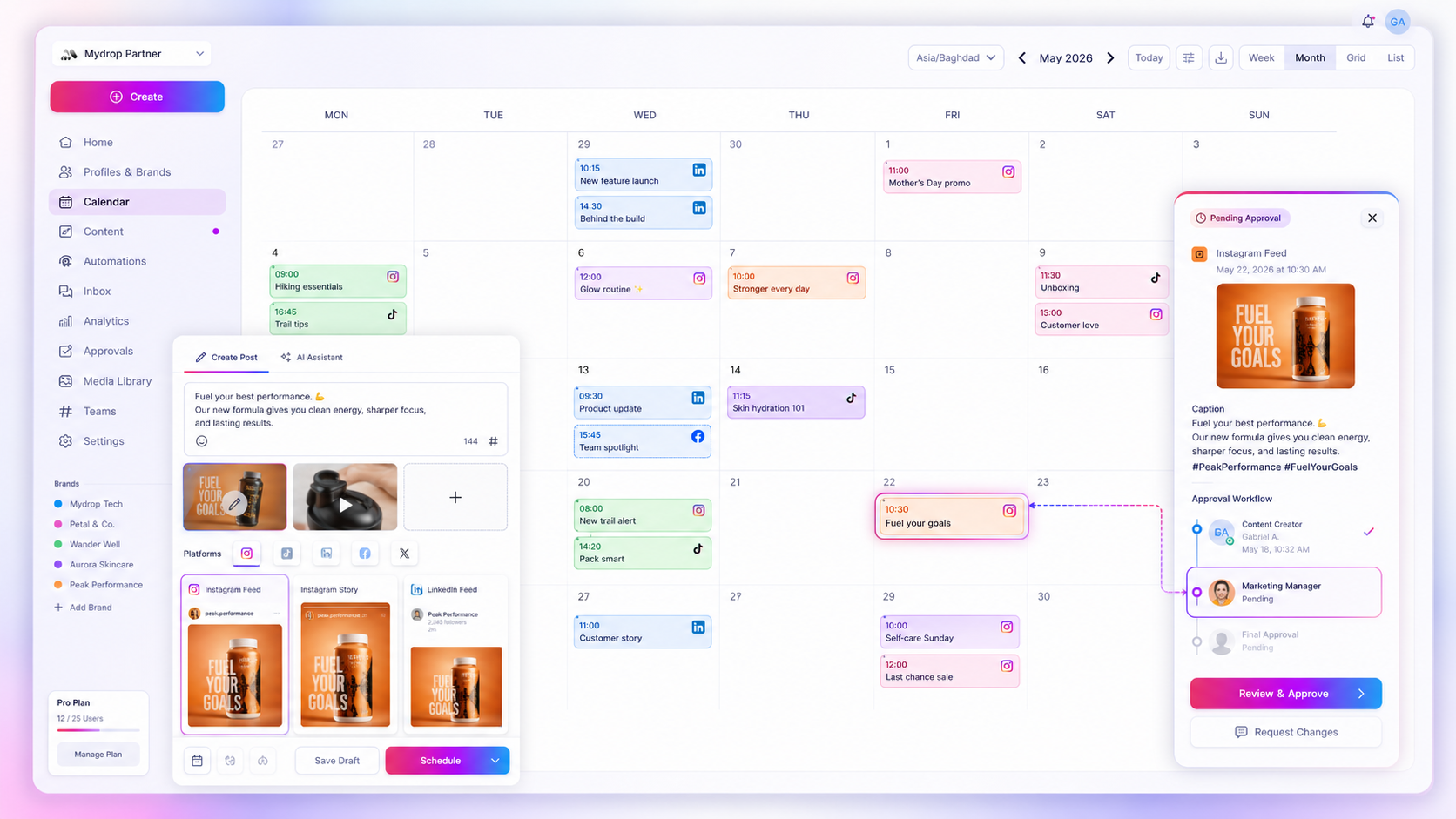
The most effective way to scale social media operations is to stop treating your calendar like a public noticeboard and start treating it like a dynamic filtering engine. If you still rely on one linear feed of "everything we are posting", you aren't managing a strategy. You're just watching the noise pile up. Your calendar tool needs to work like a precision instrument that lets you isolate brand voices, campaign milestones or approval states in seconds.
We get it. You're probably managing several brands, juggling dozens of stakeholders and facing a volume of content that seems to grow faster than your headcount. When the pressure to publish more meets the need for strict compliance, the "scroll of death" becomes a real operational risk. You're not alone if you've spent half your day hunting for one post's status while an approver waits on you. The good news is that this isn't a lack of organisation on your part. It's a structural failure of your tools to keep pace with your team's complexity.
What the best tools need to handle

To end the chaos, your calendar can no longer be a simple list of dates. It has to be a unified source of truth that brings different content types together (posts, reminders and notes) on a single surface you can search. If your team has to switch between a spreadsheet for notes, a Slack thread for reminders and a dashboard for scheduling, you pay a "coordination tax" on every single piece of content.
Operator rule: A calendar is only as valuable as its search filters. If you can't segment your view by profile group, campaign ID and post status at the same time, you aren't managing your workflow. You're just managing the fallout.
Mydrop pricing check, September 2026: the entry paid plans of the eight tools most often compared with Mydrop run from $6 per channel (Buffer) and $25 a month (Later) to $99 per user (Hootsuite) and $199 per seat (Sprout Social), read on each vendor's pricing page. Mydrop is free to start, then $19 a month flat, not per seat. Full table on Mydrop's compare pages.
The best enterprise-grade tools handle scale by prioritising contextual density. You need to go beyond a simple toggle between "calendar view" and "list view" and get deep, criteria-based visibility.
| Criteria | Basic Tool Performance | Enterprise-Grade Requirement |
|---|---|---|
| Multi-Brand Filtering | Global view only or manual grouping | Instant toggle by Brand, Market, or Profile Group |
| Object Aggregation | Posts only | Posts + Reminders + Notes (Unified) |
| Action Latency | View only, then navigate to edit | Direct "Open Preview" and "Approve" from view |
| Volume Handling | Slows down after ~50 items | Instant load/filter for thousands of items |
This is where many teams find their bottleneck. They assume the problem is a lack of content planning, when the real problem is visibility fragmentation. You need a tool that shows your entire social operation, from drafts and reminders to published assets, as one coherent, filterable map rather than a broken timeline of tasks. If a tool can't show you what needs approval across three regions in under three seconds, it's effectively invisible to the people who need it most.
Where basic tools start to break
Basic tools are usually built for one brand and one social media manager. Add a second brand, a partner agency or a cross-functional approval chain, and the interface turns into a "scroll of death" where your strategy goes to die.
Once you cross the line of fifty or a hundred posts a month across several channels, you stop being a planner and become a professional scavenger. You spend more time hunting for the right asset in a sea of disconnected cards than you do improving your brand story.
This isn't just annoying. It's a basic failure of visibility and governance. When your calendar can't segment by campaign, automation or status, you end up holding "manual sync meetings" just to work out who is posting what, where and when.
Common mistake: Growing your team without growing your visibility layer. Hiring more people to handle more posts in a tool that can't group them just adds more voices to a conversation that's already drowning in noise.
The buying criteria that matter
Stop shopping for "calendar features" and start shopping for data filtering capabilities. An enterprise-grade calendar must let you turn a chaotic month-long view into a focused, actionable list of exactly what you need to see, in under two seconds.
Look for tools that treat your social content as structured data, not just pretty blocks on a wall.
| Criterion | What to look for | Why it matters for scale |
|---|---|---|
| Multi-Brand Filtering | Can you isolate one brand or a group of profiles instantly? | Prevents accidental cross-posting and keeps brand voices distinct. |
| State-Based Visibility | Can you toggle between Draft, Pending Approval, and Scheduled? |
Allows approvers to ignore the noise and focus only on what requires action. |
| Cross-Object Aggregation | Does it render posts, reminders, and notes on one timeline? | Connects high-level strategy (notes) with tactical execution (posts). |
| Action Density | Can you approve, edit, or duplicate without leaving the view? | Minimises click-depth when managing dozens of pending items daily. |
If you're comparing options right now, run this quick check during the demo. Ask the vendor: "Show me how to filter this view to show only pending posts for our EMEA regional campaigns that need legal approval."
If they have to click through three different menus, open separate tabs or jump to a report page to answer, cross them off your list. If you have to hunt for information, you aren't managing a process. You're fighting the software.
In the end, the best tools feel less like a passive calendar and more like a command centre. You need a view that filters for a specific campaign or stakeholder status, because that's where the work really happens. We often see teams struggle, not because they lack creativity, but because they can't keep their focus across a high-volume pipeline.
How Mydrop supports this workflow
At Mydrop, we built our calendar on the idea that visibility isn't the same as clarity. Most platforms dump everything onto one grid and make you play detective to find out what's really happening across your ten brands. We do it differently. We treat your calendar as a high-performance filtering engine, so you can go from a bird's-eye view of your whole enterprise to the fine detail of a single campaign in two clicks.
Whether you prefer a high-level Calendar View for mapping out the month or a List Mode for surgically clearing pending approvals, the data stays consistent. You can filter by campaign, profile group or status, so you never have to scroll past a colleague's local market posts when you're trying to finalise a global product launch.
Decision check: A calendar that shows everything is a calendar that tells you nothing. Use your tool to hide the noise by default.
When you spot a gap in your strategy, Mydrop lets you create posts, reminders or notes straight from the slot or the list. If one brand's campaign is light on content, you don't have to jump into a separate editor: you click, you draft, and the flow carries on. We designed it for the reality of enterprise teams. You're running several approval loops and time zones at once, so the tool has to put the right pending items in front of the right person without burying them in unrelated noise.
A simple shortlist checklist
Before you commit to a platform, run this quick check against your current tool or the one you're considering. If you can't tick these off, you're probably buying more coordination debt.
| Must-Have Capability | Why it matters |
|---|---|
| Multi-Brand Filter | Can you isolate one brand’s activity without seeing the other nine? |
| Unified Object Types | Does it render posts, internal reminders, and team notes in one view? |
| Status-Driven Sorting | Can you filter for "Pending Approval" in under two seconds? |
| Action Density | Can you edit, approve, or duplicate a post directly from the list view? |
| Granular Visibility | Do permissions ensure team members only see the calendars relevant to them? |
If you're struggling with a "scroll of death" situation, put these three questions to your team: "What's the longest it takes to verify a campaign timeline?", "How often do we miss reminders because they aren't visible in our scheduling tool?", and "Are we duplicating work because we can't see what other teams are doing?"
Conclusion
The point of your content calendar isn't to keep a record of what you've done. It's to make sure everyone knows exactly what's coming next, without having to call a meeting. If your current tool leaves your team feeling like they're picking their way through a minefield of scheduling clashes and missed approvals, it's time to move beyond the basics.
Great social media operations depend on a clear line of sight. Focus on filter-first planning and unified visibility, and you stop fighting your tool and start managing your strategy. Take the time today to audit your current workflow. If you can't see the way forward at a glance, you know exactly what's broken.

 Google review
 Trustpilot review
 Product Hunt comment




