





























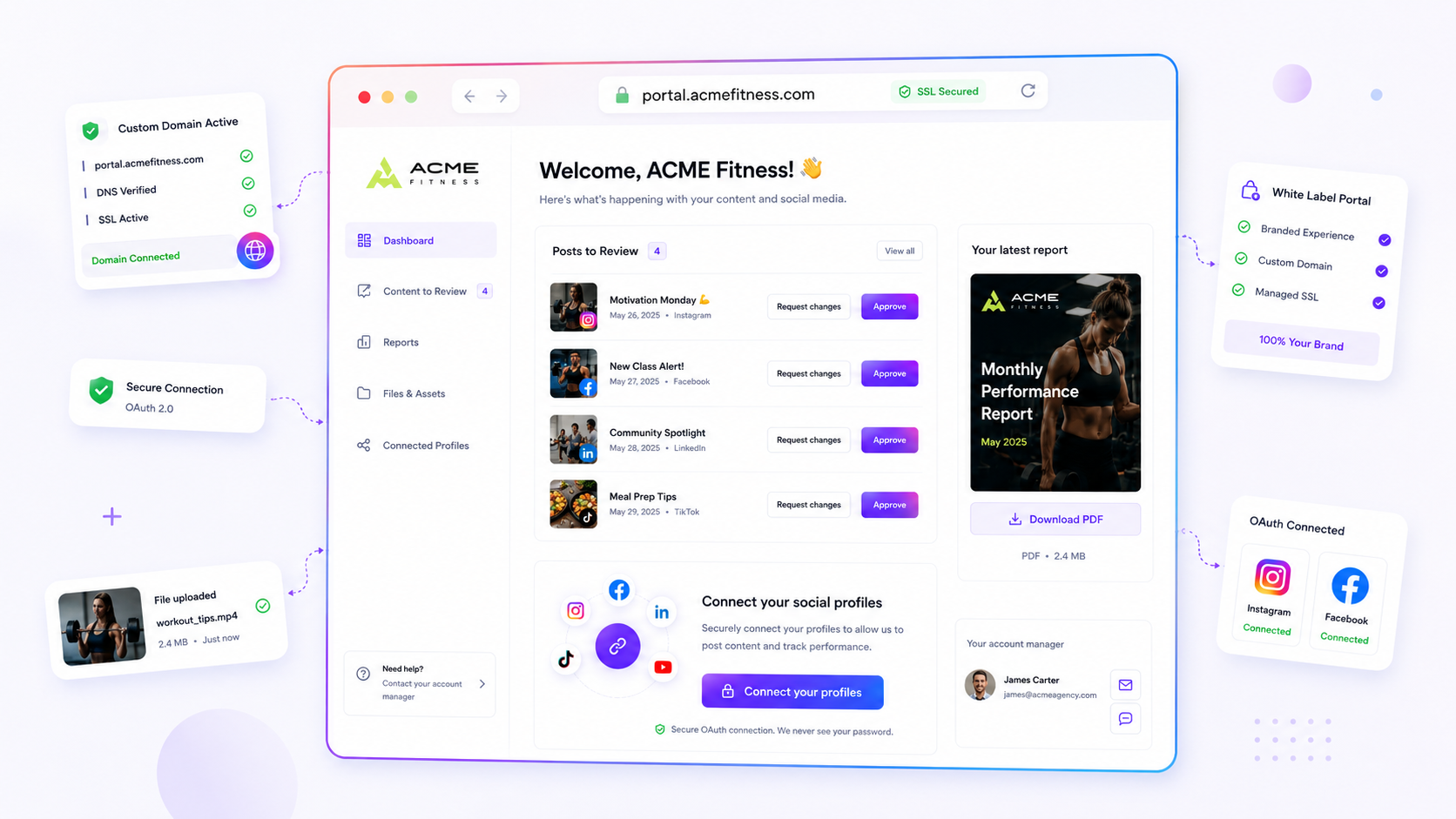
Stalled analytics reviews are rarely the client's fault. They are a delivery failure, caused by clunky, manual reporting that traps data in email threads. The best client portal software doesn't just display data; it removes the "where is it?" problem by giving clients one lasting, self-service place where review, approval and feedback all happen, with no account-creation hoops to jump through.
We get it. The reports are ready and the insights are solid, but you're stuck in a loop of email chasers, lost attachments, and clients who have moved on to their next crisis before they've even opened your link. It's not just annoying; it kills momentum and makes your best work feel like "just another email." Your reporting process carries a hidden tax: for every minute you spend chasing a review, you lose three minutes of real strategy time. Sending reports by hand isn't professional. It's a bottleneck.
What the best tools need to handle

The aim of your reporting setup is simple: make insights as easy to reach as possible, and cut the effort the client has to make to zero. If clients have to remember a password, find their way around a complicated dashboard, or dig through a thread just to see their results, they'll stop looking.
To break the cycle, any portal software you consider has to cover three non-negotiables:
- Zero-friction access: Clients should never need to create an account or manage a password just to view a report. If the tool puts up a login wall, you've already lost the fight for their attention.
- Persistent context: The portal should be the single source of truth for the campaign, keeping past reports next to the current one, so stakeholders can see trends without asking you to resend last month's PDF.
- Built-in action: Viewing data is only the starting line. The portal must let the client approve assets, comment on specific data points, or download a high-quality report in seconds.
This is where the Friction Gap is widest:
| Metric | Manual Email Delivery | Portal-Based Delivery |
|---|---|---|
| Time-to-View | Hours or days (inbox noise) | Seconds (instant link) |
| Version Control | A nightmare (V2_final.pdf) | Single source of truth |
| Feedback Latency | High (email ping-pong) | Low (in-context chat) |
| Asset Accessibility | Scattered or lost | Centralised and self-service |
At Mydrop, we built the brand-portal feature to close exactly this gap. With no-login conversations, public report links and one-click PDF downloads, it turns a passive handover into an active milestone. The best tools understand that your client's time is as limited as yours, and a portal should respect that by being the shortest route from a strategy to a "Yes."
Where basic tools start to break

Email is where analytics go to die. We've all seen it: a beautiful, data-rich report attached to a thread with forty-seven replies, three versions, and two key stakeholders who got dropped from the chain by accident. Rely on email or standard file-sharing and you're effectively asking your client to hunt for their own insights.
Here's the awkward truth: most teams don't have a data problem; they have a distribution bottleneck.
When you send a report as a PDF attachment, or as a link that forces a new login, you create what we call "friction debt". Every second a client spends searching their inbox for that attachment, or resetting a password, is a second they aren't spending on your strategy. After seeing thousands of workflows across agencies and large enterprise brands, the pattern is consistent: the harder you make it to reach the data, the faster it stops mattering.
Basic tools break because they treat reporting as a one-off delivery rather than a living, ongoing conversation. They don't give you a central "source of truth". When the client asks for the same report again three days later, you're back in the same loop, sending it by hand. That isn't just inefficient. It makes your best work feel like "just another email" instead of a strategic asset.
The buying criteria that matter
When you assess client portal software, stop looking for "fancy features" and start looking for "friction killers". The right tool puts self-service and ease of access above everything else.
In our experience, the most successful portals let clients open, review and interact with data without any account-creation hoops. If your client has to set up a permanent account just to see a monthly performance summary, they won't. They'll simply wait for you to email it.
Use this scorecard to check whether a platform really solves your coordination debt, or just moves the mess into a new interface.
Portal Capability Scorecard
| Criteria | Why it Matters | Essential? |
|---|---|---|
| No-Login Access | Ends password fatigue and "login walls" for quick reviews. | Must-Have |
| Granular Permissions | Makes sure clients see only what is relevant, and protects sensitive internal data. | Must-Have |
| PDF Download | Gives the client a permanent, offline record of your performance. | Must-Have |
| Persistent Chat | Moves feedback out of scattered email chains and into the context of the report. | Must-Have |
| OAuth Connection | Lets clients connect their own social profiles securely, without sharing passwords. | Nice-to-Have |
Operator rule: If a tool makes a client create a permanent login for a one-off report review, the platform has failed the first test of enterprise usability.
Mydrop pricing check, September 2026: the entry paid plans of the eight tools most often compared with Mydrop run from $6 per channel (Buffer) and $25 a month (Later) to $99 per user (Hootsuite) and $199 per seat (Sprout Social), read on each vendor's pricing page. Mydrop is free to start, then $19 a month flat, not per seat. Full table on Mydrop's compare pages.
At Mydrop, we built the brand-portal feature to close exactly this gap. Because access is password-protected rather than tied to a full app login, teams can share analytics reports, campaign statuses and post approvals in one branded space. The client sees exactly what you choose to show them: nothing more, nothing less.
The goal isn't to drag the client into your internal workflow. It's to create a space that meets them where they already are. Give them a lasting, self-service portal and you stop being the person who delivers data by hand and become a true partner. You're not just sending reports; you're giving them a destination for strategy.
How Mydrop supports this workflow
At Mydrop, we built our brand portal to bridge the gap between complex social data and busy clients. We realised that for teams managing hundreds of brand profiles across several markets, the biggest bottleneck wasn't the quality of the insights. It was the sheer amount of friction stakeholders faced to reach them.
When we designed the portal, our core aim was to shrink the distance between delivering data and the client acting on it. You shouldn't have to chase stakeholders for approvals. They should be able to land in their own branded space, see the latest performance data and sign it off, all without needing a Mydrop account of their own.
Decision check: If your client has to log in just to view a report, they probably won't. Make the data come to them, not the other way round.
With no-login conversations and public report links, you can keep everything in one lasting space. Whether it's a monthly performance overview, a post waiting for review or a link-in-bio update, the client finds what they need in one place. We've seen teams go from frantic email chasing to a calm rhythm of passive updates, because the client knows exactly where to look.
A simple shortlist checklist
When you're assessing client portal software, ignore the flashy interface demos and focus on how much friction the tool removes for the receiver. If it adds complexity for them, it will fail.
Use this checklist to score the solution you have now, or the one you're considering:
| Feature | Requirement | Why it matters |
|---|---|---|
| No-Login Access | Must allow view-only access without a login | Ends password fatigue and access barriers. |
| Granular Permissions | Control access by section (e.g., Reports only) | Keeps sensitive or unfinished work out of sight. |
| Report Export | Direct download of PDF versions | Lets stakeholders present the data in their own internal meetings. |
| Unified Feed | Brings chat, files and reports together | Replaces scattered email chains with one source of truth. |
| Branding | Custom domains and logos | Keeps things looking professional for your agency or team. |
If you're comparing options right now, take your top three candidates and try sharing a single report with a colleague who doesn't have an account. If they have to create a password or verify their email before they can see the data, cross that tool off your list.
Conclusion
The reality of managing social media at scale is that your tools will either be a bridge or a barrier. Most teams don't have a content problem; they have a decision bottleneck. Lock your analytics and reviews inside static, password-protected email chains and you're effectively asking clients to build a bridge themselves, just to see work you've already finished.
The best client portal software changes that dynamic completely. It turns reporting from a slow, high-friction chore into a self-service milestone. Give your partners an accessible, branded and intuitive space, and you stop being a bottleneck and start being a partner.
Stop chasing approvals at 6pm on a Friday. Centralise your delivery, remove the login barriers and let your insights speak for themselves. It's time to treat your reporting workflow with the same rigour as the content you're measuring.


 Google review
 Trustpilot review
 Product Hunt comment




