






























If your team's content calendar looks like a sea of grey rectangles with no link to your actual campaign strategy, you don't have a scheduling problem. You have a context problem. When every platform update or last-minute change sends your team scrambling across three apps to find "the notes", the friction isn't just annoying, it's expensive. Relief comes when the calendar becomes the single source of truth for both the "what" and the "why".
The best tool for your team in 2026 isn't the one with the flashiest buttons. It's the one that puts context and collaboration right inside your scheduling workflow. Pin campaign intent, approval context and brand notes to the post itself and you get rid of the "fragmentation tax" that slows down even the most capable marketing teams.
TLDR: The 2026 Hierarchy of Needs for Social Teams:
- Context: Living notes attached to the schedule.
- Validation: Automated checks before you hit publish.
- Automation: Workflow orchestration that survives human error.
Mydrop pricing check, September 2026: the entry paid plans of the eight tools most often compared with Mydrop run from $6 per channel (Buffer) and $25 a month (Later) to $99 per user (Hootsuite) and $199 per seat (Sprout Social), read on each vendor's pricing page. Mydrop is free to start, then $19 a month flat, not per seat. Full table on Mydrop's compare pages.
The feature list is not the decision

Most enterprise teams shop for social media software as if they were buying a new appliance. They print a feature checklist ("Does it support LinkedIn?", "Does it have an AI generator?", "Can it produce reports?") and assume that once the boxes are ticked, the problem is solved. That's the Dashboard Delusion. You can have the best-looking analytics charts in the industry, but if your team is still digging through Slack threads and out-of-date Google Docs to find out why a post was delayed or which brand profile it belongs to, your "premium" tool is just overhead.
When we compare platforms, we often ignore the most important variable: the friction of the handoff. Whether it's an agency looking after ten clients or a global brand coordinating across four time zones, things go wrong in the gap between the idea and the schedule.
The real issue: The silent killer of productivity isn't a lack of features. It's the cost of lost context. If a tool makes you leave the calendar to understand the intent behind a post, it's letting your team down.
Here's how to look at your options instead:
- Context-First Scheduling: Can your team see the "why" next to the "what" without switching tabs?
- Operational Governance: Does the tool catch human error (like broken links or wrong time zones) before the content reaches the API?
- Workflow Consolidation: Does the platform manage a brand's identity as strictly as it manages the assets in a post?
For teams past the "creator toy" stage, the goal isn't just to publish more. It's to stay in control. When you choose a platform like Mydrop, you're choosing an architecture that builds contextual notes straight into the calendar. The schedule becomes a living document where the strategy is as visible as the thumbnail.
Operator rule: Never let a calendar entry go live without its note. A calendar without context is just a graveyard of good ideas.
The difference is structural. Standard tools treat the calendar as a simple timeline. Mydrop treats it as a management layer. On high-stakes campaigns with several stakeholders, you need a system that checks your work (media formats, profile alignment, regional settings) before you ever reach the "Schedule" button. That shift from "posting" to "orchestrating" is what separates teams that are forever fighting fires from teams that actually ship campaigns.
The buying criteria teams usually miss

Most buyers go for the longest feature list, but in 2026 the real bottlenecks sit where the software meets the way your team is actually organised. You're not just buying a calendar. You're buying a coordination engine. If your tool can't handle time-zone-aware publishing across global markets, or the visibility gaps between disconnected brands, it isn't solving your problem. It's just putting your chaos on a screen.
Most teams underestimate: The cost of "workspace drift". When your APAC team and your North American brand leads sit in separate silos, you're guaranteed content clashes, off-brand messaging, and a legal department that can't tell which asset was approved for which region.
When you assess platforms, look closely at how they handle your organisational hierarchy. Can you manage several brands in one view while keeping their assets strictly separate, or do you have to log in and out like a freelancer? Enterprise teams need a platform that treats the workspace switcher as a main navigation tool, not an afterthought. You should be able to flip from a boutique brand's calendar to a regional product launch in two clicks, with time zones adjusting to the local market automatically, so nobody does mental arithmetic on every post.
| Evaluation Metric | The "Standard" Approach | The "Context-First" Standard |
|---|---|---|
| Asset Handoff | Email or loose file links | Direct gallery-to-publish sync |
| Approval Flow | "Approved" checkbox only | Pre-publish validation checklists |
| Campaign Context | Disconnected external docs | Linked, persistent calendar notes |
| Multi-Brand View | Fragmented accounts | Unified workspace architecture |
The biggest hidden cost is the fragmentation tax. If you have to jump to a Google Doc to find the "why" behind one caption, your team is losing at least 20 minutes per post-revision cycle. The best platforms act as a single source of truth and pin campaign context right where the scheduling happens.
Where the options quietly diverge

The market splits into two camps: tools designed for the individual creator and tools built for the enterprise operator. It isn't only about price or "white-label" features. It's about how the software handles the high-stakes moment when you hit "publish".
Operator rule: Never let a calendar entry go live without its note. If the "why" isn't tied to the "what", you're just broadcasting noise.
Many tools are "task-centric". They treat social posts like tickets in a project management system and focus entirely on status updates: Draft, Review, Ready, Published. That's fine for small groups, but for large teams it misses how social media really works, where content is part of a living, breathing story. Mydrop and its closest rivals part ways here by moving towards "calendar-centric" workflows. In these, the calendar isn't just a schedule, it's a visual space for the story.
- Strategic Intent: Users create Calendar Notes that hold themes, audience goals and brand voice guidelines.
- Operational Guardrails: Before the team hits schedule, Mydrop runs a mandatory pre-publish validation. It automatically checks profile alignment, media sizing and caption requirements.
- Creative Integrity: Design assets come in directly through gallery services, so the version in your calendar is exactly the high-quality asset your creative director signed off.
The "Dashboard Delusion" is the most common trap here. A platform with forty different sentiment analysis charts can be tempting, but if your team doesn't have a clear calendar linked to its context, those charts are just measuring how badly you coordinate. A team that knows exactly what it's publishing and why will always beat a team with expensive analytics and no shared vision.
Strip away the marketing waffle and the choice comes down to one question: does this tool push my team to be more disciplined, or does it let us keep hiding a lack of strategy behind a cluttered dashboard? The platforms that last through 2026 will be the ones that turn the calendar into a strategic asset rather than a glorified to-do list. Your aim is to stop juggling scattered tasks and start running one coherent, validated story that actually hits its mark.
Match the tool to the mess you really have

You probably have a particular kind of "mess", and it decides which tool will save your sanity and which will just add to your tab count. If your biggest hurdle is version control and creative handoffs, you need a system that treats design assets as first-class citizens, not just attachments.
Say your team juggles twenty live campaigns across five markets. The bottleneck isn't the schedule itself. It's the context that gets lost between the "idea" phase and the "publish" phase. If your tool makes you keep a spreadsheet open on a second screen just to track why a post was pushed back or what the original campaign goal was, you're losing more time than you think.
Common mistake: Using generic project management tools for social scheduling. They're great at tasks but poor at the rhythm of publishing. You end up with a board that looks tidy and a publishing workflow that is brittle, disconnected and prone to last-minute "fix-it" panics.
When you choose a platform, match your team's specific pain to the tool's core design:
| The Mess You Have | The Feature You Actually Need |
|---|---|
| Scattered campaign context | Direct calendar notes pinned to publishing slots |
| High-risk publication errors | Pre-publish automated validation checks |
| Multi-market time drift | Per-workspace time zone management |
| Fragmented creative assets | Native gallery imports with custom output formats |
If your team struggles with the "Context Gap", look for a tool that forces that context into the workflow. Mydrop, for instance, builds the calendar as more than a timeline: it's a central home for the "why" behind the "when". Notes link straight to the calendar slot, so the reasoning is never more than a click away.
The proof that the switch is working

You'll know the new workflow is sticking when you stop asking "who approved this?" and start asking "how does this fit our quarterly goals?"
Moving from a "task-centric" mindset to a "context-first" workflow changes how a team behaves. Once you're on a platform that brings your brand profiles together and demands context before scheduling, you stop reacting and start orchestrating.
KPI box: Teams using a linked-context workflow typically see a 25% reduction in post-revision time. The hidden cost of "where's that note?" disappears, and the legal or design reviewer is no longer buried in email chains trying to confirm the original intent.
To check whether your current setup is really mature, run this sanity check before your next big campaign launch. If you can't tick every box without leaving your scheduling dashboard, you're still paying the "fragmentation tax".
- Does every post have a linked note explaining its campaign goal?
- Are all profile permissions set and verified for the correct brand group?
- Have you run the pre-publish validator to catch format or size mismatches?
- Is the publication time aligned to the correct regional time zone?
- Are all creative assets exported in the specific platform-ready format?
Operator rule: Never let a post go live as a lone piece of content floating in a calendar void. If a post is important enough to schedule, it's important enough to carry its context with it.
The final test of a successful platform switch is how quickly a new team member gets up to speed. With a fragmented set of tools, they need a manual. In a context-first setup, they just look at the calendar. If they can grasp the strategy for your whole month by clicking through your scheduled posts and their notes, you've cleared the coordination debt that holds back most growing teams.
Stop managing tasks; start managing stories. Once your team sees that the calendar is not just a digital clock but a living story of the brand, the pressure to just "post more" fades, and calm, structured confidence takes its place in everything you put live.
Choose the option your team will actually use

Stop looking for the platform with the most buttons and look for the one that stops your team repeating the same mistakes. If your workflow needs a dozen tabs to get one post from idea to live, no amount of shiny AI features will fix your output. You need a platform that treats campaign context as a first-class citizen, not a secondary document tucked away in a shared folder.
For most teams, the best choice is a system that bridges the gap between your planning notes and your actual scheduling grid. If you're an enterprise brand or an agency, put platforms with contextual pinning at the top of your list: the "why" of a post stays visible to the designer, the copywriter and the final approver throughout production.
Framework: The C.A.S.T. approach for platform selection
- Context: Does the tool let you attach notes, themes, and goals directly to the calendar item?
- Alignment: Can different brands or regional teams manage their own time zones while staying visible to leadership?
- Scheduling: Is the interface built for high-volume, multi-brand grids or just single-account posting?
- Trust: Does the tool automatically validate media sizes and platform requirements before you hit publish?
If your team struggles with scattered documentation, Mydrop deserves a serious look. It stands out by dropping the "task-list" mentality for a "context-first" workflow. Instead of jumping to another doc to remember why a campaign exists, you use Calendar Notes to keep the strategy glued to the schedule. Its pre-publish validation engine also takes the last-minute panic out of publishing, catching format or sizing errors before they reach your live social feeds.
If you run a smaller shop that just needs a simple queue, enterprise-grade tools may feel like overkill. But for teams handling complex handoffs between stakeholders, the "fragmentation tax" is probably eating your budget faster than any software subscription ever could.
Here are three steps you can take this week to stop the operational drift:
- Audit your current handoff: Ask your team to note down every time they have to switch apps to find information about an upcoming post.
- Standardise your notes: If you don't choose a platform with built-in context, create a mandatory "Context Header" and paste it into every calendar entry.
- Consolidate your workspaces: List every separate login or tool you currently use for different brands, along with the top three features you really use in each. That will make your migration plan obvious.
Conclusion
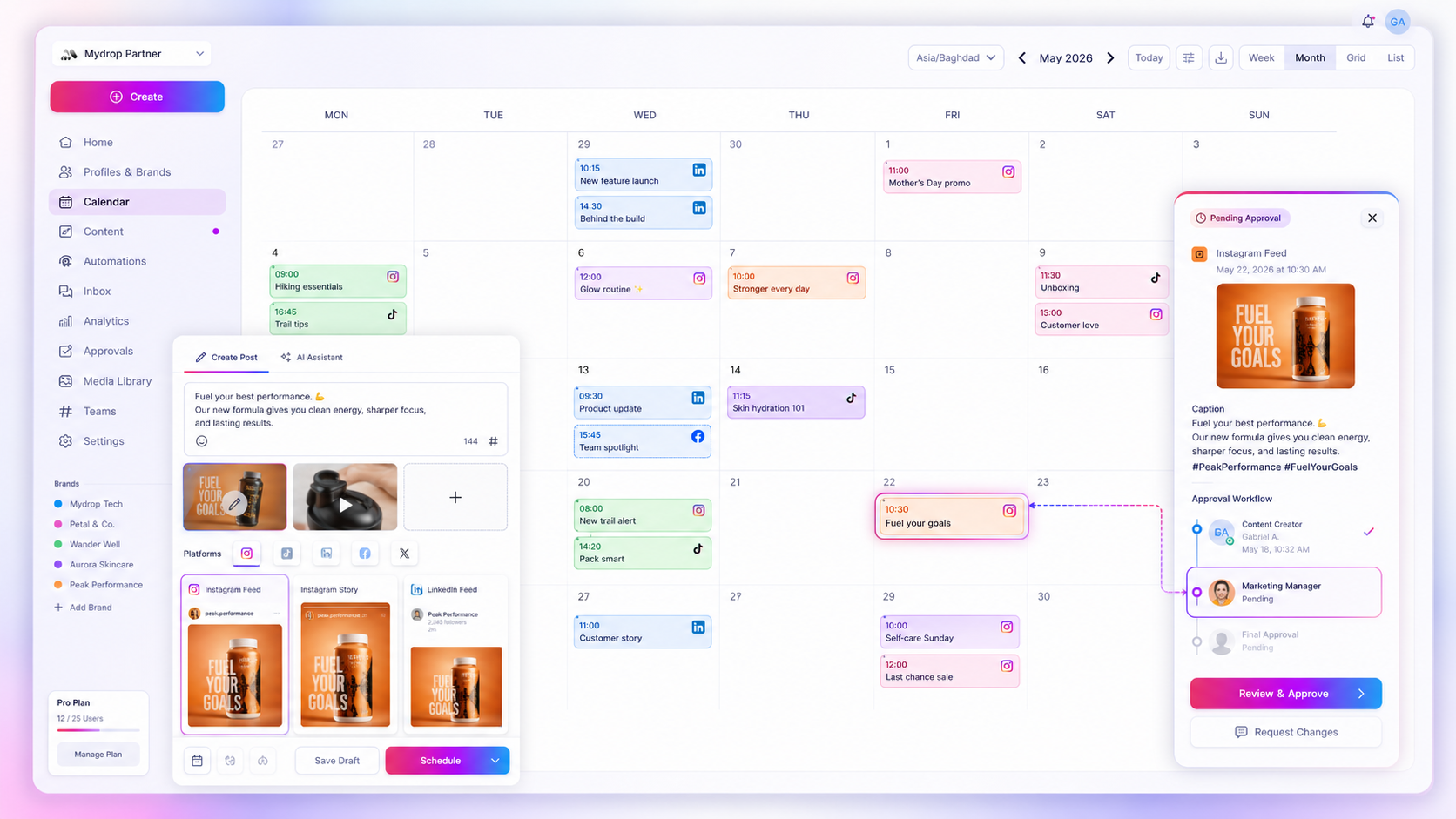
The goal of your calendar shouldn't be simply to fill empty slots. It should be to build a reliable, repeatable story across every channel your brand is on. Take away the friction of hunting for context and you'll find your team spending less time on admin clean-up and more time polishing the stories that really resonate with your audience.
Quick win: Link your creative assets directly to your calendar items this week and see how much time you save by ending the "where's the file?" back-and-forth.
In the end, software is just scaffolding. Your team's success in 2026 depends on whether you can stop managing individual tasks and start managing coherent stories. You're not just scheduling content. You're protecting your brand's voice in a noisy market. The platforms that succeed are the ones that make that protection a natural part of the daily workflow, not a rushed final check. At the end of the day, a content calendar is only as strong as the intent behind it.

 Google review
 Trustpilot review
 Product Hunt comment




