

The bottleneck in your campaign is not your client’s busy schedule-it is the friction of manual, multi-channel feedback loops that force you and your clients to toggle between email, spreadsheets, and messaging apps just to sign off on a single social post. You are currently paying a premium for operational drag, where every additional platform, stakeholder, or manual nudge adds exponential weight to a simple decision.
We get it-you are managing high-stakes content while trying to be the calm center of a storm. It is exhausting to play message tag at 4:00 PM on a Friday because an approval got lost in a thread, turning a simple green light into a campaign-stalling emergency. The truth is that most teams do not have a content problem; they have a decision bottleneck. When feedback is scattered across five different apps, the creative energy you should be putting into your strategy is instead wasted on manual status tracking.
Where the handoff is actually breaking

The breakdown almost always happens at the point of "handoff," where the work leaves your desk and enters the client's inbox. This is where most teams lose control. If your process relies on email threads or static documents, you are not just waiting for an answer; you are creating a secondary workflow just to manage the primary one.
In our experience, these handoffs die in three specific, predictable ways:
- Version Drift: Feedback arrives as a vague email reply-"make the logo bigger"-that does not correlate to a specific post version, leading to multiple back-and-forth threads to clarify intent.
- Context Fragmentation: The client has to open three different tabs to see the copy, the image, and the preview, forcing them to do the heavy lifting of mental assembly before they can even decide to approve.
- Authentication Friction: Requiring a client to log into yet another portal or tool just to click "approve" is the fastest way to kill momentum. If they cannot sign off in the time it takes to grab a coffee, the task moves to the bottom of their list.
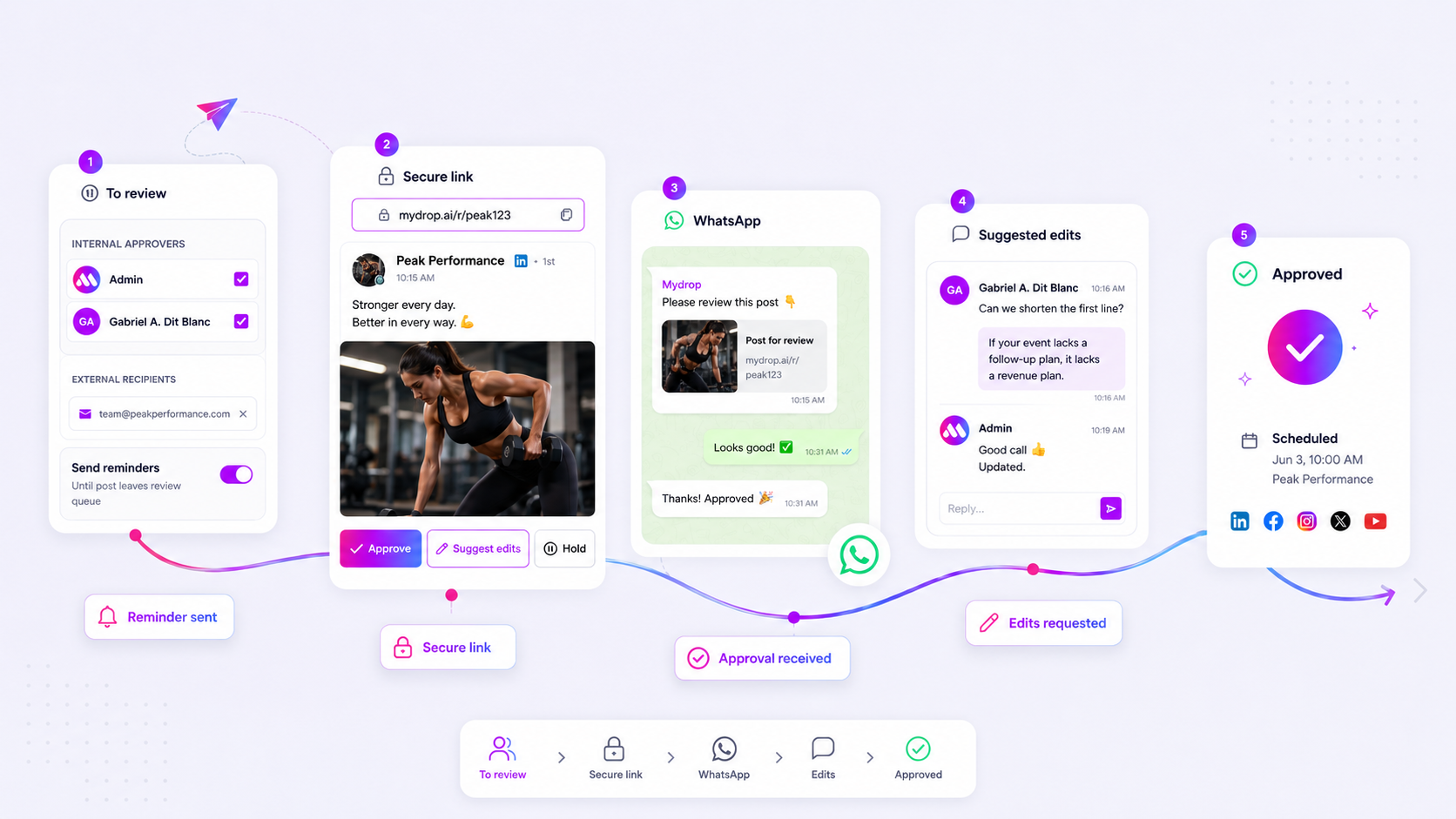
At Mydrop, we see teams move from "reply-all" chaos to faster cycles by shifting to tokenized review links. Instead of sending a file that exists outside of your workflow, you send a dedicated preview that captures decisions exactly where the work lives.
Common mistake: Treating approval as a separate communication task rather than an integrated part of the publishing timeline. If the feedback is not attached to the post preview, it effectively does not exist.
When you remove the need for logins and consolidate feedback into a single, in-context portal, you turn a stalled conversation into a one-tap decision. The goal is not to get the client to work more; it is to remove every click that stands between them and a confident "yes."
The coordination debt checklist

Most of us have a gut feeling when a workflow is broken, but it helps to put a number on the frustration. If you want to know if your team is drowning in administrative weight, run this quick check. Think about the last three campaigns you pushed through.
If you answer "yes" to more than two of these, your current process is the primary reason for those missed deadlines.
| Check Item | Impact on Speed | The Reality Check |
|---|---|---|
| Password Hunt | High | Does your reviewer need to log in to see the draft? |
| Thread Switching | Medium | Is feedback split between email, Slack, and docs? |
| Version Drift | High | Are there three versions of the "final" asset circulating? |
| Ghost Approvals | High | Does a post sit pending for 24+ hours with no status? |
| Mobile Friction | Medium | Can a stakeholder approve this while they are away from a desk? |
Formula for your bottleneck: Count the number of "yes" answers and multiply by the average hours spent chasing a sign-off. If your result is over 10 hours per week, you are spending more time playing project manager than you are creating content. That is not just poor planning; it is a direct hit to your marketing ROI.
How to move decisions closer to the work
The secret to ending the chase is simple: stop asking people to leave their environment to approve your work.
Every time you force a stakeholder to open a new tab, find a login, or hunt through a buried email thread, you introduce a new opportunity for them to walk away. Decisions should live exactly where the work exists. If the feedback is not attached to the post preview, it is just noise.
This is where we usually see the biggest shift in team velocity. Instead of sending an email blast, send a link that carries the context with it. When we built the tokenized portals at Mydrop, the goal was to eliminate the "login barrier" that kills so many approval chains. A recipient should be able to tap a link, see the exact post with the correct media and profile data, and hit "approve" without ever touching a password manager.
Operator rule: If a reviewer needs to ask "which version are we looking at?" you have already failed the workflow.
To move decisions closer to the work:
- Centralize the preview: Stop sending attachments. Use a single, live link that represents the actual, final state of the post.
- Enable direct action: If they have a change, let them request the edit right on the preview. This keeps the feedback pinned to the content, not lost in a separate chat app.
- Support the "on-the-go" sign-off: Enterprise stakeholders are rarely sitting at a desktop. If your workflow doesn't work on a phone-like through a quick WhatsApp prompt-you are voluntarily creating a 12-to-24-hour delay.
By moving to this model, the conversation happens inside the approval loop. You get a clear, timestamped record of exactly who approved what, and the post moves automatically to the schedule. You stop being a professional chaser and start being a professional marketer again. No more Friday evening panic, and no more wondering if the client actually saw the final copy.
The roles and rules that reduce rework
Even with the best tools, a process is only as good as the guardrails you set. If everyone has "admin" access, nobody is truly responsible for the final quality check. We find that teams running the smoothest operations treat approvals not as a gatekeeper task but as a collaborative handoff.
To prevent version drift, you need clear roles and rigid rules for how feedback is handled.
Decision check: If a feedback cycle requires more than two back-and-forth emails, the process has failed. Pivot to a direct, in-context conversation.
At Mydrop, we suggest a simple 3-tier hierarchy for every campaign asset:
- The Creator: Responsible for the technical setup and initial draft. They own the
submittedApprovalAtstatus. - The Editor: Handles minor copy or visual tweaks. They have the power to suggest edits directly on the post preview, keeping the history attached to the asset.
- The Approver: Holds the final "green light" permission. Without their specific digital sign-off, the post stays in a
pendingstate, effectively acting as a system-wide circuit breaker.
By clearly defining who can "suggest" versus who can "approve," you stop the frantic scramble of "did legal see this?" or "did the brand lead sign off?". When a change is suggested in Mydrop, the system notifies the creator and keeps the conversation thread tied to that specific post. This prevents the classic trap where someone gives feedback on the wrong version of a creative, sending the whole team back to square one.
The weekly## The roles and rules that reduce rework
The reason most approval chains become a tangled mess is that we treat everyone as a generic "approver." In reality, you have two distinct types of people in your loop, and treating them the same creates a massive amount of unnecessary back-and-forth.
You have the Strategic Lead, who needs to check the high-level message and brand alignment, and the Technical Reviewer, who is really there to catch typos, broken links, or minor image formatting errors.
If you send a complex brand strategy doc to someone whose only job is to catch a typo, you get "feedback noise"-where people comment on things they don't actually need to own.
Workflow check: Define the Scope of Authority before the first post is even drafted. If an approver isn't responsible for legal or brand compliance, their feedback should be restricted to functional errors only.
At Mydrop, we see the most efficient teams use a simple permission-based system. By assigning specific roles within the workspace, you ensure the right eyes are on the right fields. If a creator doesn't have "publish" status, the post sits in a pending state. It is not an error; it is a safety feature. It forces the workflow to stop at the gate, ensuring that the approvedAt timestamp is more than just a formality-it is a verifiable sign-off that someone with authority actually reviewed the final asset.
The weekly habit that keeps the system honest
You cannot fix a broken feedback cycle with more emails. You fix it by establishing a cadence that makes status invisible. If people are constantly asking "What’s the status of this campaign?", your system has already failed.
The best teams we work with run a "15-minute sync" every Monday. They don't discuss content; they discuss bottlenecks. They look at the posts sitting in the "pending" state and ask one simple question: Who is the blocker?
Here is a simple audit checklist to run during that sync to keep your momentum high:
| Checkpoint | Action | Goal |
|---|---|---|
| The Aging Post | Filter for posts pending > 48 hours. | Clear the queue or kill the concept. |
| The Feedback Loop | Are edits still happening in email? | Move them to the post conversation. |
| The Reminder Pulse | Are approval alerts enabled? | Use automated triggers to nudge stakeholders. |
If you are still manually emailing reminders at 4:30 PM on a Thursday, you aren't managing social media; you are performing administrative support. Use the platform’s scheduling capabilities to automate those nudges. When a post remains unresolved, the notification should go out automatically. Your job is to be the creative lead, not the human calendar reminder.
Conclusion
The secret to scaling your output isn't working faster. It is removing the friction that makes work stop in the first place. When you move from fragmented email threads to a centralized, tokenized review portal, you stop playing message-tag and start building a predictable, high-velocity machine.
The next time you feel that familiar itch to jump into an email thread to chase an approval, stop. Instead, send a direct, in-context link. Give your clients or stakeholders a one-click way to say "yes" or "fix this" without requiring them to log into another tool they will only forget the password to.
You’ll find that when you make it easier for them to approve, they actually get around to doing it. And you? You might finally get to sign off at 5:00 PM without having to check your phone for a "go-ahead" confirmation.


