

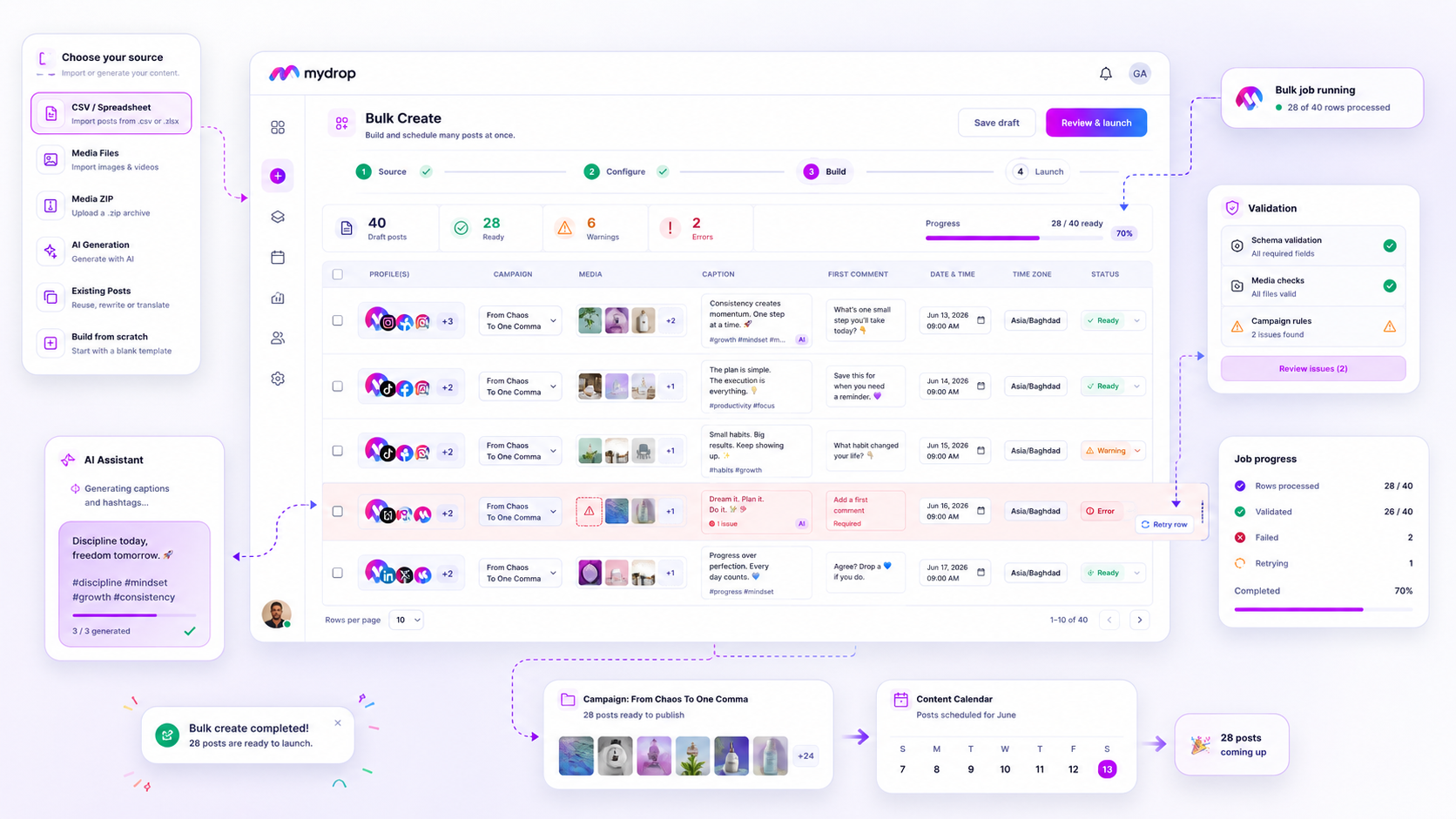
If you see a batch of failures in your bulk campaign, stop hitting Retry All. That button is a reflex, not a strategy. When you are managing enterprise-scale workflows across dozens of brands, retrying every error blindly just forces the system to re-validate bad data, often triggering rate limits or wasting AI tokens on rows that were never going to succeed.
We get it. You are staring at a "15 failed rows" notification during a high-stakes launch, your internal stakeholders are checking the dashboard, and the easiest move is to clear the red error state as fast as possible. But treating every failure as a transient glitch is an expensive operational mistake. It masks systemic issues in your source data and turns your automation pipeline into a chaotic guessing game.
True bulk management is about narrowing your focus. Instead of fightingIf you are staring at a batch of failed rows in your campaign bulk job, stop hitting "Retry All." A blind retry is a gamble that rarely pays off; it just forces your system to fight the same broken data while burning through AI tokens and hitting API rate limits. Instead, treat every failure as a diagnostic signal. The moment you see those red indicators, you are not looking at a technical glitch-you are looking at a coordination gap in your source material.
We have all been there. It is 5:00 p.m. on a Tuesday, the campaign launch is set for tomorrow morning, and you have a hundred-post CSV upload that just choked on five rows. That sinking feeling is normal, but the urge to panic-click is what drains your team’s efficiency. True bulk management is not about brute-forcing the upload; it is about separating the temporary "oops" from the fundamental "this is never going to work."
The decision each metric should trigger

Most enterprise teams default to a "Total Failure Count" metric, which is effectively useless. It tells you that something went wrong, but it offers zero path to recovery. To actually manage your workflow, you need to break those failures down by source type-CSV mapping, missing assets, or platform-level constraints-before you touch the retry button.
When you look at the job history, categorize your failed rows immediately using this logic:
| Error Category | The Problem | The Required Action |
|---|---|---|
| Schema Mismatch | Column structure in your CSV shifted or content exceeds character limits. | Edit the source file and re-upload the corrected set. |
| Missing Assets | The system could not resolve the URL or file path for an image or video. | Fix the asset link, update your source record, and trigger a row-level retry. |
| Transient Timeout | Network blip or platform rate limit hit during a high-volume burst. | Safe to retry; this is just noise, not a structural flaw. |
Operator rule: If a row fails due to a schema violation, do not retry it until you have audited the entire CSV. If one row has a broken column, it is highly likely that a dozen others are just waiting to fail in the exact same way.
By shifting your focus from "how many failed" to "what is the pattern of failure," you turn a reactive cleanup task into a repeatable operating habit. At Mydrop, we see teams that treat bulk jobs as a campaign factory, and the most successful ones never retry a row without first verifying if the source file was the culprit.
If you see a string of failures, resist the urge to jump back into the tool. Open your source file, fix the root cause, and then perform the retry. It adds two minutes to your workflow now, but it saves your team from playing "whack-a-mole" with failed posts for the next three hours.
The scorecard that keeps reporting useful

Stop looking at the raw failure count as your primary success metric. If you’re managing a campaign with three hundred rows, seeing "15 failed" tells you absolutely nothing about whether you’re actually winning or just drifting into a different set of problems.
Instead, track your failure rate by source origin. You need to know if the errors are coming from your creative team’s asset folders, your strategy spreadsheet, or the automated text generation layer.
| Source Type | Primary Failure Trigger | Operational Action |
|---|---|---|
| Manual CSV | Field mismatch or syntax | Audit mapping rules; re-validate CSV headers |
| Media/ZIP | Missing or broken asset paths | Relink files; verify source directory |
| AI Generation | Token limit or output schema | Simplify prompts; reduce complexity in batch |
| Existing Posts | Permissions or expired tokens | Refresh platform access; re-sync profiles |
By breaking it down this way, you move from "there are errors" to "I have a systemic issue with my media server," which is the kind of insight that stops you from burning hours on manual retries.
What to stop measuring by default
The most dangerous number in any bulk job monitor is the Total Retry Count. When you treat this as a KPI, you accidentally incentivize your team to "clear the board" rather than fix the underlying data health.
Decision check: If you have to retry the same row more than twice, stop clicking the button. You aren't fixing a transient network flicker anymore; you're just masking a flaw in your source content.
Here are three things you should stop obsessing over right now:
- 100% immediate completion: In enterprise environments with high-volume pipelines, a 5% initial failure rate is often just noise from network jitter. Stop chasing a perfect score on the first pass and start building a cadence for reviewing the remaining errors at a set time.
- Total manual intervention time: Stop tracking how long it takes to fix rows individually. Start tracking the time it takes to identify and fix the upstream source that caused the failure. That is where your real efficiency gains live.
- Blind retry frequency: A high retry frequency suggests your team is using the "Retry" button as a substitute for actual problem solving. If your retry rate is climbing, you’ve got coordination debt piling up in your campaign factory.
Ultimately, your goal isn't a zero-error bulk job. It is a predictable, repeatable process where the system handles the heavy lifting, and your team only steps in when they have to make a creative or strategic decision. Anything else is just manual labor with extra steps.
How to connect metrics to next actions
The secret to cleaning up a stalled bulk job is realizing that the Bulk Jobs Listener in Mydrop is a diagnostic dashboard, not just a progress bar.
When you see a row fail, the specific error signal is your direct instruction. If the error is Schema Validation, your spreadsheet has become a crime scene-you have missing URLs, invalid date formats, or broken character counts. Stop retrying. The code isn't failing; your source data is. Fix the CSV, upload the fresh version, and move on.
If the error is Asset Unavailable, you have a broken pipeline between your media storage and the tool. Trying to push those rows again without fixing the path is just a waste of cycles. You need to verify the source link in your local storage or cloud asset manager first.
Workflow check: Only hit "Retry" when the error signal is System-Level (e.g., a timeout or network glitch). If the error is Content-Level (missing text, bad links, file errors), treat the row as a refactor project, not a retry candidate.
The review cadence that makes the model stick
Most campaign teams operate in a state of "launch and pray," only checking progress when a stakeholder complains about a missing post. Instead, build a simple 5-minute post-launch cadence into your weekly workflow.
By standardizing this, you stop chasing fires and start managing a predictable production line.
- The 15-Minute Check: Immediately after hitting "Launch" on a bulk job, stay in the dashboard. Watch the first few batches. If the error rate spikes above 5% immediately, cancel the job, wipe the created drafts, and audit your source.
- The One-Hour Audit: Return to the
bulkJobshistory screen. Filter for allfailedrow statuses. Export only the failed rows, fix the data errors in bulk, and perform a scoped retry of just those specific lines. - The Weekly "Cleanup" Sync: On Friday, delete jobs older than one week that remain in a
partialstate. This prevents coordination debt from cluttering your dashboard and confusing your team’s view of what actually made it to the calendar.
Campaign Health Checklist: Post-Bulk Launch
| Task | Frequency | Success Indicator |
|---|---|---|
| Verify Batch Throughput | Post-Launch | > 95% of rows enter processing state |
| Clear Schema Errors | T + 60 mins | 0 rows remain with "Validation" errors |
| Resolve Asset Issues | T + 60 mins | 0 rows remain with "Missing Media" errors |
| Housekeeping | Weekly | All cancelled or old jobs removed from view |
Conclusion
The difference between a frantic team and a high-performance marketing operation isn't the number of posts they manage-it's how they handle the friction inherent in large-scale production.
Stop viewing bulk errors as failures to be ignored or blind retries to be automated. Treat them as data signals that tell you exactly where your internal process is breaking. When you shift your mindset from "get this job done" to "optimize the pipeline," you stop spending your time chasing ghost errors and start spending it on the creative work that actually drives brand growth.
At Mydrop, we’ve seen the most successful agencies and in-house teams treat their bulk creation workflow as a factory. They expect a certain amount of noise, they filter it intelligently, and they keep their calendar clear of clutter. You can do the same. Next time a campaign drop hits a snag, don't rush to hit the retry button-pause, check the signal, and fix the source. Your future self, and your stakeholders, will thank you.


