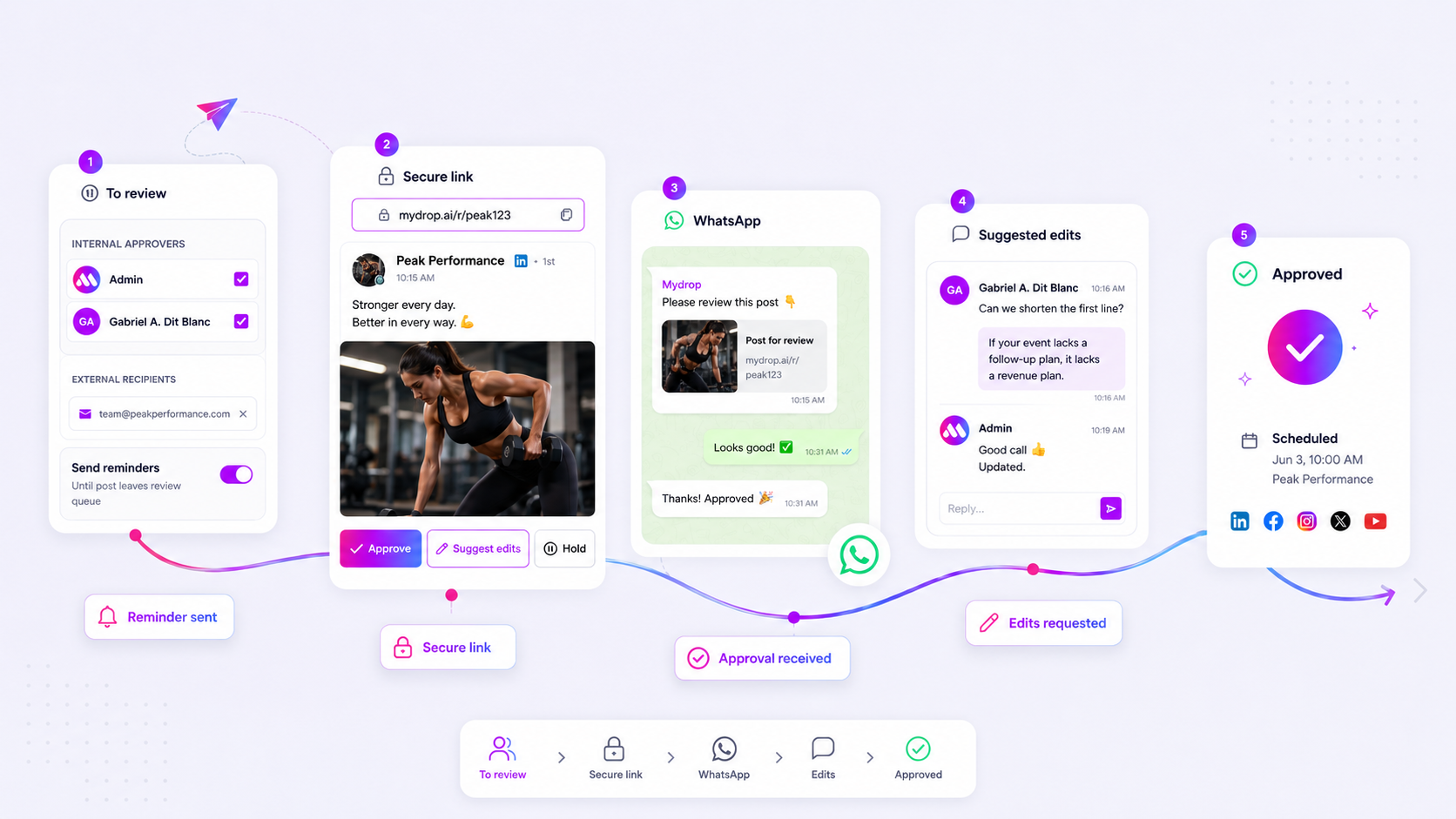
The best social media management software for agencies isn't the one with the most bells and whistles; it is the one that prevents your team from ever accidentally posting to the wrong brand account. If you cannot restrict a contractor’s ability to publish, delete, or edit content on a specific client profile without impacting the rest of your dashboard, you are not managing a tool-you are managing a constant risk of public error.
We get it. You are juggling a dozen brand voices, multiple time zones, and a revolving door of freelancers. The last thing you want is a late-night frantic call because an intern pushed a draft live to a client's main feed by mistake. That "who has access to what" conversation shouldn't keep you awake at night, yet when a simple mistake happens, it becomes the only conversation that matters to your leadership team.
What the best tools need to handle

The reality of agency work is that your needs are rarely static. You might have an in-house designer who needs full read/write access to assets but no publishing authority, or a client stakeholder who needs "read-only" access to the upcoming week's calendar but shouldn't be able to edit a single caption.
Basic, generic tools often fail here because they rely on global roles. They force you into a corner where you are either an "Admin" with god-mode access or a "Contributor" who can barely do anything at all. This forces teams to over-permission users just to get work done, which is a massive liability.
Operator rule: If your tool forces you to choose between "too much access" and "not enough access" for a team member, your software is creating your security risks, not solving them.
To scale effectively without creating a mess of coordination debt, the best platforms handle complexity through resource-level authority. Instead of assigning a global badge to a user, the tool must map specific actions to specific resources.
Here is the difference in how those workflows look when you try to apply them to a real agency scenario:
| Feature Category | Basic/Generic Tools | Professional Agency Tools |
|---|---|---|
| Role Scope | Global/Static (One size fits all) | Resource-level (Customizable per client) |
| Publishing Gatekeeping | All-or-nothing access | Workflow-based (Draft -> Approve) |
| Error Mitigation | "Trust-based" systems | "Policy-enforced" systems |
When you look at your current software, ask yourself: Can I give a freelancer access to just this one client's inbox and calendar while explicitly blocking them from the "delete" or "invite members" actions? If the answer is no, your agency is carrying an unnecessary operational tax. Every time you have to work around your software’s limitations by manual checking or Slack-based "please don't touch that" warnings, you are paying that tax. You need an architecture that ensures the right people have the right keys to the right doors, and nothing else.
Where basic tools start to break

Basic collaboration tools treat everyone as if they are in the same room. You get a set of global roles like Admin, Editor, and Viewer, and that is where the logic ends. For a small team of three, that works perfectly. But at an agency scale, this "one size fits all" approach quickly turns into a massive operational liability.
When you manage dozens of brands, you cannot afford to have an intern-or even a mid-level freelancer-with the power to accidentally delete a client’s entire post history or, worse, publish an unapproved draft to a premium brand channel. In basic systems, the only way to prevent this is to tightly restrict access across the board. The result? You create a massive bottleneck. Every single action-even a simple copy edit-requires an Admin to manually log in and perform the task because the "Editor" doesn't have the right permissions to touch the asset.
At Mydrop, we see this pattern constantly: teams trying to work around tool limitations by sharing single accounts, bypassing workflows, or relying on chaotic Slack threads to confirm who is allowed to do what. The tool stops being a facilitator and becomes a piece of software that you are constantly fighting against just to keep the lights on.
Common mistake: Using a single "master" login for multiple team members to avoid permission headaches. It hides accountability, makes auditing impossible, and ensures that when something breaks, no one knows exactly who hit the button.
The buying criteria that matter
Stop looking for the tool with the best user interface and start looking for the tool with the best resource-level authority. You need an architecture that understands the difference between an asset, a workflow, and a user. A robust system doesn't ask "what is this person's job title?"; it asks "is this specific user allowed to perform this specific action on this specific resource?"
When evaluating potential platforms, use this scorecard to identify whether the software is built for agency growth or just small-team convenience.
Agency Permission Scorecard
| Capability | Evaluation Rule | Why it matters |
|---|---|---|
| Granular Mapping | Does the system map actions to individual objects (e.g., specific posts, profiles, inbox threads)? | Prevents "all or nothing" access creep. |
| Action-Specific Toggles | Can you grant Read access without granting Delete or Modify? |
Crucial for client-view-only audits. |
| Approval Guardrails | Are workflow stages hard-coded into the access level? | Ensures a Junior user can draft but never skip approval. |
| Change Logs | Is there a history of permission modifications per member? | Provides an audit trail for compliance. |
| Notification Logic | Can users opt-in to alerts only for the resources they own? | Reduces noise for teams with 50+ brand profiles. |
The reality is that social media scale usually fails from coordination debt, not a lack of ideas. When you have to manually police who has access to which file or which brand, you have already lost. You need a system that forces policy-enforcement at the database level.
If you are currently managing more than five brands or juggling more than ten stakeholders, look for a tool that treats permissions as a living, breathing resource map. If the platform’s security model is just a static dropdown menu of broad roles, it is time to move on. Your agency's reputation is too expensive to gamble on a "trust-based" system that lacks the granular control to keep your channels safe.
How Mydrop supports this workflow
We built Mydrop on a simple, slightly obsessive premise: if the software knows exactly what you are allowed to do, it can stop you from doing what you are not. Instead of relying on a flimsy "Editor" role that grants broad, dangerous access, Mydrop treats your team permissions as a granular map.
Think of it as a gatekeeping engine that lives right at the resource level. When you invite a new freelancer or a client stakeholder, you do not just drop them into the workspace. You assign a specific set of permissions for every critical object-posts, analytics, inbox threads, or automation workflows. If someone should only be allowed to draft content for the "Luxury Retail" brand but not approve it for the "Consumer Electronics" brand, our system enforces that boundary.
Decision check: If your team has to ask "Can you check if I have access to this?" more than once a week, you have a configuration problem, not a communication problem.
At Mydrop, we see hundreds of agency workflows where the biggest bottleneck is actually the fear of accidental deletion. By letting you define canPerformAction maps for every member, we ensure your interns can safely craft drafts while your senior managers hold the keys to the approval gates. It turns a chaotic "trust-based" system into a policy-enforced one, meaning you spend less time fixing mistakes and more time actually strategizing.
A simple shortlist checklist
Before you commit to a new platform or reconfigure your current one, run your team through this audit. If you answer "no" to more than two of these, your current tool is likely costing you more in "human error tax" than it is saving you in convenience.
| Checklist Item | Objective |
|---|---|
| Can we restrict access by brand or client? | Prevents cross-brand contamination. |
| Is approval authority separated from drafting? | Removes the "self-publish" risk. |
| Can we toggle individual email alerts? | Prevents "notification fatigue" for managers. |
| Are resource-level permissions native? | Avoids workarounds like shared passwords. |
| Can we revoke access instantly for all resources? | Essential for offboarding contractors. |
Conclusion
The reality of agency life is that the moment you think you have control, a client asks for a custom campaign, a contractor joins mid-week, or a new brand account is added to your roster. If your management software requires a manual spreadsheet just to keep track of who is allowed to do what, the software is working against you.
The most successful agencies we work with do not struggle because they lack creative ideas; they struggle because they have built up significant coordination debt. They spend their brightest hours chasing people to approve posts or explaining why an asset was deleted by mistake.
Stop trying to manage your team’s behavior with emails and Slack reminders. Hard-code your governance into your tools. When your software acts as the first line of defense for your agency’s reputation, your team stops worrying about the "what-ifs" and starts focusing on the work that actually moves the needle for your clients.