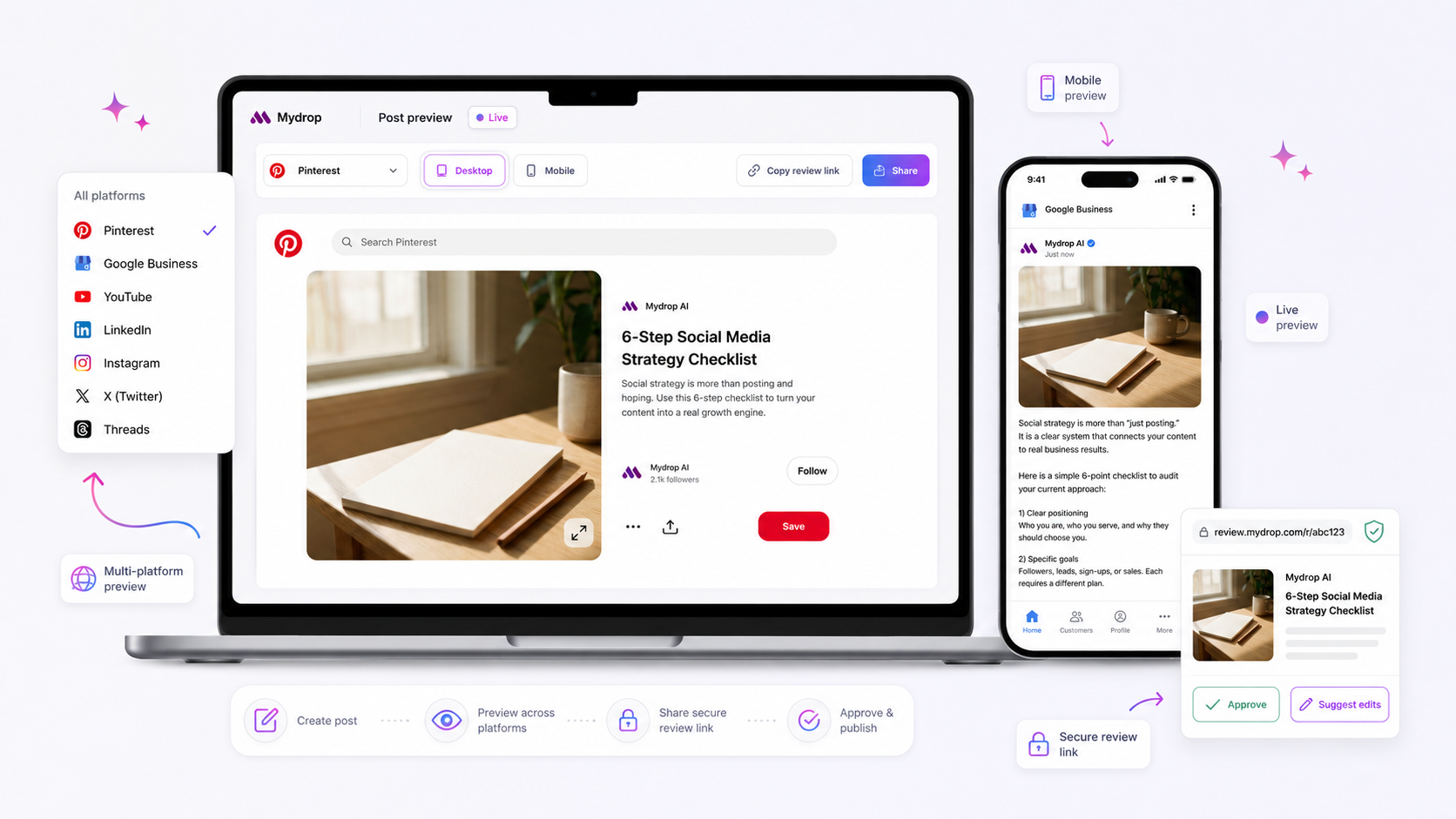
The best social media approval platform is not a separate tool; it is the integrated composer where your team creates, validates, and gets sign-off in one fluid motion. Splitting your creation workflow from your approval chain creates a "coordination tax" that stalls momentum and risks brand consistency. The real enterprise bottleneck is not a lack of ideas or design skill; it is the friction of shifting between disjointed platforms to get the green light. If you want to scale output without losing control, stop treating approval as a bolt-on. It belongs where the content lives, tethered to the platform-specific rules that make or break your reach.
We get it. You are juggling a dozen brand voices and thirty stakeholders. The "approval bottleneck," where content goes to die in a sea of email threads, is a structural failure that drains team creativity.
What the best tools need to handle

If your process relies on exporting a preview to a separate document to get a thumbs-up, you have lost. Effective workflows rely on Single-State Creative, where the draft, its state, and all approval context remain anchored to the post.
At Mydrop, we designed our Post Composer to ensure approval is part of the composition, not a post-production step. If you cannot see the platform-native preview, set the campaign tag, and invite the reviewer within the same screen where you write the caption, you are forcing your team to waste time on administrative logistics rather than creative strategy.
Here is how you can diagnose if your setup is scaling or stalling:
| Category | Low Friction (Mature) | High Friction (Bottlenecked) |
|---|---|---|
| Tool Centralization | Everything happens in the composer. | Creation and approval are siloed tools. |
| Schema Validation | Platform rules (e.g., IG story vs. feed) are enforced before sign-off. | Approver discovers formatting errors after sign-off. |
| Stakeholder Visibility | Stakeholders see a platform-native preview. | Stakeholders review static PDFs or spreadsheets. |
| Version Control | Chat and feedback history are pinned to the draft. | Feedback is lost in emails or Slack threads. |
Operating rule: If you cannot validate platform requirements-like missing LinkedIn thumbnails-before reaching the approver, your process is backwards. The approver should check content quality, not catch basic technical errors the composer should have flagged.
Most teams do not have a content problem. They have a decision bottleneck.
Where basic tools start to break

When your approval process lives in a completely different tab than your post creation, you are essentially building a coordination factory that produces delays instead of content. The fundamental problem with basic tools-or worse, just using email and spreadsheets-is the massive context-switch penalty. Every time a creator has to copy-paste a caption into an email, attach a media asset, and then wait for someone else to open the post in a separate tool, they are bleeding productivity.
The hidden cost here is "compliance drift." If the tool you use to manage approvals does not understand that an Instagram Story needs different metadata than a LinkedIn carousel, your approvers will miss the obvious errors. When you disconnect the composer from the approval chain, you add hours of manual administrative labor and double the risk of misfiring on platform-specific requirements.
The most dangerous failure mode is when the approver cannot see what the audience sees. If the approval interface is just a text box, they might approve a caption that gets truncated or a video that won't play correctly on that specific device. At Mydrop, we see teams struggle with this across hundreds of brand profiles; they end up chasing emails at 6 p.m. because the preview link was broken or the thumbnail failed to load.
Approval Friction Scorecard
Use this scorecard to diagnose if your current setup is draining your production capacity.
| Metric | Low Friction | High Friction | Warning Sign |
|---|---|---|---|
| Creation Context | Unified composer | CMS + Email/Slack | If context switch > 3 minutes, you have a process bottleneck |
| Preview Accuracy | Live, native-rendered | PDF/Static image | If preview is simulated, you risk format mismatch |
| Schema Validation | Automated on-save | Manual checklist | If no auto-check, expect 15% error rate on fields |
| Version History | Native, per-artifact | Email thread/File names | If renaming files to "v3_final", coordination debt is high |
If your process consistently hits the "High Friction" column, it is not a talent problem; it is a structural failure of your tooling.
The buying criteria that matter
When looking for a platform that actually scales, stop evaluating features like "nice-to-have" add-ons. You need a platform that treats approval as a core component of the creation process. The best social media approval platform is not a separate tool; it is the integrated composer where your team creates, validates, and gets sign-off in one fluid motion.
Operator rule: If the approval status is not natively linked to the artifact itself within the composer, the tool will eventually fail you.
When evaluating vendors, look for these three non-negotiables:
- Schema-Driven Validation: The tool must know the rules for each platform. It should flag missing mandatory fields-like a LinkedIn thumbnail or an Instagram Story link-before the post ever hits the approver’s desk. This stops the "ping-pong" effect of sending posts back because they were technically incomplete.
- Native Previewing: Approvers need to see the post exactly as it will appear on the platform. If they have to imagine what a text-only link will look like on a TikTok feed, they are not really approving it. They are guessing.
- Single-State Creative: A draft's state (pending, approved, scheduled) must be natively linked to the post within the composer. Do not settle for tools that require you to manually sync an external approval database. The state should be an intrinsic property of the post object.
At Mydrop, we designed the post composer around these principles because we know that managing brand consistency at scale requires removing the administrative "coordination tax." You want your team focusing on the creative impact of their strategy, not managing the overhead of getting a caption checked by stakeholders. The goal is to make the right process the easiest process. When validation happens automatically while the creator is still typing, the approval chain becomes a simple confirmation rather than a long, painful review cycle.
How Mydrop supports this workflow
At Mydrop, we designed our Post Composer specifically to eliminate the coordination tax that ruins agency margins. Instead of forcing your team to draft in one tool and manage approvals in another, we treat approval as a first-class property of the post itself.
When you select a profile, the composer immediately surfaces the correct schema-driven fields. Whether you are dealing with a required LinkedIn thumbnail, an Instagram first comment, or specific TikTok visibility settings, the interface guides the creator to completeness before the draft is even saved. Because this validation is baked into the draft phase, you never send a post to a client or internal stakeholder only to have them reject it because it is missing a technical requirement.
The real friction, however, is often in the feedback loop itself. That is why we built Post Chat directly into the composer. If a legal reviewer or brand manager has questions about a campaign direction or a specific caption, they can leave their feedback right alongside the draft artifact. This context travels with the post, not in a separate email chain or a fragmented Slack thread that loses history. When your team needs to iterate, they pick up the creative discussion where they left off without digging through archives. By the time the post enters the final approval stage, you are not chasing down comments or reconciling version history; you are simply hitting send.
This approach transforms the approval stage from an administrative hurdle into a seamless operational sign-off. It is the difference between sending a draft into a black box and having a living, breathing artifact that stakeholders can trust, review, and authorize with total confidence.
A simple shortlist checklist
When evaluating your next social media platform, do not just look at the publishing speed or the analytics dashboard. Look at how well the tool bridges the gap between creation and sign-off. If your current setup does not satisfy this list, you are likely overpaying for manual labor and creating unnecessary friction for your stakeholders.
| Capability | Why it matters |
|---|---|
| Integrated Composer | Drafts and approvals exist in one UI, not separate, siloed tools. |
| Schema Validation | Post requirements are validated before reaching the approver. |
| Contextual Chat | Feedback is pinned to the draft, not hidden in external email threads. |
| Automated Reminders | Approvers receive timely prompts, reducing the administrative coordination tax. |
| Platform Previews | Stakeholders see exactly how the post will look on the live feed. |
Use this checklist as your baseline. If a tool requires you to export a post to a PDF just for a manager to say "looks good," it is not helping you scale-it is adding a bottleneck.
Conclusion
The truth is that most agency bottlenecks are not creative failures. They are coordination failures. When you treat the approval process as a bolt-on, post-production activity, you essentially build a manual factory that produces nothing but delays.
The best social media approval platforms force you to shift your perspective. They make the approval state a visible, manageable, and native property of the creative asset.
Stop letting your team waste precious hours chasing down stakeholders and reconciling final_v3_updated files. Standardize your workflow inside a unified composer, automate the validation checks, and keep the creative context where it belongs: right next to the post. Your campaign momentum-and your sanity-will thank you for it.