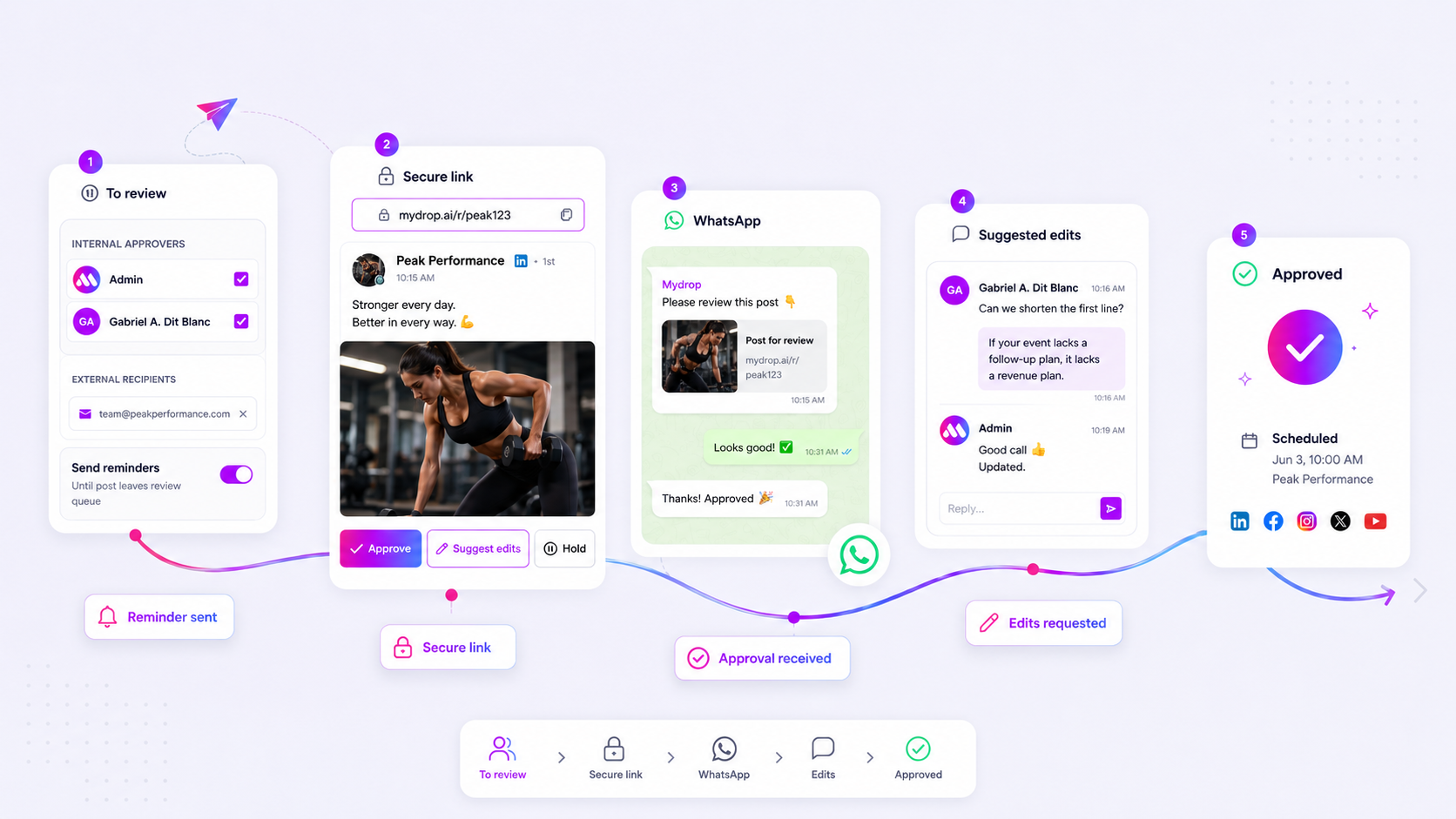
The best way to stop the reply-all madness is to stop using email for approvals entirely. If you are still chasing clients through scattered threads and version-control nightmares, you are not just losing time. You are building a massive, silent bottleneck into your agency operations. The answer is not another password-protected portal clients refuse to log into. It is moving to a tokenized, no-login, single-click approval workflow that meets them where they are. When approval becomes frictionless, your velocity skyrockets, and those 6 p.m. frantic email chains finally become a thing of the past. It is about replacing administrative friction with clear, actionable decision-making.
We have all been there. It is Friday afternoon, a campaign launch is due on Monday, and your legal lead is digging through three different email threads to find the latest version of a post. The frustration is not the work itself. It is the coordination debt. Every time you ask a client to log into a complex system, you add a hurdle that guarantees delay.
Here is where teams usually get stuck: they prioritize feature sets over workflow reality.
What the best tools need to handle

When evaluating potential tools, stop asking about features and start asking about friction. Does this tool actually get you an answer faster, or does it just change the medium of the delay?
| Metric | Email Chain | Tokenized Portal |
|---|---|---|
| Access Barrier | Account needed / High | None / Instant |
| Version Control | Manual / High Risk | Native / Versioned |
| Feedback Speed | Hours to Days | Seconds to Minutes |
| Administrative Overhead | High (Chasing/Logging) | Low (Automated/Audit) |
A tool that truly serves an agency workflow must handle these three things without compromise.
- No-Login Review: The client should be able to see the live preview, check the media, and interact with the post instantly from a single secure link. If they have to remember a password, they will not review it until the last possible minute.
- Contextual Feedback: Do not let them say "fix the image." Give them tools to suggest edits directly on the preview. This keeps the context of the requested change right next to the asset.
- Channel Flexibility: Whether it is an email or a WhatsApp message, the approval action needs to be immediate. If your workflow requires them to leave their communication app to do work, you have already lost the battle for their attention.
At Mydrop, we have seen that when teams replace this chaos with tokenized, no-login links, approval velocity typically jumps because you have removed the login friction that causes most client procrastination.
Where basic tools start to break

When your approval process relies on email, Slack threads, and the occasional desperate text message, you are not just managing content. You are managing a coordination disaster. The moment a client has to search through five different email threads to find the latest version of a post, your momentum dies.
This is where the cracks show. For teams managing hundreds of brand profiles across multiple time zones, manual feedback loops are a silent profit killer.
Here is where teams usually get stuck:
- Version control chaos: You send a preview, the client replies with changes, you update the post, and suddenly they are commenting on the version from last Tuesday. The spreadsheet has become a crime scene.
- The login barrier: Forcing a client to create an account, verify their email, and learn a new dashboard just to say "looks good" is the fastest way to get ignored. If the effort to approve is higher than the effort to procrastinate, they will choose procrastination.
- Feedback fragmentation: When comments are scattered across platforms, it is impossible to maintain an audit trail. You end up manually aggregating feedback while the clock ticks toward the publishing deadline.
Most teams do not have a content problem. They have a decision bottleneck. If your tool requires a password, it is working against your client's busy schedule, not for it.
Review Friction Scorecard
| Metric | Manual Email Chain | Mydrop Portal |
|---|---|---|
| Time to First Feedback | 4-24 hours (average) | Instant (often minutes) |
| Version Control | Risky (v1, v2, vFINAL_v3) | Single source of truth |
| Client Friction | High (login, signup, password) | None (one-click access) |
| Admin Overhead | 1-2 hours weekly per client | <15 minutes total |
The buying criteria that matter
Stop looking for features that help you make posts and start looking for features that help you close them. If a tool promises efficiency, it must solve for the "last mile" of the workflow-getting that final green light.
When evaluating your next approval tool, use this as your non-negotiable checklist:
- Tokenized, no-login access: This is non-negotiable. Your clients should be able to view a high-fidelity, platform-accurate preview of their content with a single click from their email or a secure link.
- In-context feedback: Avoid tools where feedback is separate from the asset. Look for the ability to suggest edits directly on the preview itself. At Mydrop, we see that consolidating feedback into a single, conversation-based stream significantly reduces the back-and-forth ambiguity that plagues most agencies.
- Actionable notifications: If the platform does not proactively nudge your approvers, you are still the one doing the chasing. Look for automated reminders that fire off based on the deadline, not based on your memory.
- Multi-channel support: If your client lives in WhatsApp, your approval process should be there, too. A tool that maps inbound WhatsApp replies directly to the active approval context is a massive operational win for speed and convenience.
Operator rule: If a platform forces a client to navigate an account structure to approve a single post, it is not an approval tool-it is a project management tool in disguise.
When you remove the friction, you change the relationship. You move from being the person chasing for an approval to the person who provides a seamless, professional experience. That shift is how you protect your margins and keep your team sane during a campaign launch.
How Mydrop supports this workflow
If you have spent any time in the trenches of social media management, you know that the biggest enemy isn't the platform algorithm-it is coordination debt. The longer a post sits waiting for a green light, the more likely it is to be published late, miss the cultural moment, or be rushed out with errors.
At Mydrop, we built our approval flow to solve exactly this by treating the approval process not as a gate, but as a bridge. We move the review out of the "reply-all" black hole and into a clean, tokenized portal that requires zero logins for the client.
When you submit a post for approval in Mydrop, the system creates a secure, temporary link. Your client opens this URL and sees exactly what will be published-the caption, the media, the preview, and the workspace context-all in a professional, branded layout. They can click "Approve" to send it straight to the scheduler, or "Suggest Edits" to leave feedback directly on that specific post.
For the high-velocity teams we work with, the WhatsApp integration is the real game-changer. When configured, approvers receive a notification directly in WhatsApp with interactive buttons to approve or request edits instantly. This turns a task that used to require opening a laptop and logging into a tool into a two-second action they can complete between meetings. It is about meeting the stakeholders where they already live, not forcing them into your workflow.
A simple shortlist checklist
Before you commit to a new tool, run it through this quick evaluation. If a solution cannot hit these marks, you are likely just buying a shinier version of your current email bottleneck.
| Feature | Why it matters |
|---|---|
| No-login portals | Eliminates the single biggest source of friction; if they can't access it in one click, they won't. |
| Tokenized security | Ensures that sensitive, pre-publication content is only accessible via authorized, unique links. |
| Contextual feedback | Allows edits to be tied directly to the post, preventing the "which version are we talking about?" confusion. |
| Cross-platform alerts | Must support email and mobile-friendly messaging (like WhatsApp) to capture attention outside of the desktop. |
| Automated reminders | Prevents "approval fatigue" by automatically nudging stakeholders who haven't acted on pending posts. |
Conclusion
The goal of any approval process is simple: move from "I think this is ready" to "This is live" with the least amount of friction possible. If your current setup involves chasing stakeholders across four different apps, you have outgrown it.
Most teams do not have a content problem; they have a decision bottleneck. By standardizing on a tool that provides tokenized, no-login reviews and keeps feedback consolidated, you aren't just saving hours of administrative work-you are reclaiming the speed required to actually compete in a noisy social landscape. Stop managing email threads and start managing your campaign velocity.