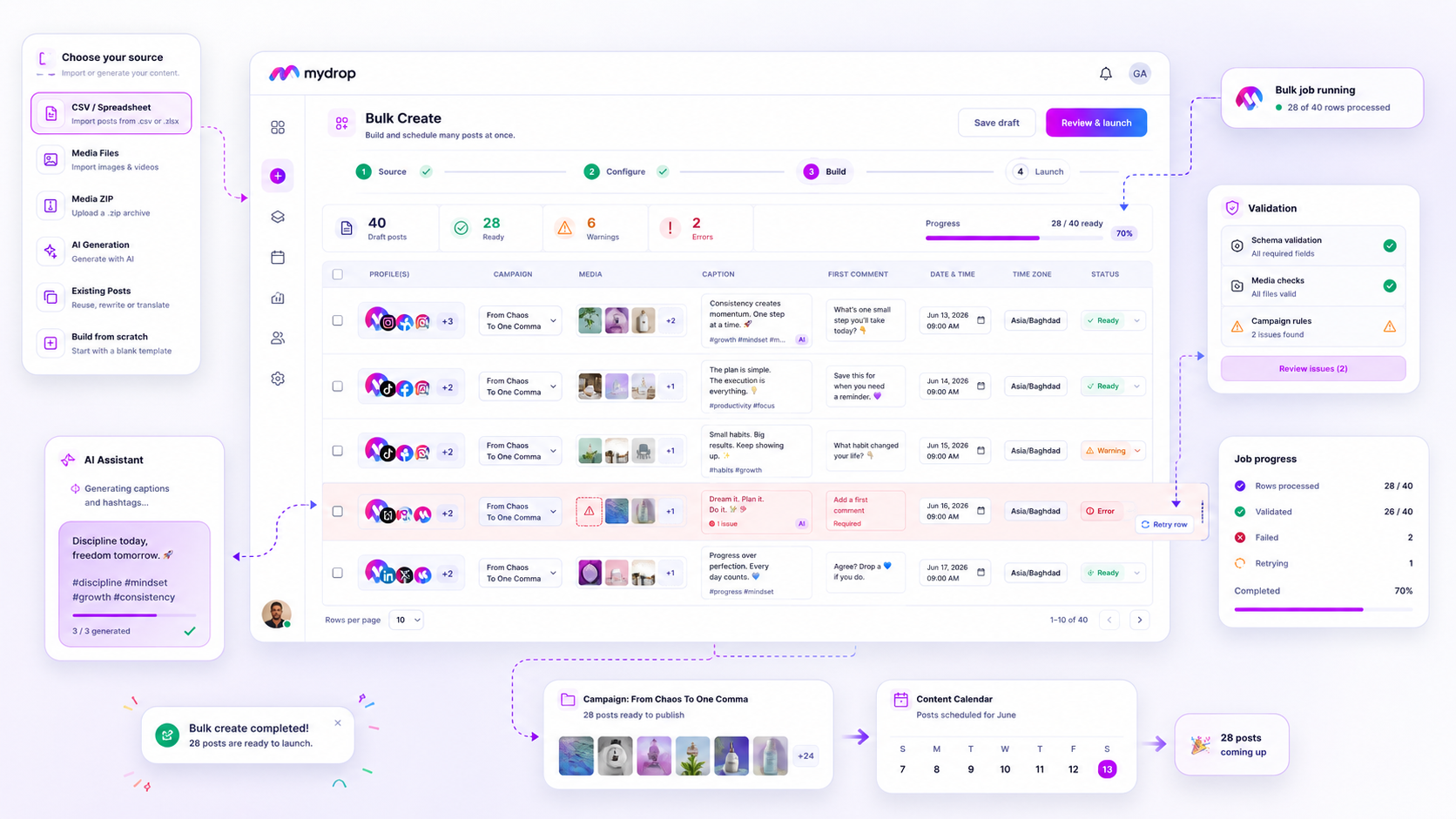
The best bulk social media tool for an agency is one that treats error remediation as a primary feature, not an afterthought. When you are managing agency-scale campaigns, the biggest threat to your productivity is not volume. It is the bottleneck caused by a single failed post in a batch of hundreds. If your current tool forces you to nuke and restart a job because of one typo in row 142, you are not managing social media; you are managing panic. You need a workflow that treats bulk creation as a risk mitigation system, not just a way to upload files faster.
We have all been there: it is Saturday morning, you have a massive launch queued, and suddenly, you are frantically hunting down why one row failed while the rest of the job hangs in limbo. No one signed up for this kind of stress. You deserve a system that isolates errors, reports them clearly, and lets you fix the mess without starting from scratch.
What the best tools need to handle

The shift from "bulk speed" to "bulk safety" is the most important maturity step for any agency. Most tools focus on how quickly they can ingest your CSV file, but they often ignore the fact that agency work is messy. Data gets corrupted, image links break, and client requirements change mid-campaign.
If your tool handles these errors by stopping the entire machine, your team spends hours on manual cleanup instead of strategy. You need a system that adopts the Graceful Failure Principle: the ability to process a bulk job asynchronously while isolating individual failures for targeted retry.
Here is the difference between a tool that builds campaigns and a tool that creates more work:
| Feature | Naive Batch Uploader | Validated Campaign Factory |
|---|---|---|
| Error Handling | Total job failure | Row-level isolation |
| Retry Logic | Restart entire file | Targeted row-only retry |
| Progress Tracking | Modal lock-in | Async status listeners |
| Validation | Post-upload rejection | Pre-launch schema checks |
In our experience, teams find peace of mind when they can see exactly which row failed and why without killing the job. This is not just about convenience; it is about protecting your team from the hidden cost of coordination debt. When a tool allows you to isolate a single row, fix the broken asset or the typo, and re-launch just that item, you transform a potential crisis into a five-minute maintenance task.
When choosing your next bulk workflow, do not just look at the maximum number of rows you can upload. Look at how the tool treats the row that will eventually fail.
Where basic tools start to break

Here is the awkward truth: most bulk tools treat a CSV file like a one-way ticket. You upload the data, press "Go," and hope for the best. If your file has one malformed row or a broken image link, the entire system often crashes or, worse, silently skips the offending post and keeps going-leaving you to play detective later.
When you're pushing hundreds of posts for a major client launch, that "all-or-nothing" approach is a liability. You don't have time to re-run the entire batch just because row 42 had a typo. You need a system that treats each post as an independent, validated entity, not just another line in a spreadsheet.
Common mistake: Treating a bulk job as a monolithic block. If your tool doesn't allow you to see progress or errors row-by-row in real-time, you are flying blind.
When your tool lacks granular reporting, you end up wasting hours manually reconciling your spreadsheet against the content calendar to find what actually made it through. It turns a "timesaving" workflow into an administrative nightmare.
The buying criteria that matter
Stop asking how many posts a tool can queue. Instead, ask how it handles the inevitable failure. Use this scorecard to evaluate whether your current workflow is built for an agency or a hobbyist.
| Feature | The "Naive" Uploader | The "Validated" Factory | Why it matters |
|---|---|---|---|
| Row-Level Error Reporting | Silent failures or generic error messages. | Specific error (e.g., "invalid date," "missing asset"). | Stops the guessing game when a batch fails. |
| Targeted Retry | Requires a full job restart. | Retries only failed rows. | Saves hours of manual cleanup for one bad row. |
| Async Visibility | Requires an open browser window. | Tracks progress in the background. | Lets your team move on to other work during long jobs. |
| Pre-Flight Validation | Checks only after submission. | Validates schema/rules before queueing. | Prevents broken posts from ever entering the calendar. |
The best tools act as a Campaign Factory. They take your raw, messy inputs-CSV files, media folders, random AI-generated ideas-and run them through a rigorous validation pipe.
Operator rule: If you cannot isolate, fix, and retry individual failures without touching the successful posts, your tool is just deferring your work, not completing it.
At Mydrop, we see teams struggle most when they can't trust the output of their bulk imports. That is why our Bulk Create feature prioritizes visibility. When a row fails, you don't have to nuke the job. You can see the specific issue, fix it, and hit retry. It turns a potential "Saturday morning emergency" into a quick, surgical fix.
When evaluating your tech stack, don't just look for speed. Look for the ability to manage the chaos. A tool that fails gracefully is infinitely more valuable than one that is fast but fragile.
The Agency-Grade Scorecard
Before you commit to a tool for the next twelve months, run your current workflow through this scorecard. If your "bulk creation" process consistently triggers a late-night panic, you are likely using a tool optimized for volume, not for the reality of agency operations.
| Feature | Naive Batch Uploaders | Validated Campaign Factories |
|---|---|---|
| Error Handling | Silent failure or total job halt | Row-level isolation and reporting |
| Retry Strategy | Full file restart required | Targeted retry of failed rows only |
| Validation | Post-upload error discovery | Pre-launch schema validation |
| Async Tracking | Modal-dependent progress | Persistent job listeners |
| Cleanup | Manual post-by-post deletion | Automatic batch cleanup on cancel |
Decision check: If your bulk tool cannot isolate a single failed row without forcing you to restart the entire CSV, it is not a tool; it is a liability.
How Mydrop supports this workflow
At Mydrop, we built our Bulk Create engine to solve the specific chaos we see in agency life. We realized that enterprise teams do not need more ways to dump content into a queue. You need a way to build a massive campaign factory that respects your time and your sanity.
When you upload a large CSV or media package, Mydrop does not just "fire and forget." It acts like a digital project manager. The moment you initiate a job, our worker starts validating every single row against your platform requirements. If row 142 has an unsupported aspect ratio, we mark it, report it, and keep processing rows 143 through 500.
This is the "Graceful Failure Principle" in action. You never have to sacrifice the work of the ninety-nine successful rows because one row missed a character limit.
In our experience, teams find peace of mind when they can see exactly which row failed and why without killing the job. You can open our bulk job listener, review the error logs, fix the specific issue in the UI, and hit "retry" on just those items. It turns a potential "Saturday morning emergency" into a five-minute coffee break cleanup.
Furthermore, our system is entirely asynchronous. You can launch a campaign with hundreds of posts, close the modal, grab lunch, and come back to a real-time notification tracking the progress. You are not tethered to a loading screen. We manage the cleanup as well: if you have to cancel a job, we handle the heavy lifting of removing the partially created posts, so your workspace does not become a cluttered crime scene.
A simple shortlist checklist
When evaluating your next tool, use this checklist to ensure you are buying a system that handles agency scale. Do not settle for "it imports CSVs."
- Row-level error reporting: Can I see exactly which row failed and why, without a generic "error" message?
- Targeted retry: If a job partially fails, can I fix the data and retry only the failed rows, or do I have to nuke the whole batch?
- Pre-flight validation: Does the tool check for platform-specific constraints (character limits, aspect ratios) before it tries to publish?
- Async processing: Can I close the app or navigate away while the batch processes?
- Campaign cleanup: If I cancel a job, does the tool help me remove the posts it already created, or am I left to clean up the mess manually?
Conclusion
The difference between a frantic agency and a calm one is rarely the volume of content. It is the ability to handle the inevitable "oops" moments that happen when you manage hundreds of brand profiles.
Stop chasing throughput at the expense of control. A bulk creation tool should be a safety net that catches errors before they reach your clients, not a fire hose that amplifies your mistakes. When you move to a system that treats error remediation as a core operating capability, you stop spending your time on data cleanup and start spending it on the strategy that actually moves the needle for your clients.
You have enough variables to manage in a campaign. The tool you use to build it should be the most reliable variable in your process.