Stop evaluating AI media tools based on image quality alone and start prioritizing governance-first workflows where brand context, centralized quota management, and collaborative approvals are non-negotiable requirements. If your agency’s AI process is just a collection of disconnected prompts, you aren't building a media engine; you are just building a new, faster bottleneck.
We get it. Creative teams are drowning in "good enough" AI images that miss the brief, while account leads are panic-tracking usage costs in shared spreadsheets that have become total crime scenes. You are chasing speed but losing control in the process. It feels like every asset is a race against compliance, and honestly, no one enjoys chasing approval signatures at 6 p.m. on a Friday.
Moving your agency from chaotic individual prompting to a scalable system requires a shift in focus. It is not about which tool generates the most photorealistic cat; it is about which platform keeps your team from breaking brand guidelines or burning through a monthly budget in a single afternoon of R&D.
What the best tools need to handle

The best platforms manage the entire lifecycle of an asset, from the moment a content creator needs a visual to the final moment it hits the social feed. When we evaluate tools at Mydrop, we look for systems that treat AI generation as a managed task rather than a wild-west experiment.
For agency-scale work, a tool must handle these four pillars of the media lifecycle:
- Brand-Aware Context: The AI needs to know your brand, not just a generic prompt. If you have specific color palettes or visual styles, the system should be able to integrate those constraintsIf you want your agency to scale social content, stop shopping for the AI tool with the flashiest image quality and start looking for one that manages the chaos of a multi-brand workflow. The real problem isn't generating a nice picture; it is the friction of getting that picture through legal review, into a post, and correctly accounted against a client's monthly quota before the deadline passes.
We have all been there. It is 5 p.m. on a Thursday, the campaign launch is tomorrow, and your designer is playing tag with a dozen different stakeholders over an image that turns out to be wrong anyway. You are not alone in this-the industry is flooded with disconnected tools that promise speed but leave you holding the bag on compliance and budget.
What the best tools need to handle

You need a platform that treats every AI-generated asset as a tracked campaign component rather than a loose file. When you are managing dozens of brand profiles and hundreds of active assets, a standalone generator is a liability. It creates a vacuum where usage, approvals, and brand context simply disappear.
A production-ready system must manage the full lifecycle, from the initial prompt to the final approval. If your workflow involves downloading a file, renaming it, uploading it to a separate tool, and then manually checking if you have hit your budget limit, you are burning hours on administration that should be spent on creative strategy.
The best platforms handle the heavy lifting for you through four critical checkpoints:
| Checkpoint | Why it is non-negotiable |
|---|---|
| Centralized Quota | Prevents budget surprises by tracking usage across all teams and brands in one dashboard. |
| Brand-Linked Context | Ensures the AI understands your brand identity, colors, and voice before it starts processing. |
| Approval Routing | Ties generated media directly into your existing campaign review workflow. |
| Job Resilience | Manages asynchronous tasks (like video rendering) without losing track if a provider hits a delay. |
Operator rule: Never initiate an AI generation task that isn't already mapped to a specific post or media plan item. If you cannot trace the asset back to a campaign, the generation is just noise.
At Mydrop, we see teams fail when they treat AI as a "free" button rather than a managed resource. A sound architectural approach means the system polls status updates, stores metadata, and attaches outputs to your post composer automatically. This ensures your creative stays locked to the project record.
When you lose the connection between the intent (the media plan) and the output (the generated file), you invite compliance risks and duplicated work. The goal is to move from chaotic, one-off prompting to a unified production loop where every generation is verified, stored, and accounted for before it ever reaches a social feed.
Where basic tools start to break
You hit the wall the moment your team grows past a few people or one brand. Basic AI generators-the ones designed for quick, solo creative bursts-fumble when you introduce real-world agency messiness.
Here is what happens when those tools meet a campaign launch at scale:
- The Approval Black Hole: You generate a perfect image, but it lives in a siloed web tab. Your account lead can’t see it, your client can’t approve it, and the content ends up sitting in a Google Drive folder that no one remembers to check until the deadline hits.
- The Hidden "Cost-Per-Click" Burn: When you don’t have central quota tracking, a junior designer running fifty iterations for one post isn't just "testing"-they are burning through your monthly AI budget. By mid-month, the account manager gets a shock, and the agency is stuck explaining why the budget is already dry.
- Contextual Amnesia: Basic tools don’t know your brand colors or current campaign voice. You end up with images that look great in a vacuum but feel like they belong to a completely different brand. You spend more time prompt-engineering or fixing outputs than you would have spent just creating the asset from scratch.
Common mistake: Treating AI generation as a standalone task rather than a linked workflow step.
The buying criteria that matter
Stop shopping for "the coolest looking AI." Start shopping for production stability. If you are managing multiple brands or high-volume output, your decision matrix shouldn't be about style transfer quality; it should be about how the tool handles the entire creative lifecycle.
The Agency AI Evaluation Scorecard
| Capability | What to look for | Why it matters |
|---|---|---|
| Brand Context | Native support for style guides or asset references. | Eliminates manual "brand-check" editing. |
| Quota Visibility | Real-time dashboards per team and brand. | Prevents surprise budget overages. |
| Workflow Linking | Direct attachment to scheduled posts. | Keeps assets in the campaign plan, not loose files. |
| Approval Flow | Built-in review steps for AI-generated output. | Ensures legal/client sign-off before publishing. |
| Polling Resilience | Automatic retries and status tracking. | Prevents "lost" media jobs when servers lag. |
When evaluating platforms, ask specifically how they handle asynchronous generation. If the tool hangs on a "generating" screen and fails to save the file if you close your laptop, walk away. You need a platform that treats your media task as a persistent job-tracking status, handling callbacks, and confirming delivery into your storage.
At Mydrop, we see teams struggle most when they try to stitch together three different tools to handle what should be one flow. If your AI image generator, your media library, and your post composer don't talk to each other, you are creating a manual reconciliation job for yourself every single day.
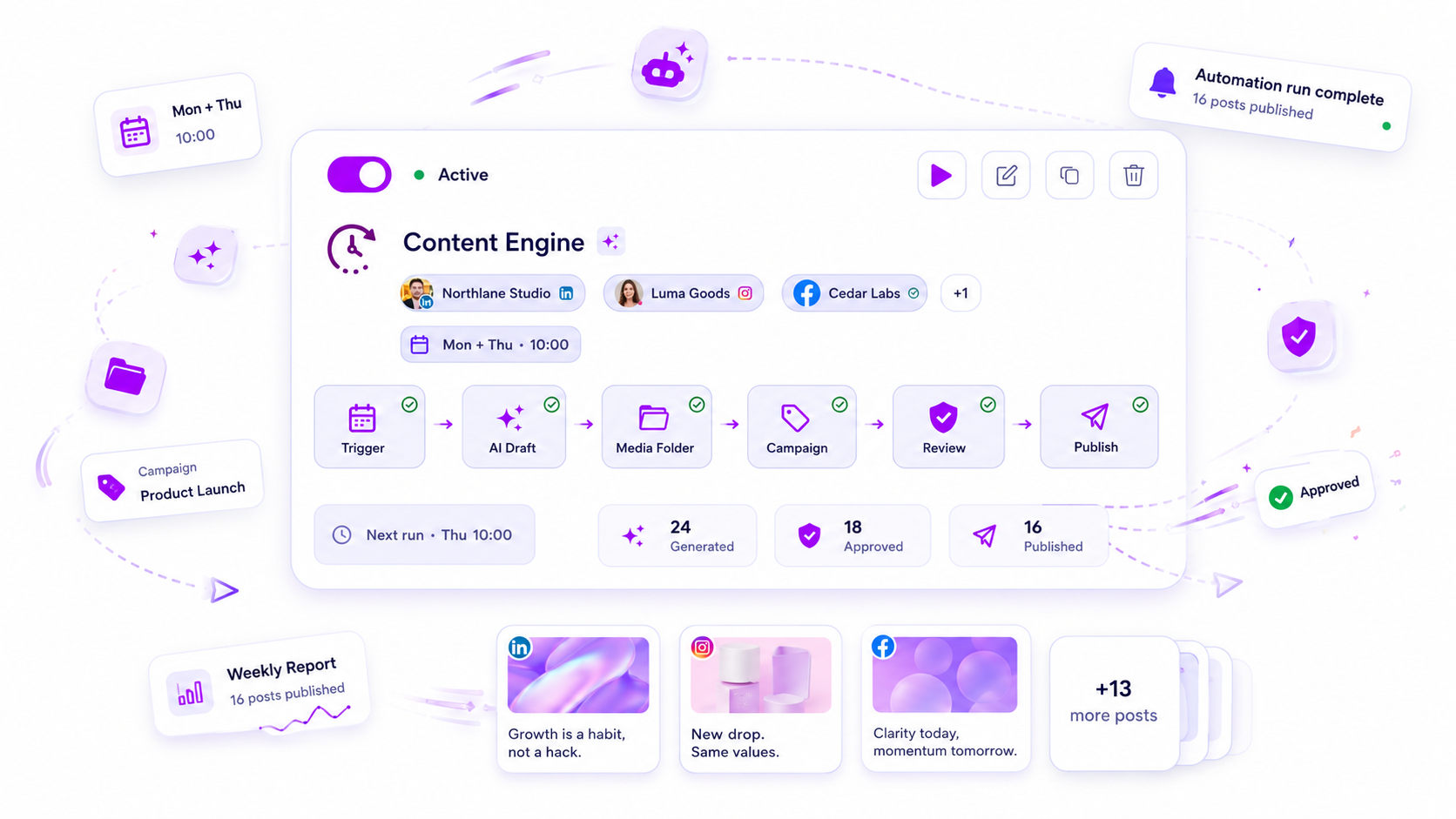
The best workflow is invisible. It is where your designer requests an image, the system validates the quota, the AI generates the media, and the content is attached to the scheduled post-all without a single manual file upload or spreadsheet update. If your platform doesn't close that loop, it is just adding to your pile of work, not reducing it.
How Mydrop supports this workflow
At Mydrop, we see the most successful teams treating AI media generation as a governed step within the broader campaign lifecycle, not as a side-quest for designers. You want a system where the AI is aware of your media plan and your account-level constraints from the start.
Instead of hunting through chat history for the right variation, Mydrop keeps everything in the AI Media Panel. When your team requests an image or video, the platform manages the entire asynchronous job, polling for completion, and automatically attaching the result to the correct post or gallery.
Crucially, we bake quota accounting into the generation flow. Your workspace administrators set usage limits, and the platform enforces them in real-time, so a junior designer doesn't accidentally burn through the entire monthly budget during a late-night iteration session. Before a single pixel is generated, the system checks if the workspace has the available capacity, providing an immediate guardrail that keeps your finance lead from having a panic attack at the end of the month.
When those assets are ready, the Media Plan Review kicks in. An agent verifies the generated output against your planned requirements, ensuring the content matches the brief before it ever hits a social channel. You are not just generating images; you are closing the loop between a creative request and a compliant, ready-to-publish asset.
A simple shortlist checklist
If you are evaluating platforms this month, use this checklist to separate the tools built for actual agency work from those built for personal hobbyists.
| Requirement | Why it matters |
|---|---|
| Centralized Quotas | Prevents budget overruns across multiple client workspaces. |
| Approval Routing | Ensures AI output must be reviewed before it can be scheduled. |
| Brand Context | Uses pre-set brand colors or style rules to steer generation. |
| Asynchronous Jobs | Handles delays gracefully without losing your progress. |
| Asset Storage | Automatically archives generated files into your media library. |
Watch out: Buying a tool based on "creative versatility" while ignoring how that tool integrates with your existing approval process. A pretty image is useless if it takes an hour of manual email back-and-forth to get it into your scheduling calendar.
Conclusion
The transition from "manual creative" to "AI-assisted production" is rarely about the model’s artistic capability. It is about the plumbing.
Your agency’s success hinges on whether you can scale your creative output without sacrificing the visibility and oversight your clients demand. The best teams do not look for the model that generates the flashiest content; they look for the platform that keeps their process predictable, their costs tracked, and their creative assets governed from the moment of ideation to the final post.
Stop treating AI as a separate, chaotic layer of your work. Bring it into your existing campaign lifecycle, tie it to your existing approval loops, and watch how quickly your team starts producing consistently rather than sporadically. You deserve a workflow that works as hard as your creative team does.