





























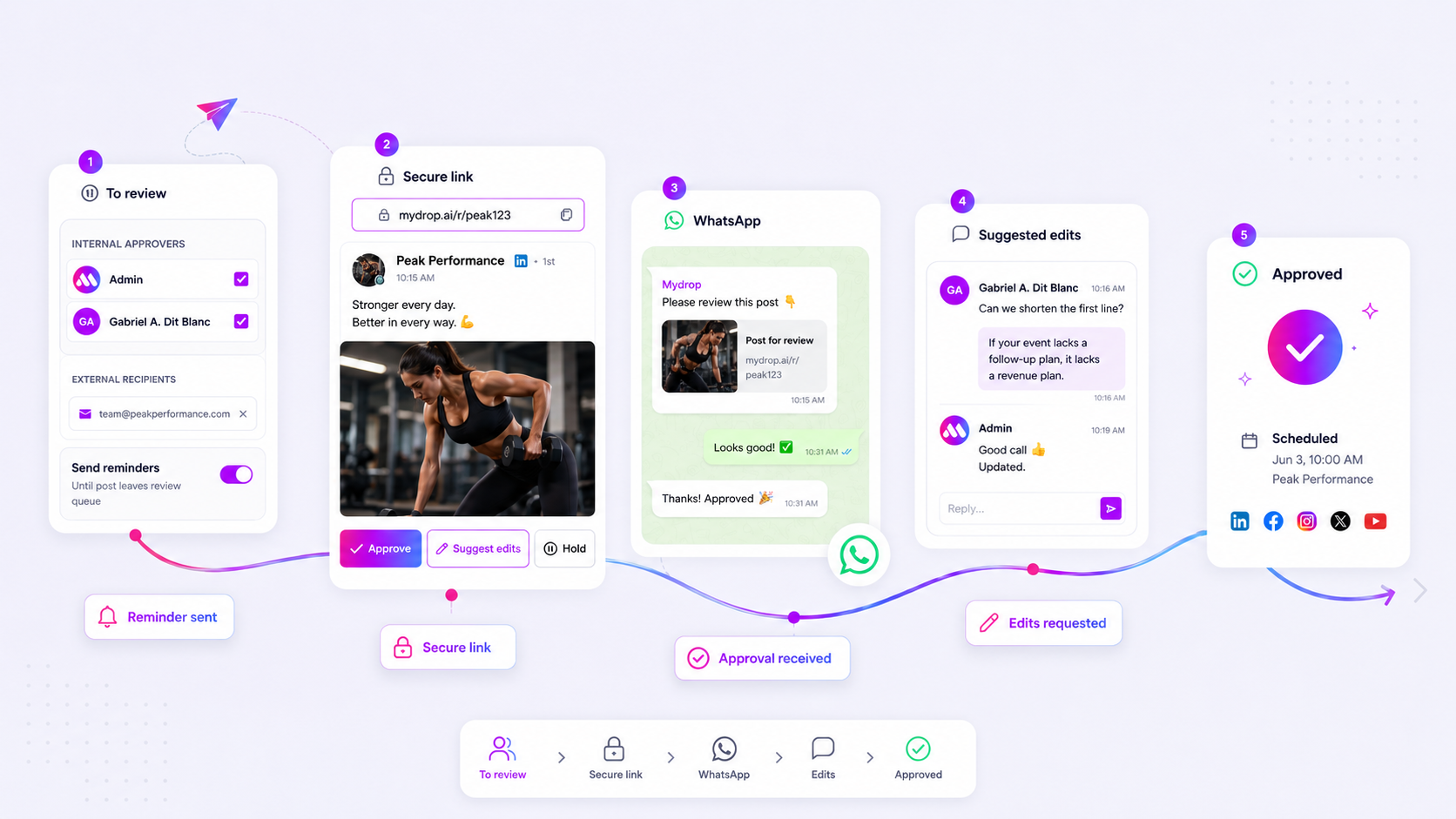
The best way to stop the reply-all madness is to stop using email for approvals altogether. If you're still chasing clients through scattered threads and version-control headaches, you're not just losing time. You're building a big, silent bottleneck into your agency. The answer isn't another password-protected portal that clients refuse to log into. It's a tokenised, no-login, single-click approval workflow that meets them where they already are. Once approval is frictionless, you move faster, and those frantic 6 p.m. email chains finally become a thing of the past. It's about swapping admin friction for clear, quick decisions.
We've all been there. It's Friday afternoon, a campaign launch is due on Monday, and your legal lead is digging through three different email threads to find the latest version of a post. The frustration isn't the work itself. It's the coordination debt. Every time you ask a client to log into a complicated system, you add a hurdle that guarantees delay.
This is where teams usually get stuck: they put feature lists ahead of how the workflow really runs.
What the best tools need to handle

When you're weighing up tools, stop asking about features and start asking about friction. Does this tool get you an answer faster, or does it just change how the delay arrives?
| Metric | Email Chain | Tokenised Portal |
|---|---|---|
| Access Barrier | Account needed / High | None / Instant |
| Version Control | Manual / High Risk | Native / Versioned |
| Feedback Speed | Hours to Days | Seconds to Minutes |
| Administrative Overhead | High (Chasing/Logging) | Low (Automated/Audit) |
A tool that truly suits an agency workflow has to get these three things right.
- No-Login Review: The client should be able to see the live preview, check the media and respond to the post straight away from one secure link. If they have to remember a password, they won't review it until the last possible minute.
- Contextual Feedback: Don't let them say "fix the image". Give them tools to suggest edits right on the preview. That keeps the context of the change next to the asset it applies to.
- Channel Flexibility: Whether it arrives by email or WhatsApp, the approval action has to be immediate. If your workflow makes people leave their messaging app to do the work, you've already lost the fight for their attention.
At Mydrop, we've seen that when teams replace this chaos with tokenised, no-login links, approvals typically speed up, because you've removed the login friction behind most client procrastination.
Where basic tools start to break

When your approval process relies on email, Slack threads and the odd desperate text message, you're not just managing content. You're managing a coordination mess. The moment a client has to search through five email threads to find the latest version of a post, your momentum dies.
This is where the cracks show. For teams managing hundreds of brand profiles across several time zones, manual feedback loops quietly eat into profit.
This is where teams usually get stuck:
- Version control chaos: You send a preview, the client replies with changes, you update the post, and suddenly they're commenting on last Tuesday's version. The spreadsheet has become a crime scene.
- The login barrier: Making a client create an account, verify their email and learn a new dashboard just to say "looks good" is the fastest way to get ignored. If approving takes more effort than putting it off, they'll put it off.
- Feedback fragmentation: When comments are scattered across platforms, you can't keep an audit trail. You end up gathering feedback by hand while the clock ticks towards the publishing deadline.
Most teams don't have a content problem. They have a decision bottleneck. If your tool needs a password, it's working against your client's busy schedule, not for it.
Review Friction Scorecard
| Metric | Manual Email Chain | Mydrop Portal |
|---|---|---|
| Time to First Feedback | 4-24 hours (average) | Instant (often minutes) |
| Version Control | Risky (v1, v2, vFINAL_v3) | Single source of truth |
| Client Friction | High (login, signup, password) | None (one-click access) |
| Admin Overhead | 1-2 hours weekly per client | <15 minutes total |
The buying criteria that matter
Stop looking for features that help you make posts and start looking for features that help you close them. If a tool promises efficiency, it has to solve the "last mile" of the workflow: getting that final green light.
When you assess your next approval tool, use this as your non-negotiable checklist:
- Tokenised, no-login access: This is non-negotiable. Your clients should be able to open a high-fidelity, platform-accurate preview of their content with one click from their email or a secure link.
- In-context feedback: Avoid tools where feedback lives apart from the asset. Look for the ability to suggest edits right on the preview itself. At Mydrop, we see that pulling feedback into a single, conversation-style stream cuts the back-and-forth confusion that plagues most agencies.
- Actionable notifications: If the platform doesn't nudge your approvers for you, you're still the one doing the chasing. Look for automatic reminders that go out based on the deadline, not on your memory.
- Multi-channel support: If your client lives in WhatsApp, your approval process should be there too. A tool that links incoming WhatsApp replies straight to the right approval is a big win for speed and convenience.
Operator rule: If a platform makes a client work through an account structure to approve a single post, it isn't an approval tool. It's a project management tool in disguise.
Mydrop pricing check, September 2026: the entry paid plans of the eight tools most often compared with Mydrop run from $6 per channel (Buffer) and $25 a month (Later) to $99 per user (Hootsuite) and $199 per seat (Sprout Social), read on each vendor's pricing page. Mydrop is free to start, then $19 a month flat, not per seat. Full table on Mydrop's compare pages.
When you remove the friction, you change the relationship. You stop being the person chasing for approval and become the person who offers a smooth, professional experience. That shift protects your margins and keeps your team sane during a campaign launch.
How Mydrop supports this workflow
If you've spent any time in the trenches of social media management, you know the biggest enemy isn't the platform algorithm. It's coordination debt. The longer a post waits for a green light, the more likely it is to go out late, miss the moment or be rushed out with mistakes.
At Mydrop, we built our approval flow to solve exactly this, treating approval not as a gate but as a bridge. We take the review out of the reply-all black hole and into a clean, tokenised portal that needs no login from the client.
When you submit a post for approval in Mydrop, the system creates a secure, temporary link. Your client opens it and sees exactly what will be published: the caption, the media, the preview and the workspace context, all in a professional, branded layout. They can click "Approve" to send it straight to the scheduler, or "Suggest Edits" to leave feedback right on that post.
For the fast-moving teams we work with, the WhatsApp integration is the real game-changer. Once it's set up, approvers get a notification in WhatsApp itself, with buttons to approve or request edits on the spot. A job that used to mean opening a laptop and logging into a tool becomes a two-second action between meetings. It's about meeting stakeholders where they already are, not dragging them into your workflow.
A simple shortlist checklist
Before you commit to a new tool, run it through this quick check. If a solution can't hit these marks, you're probably just buying a shinier version of your current email bottleneck.
| Feature | Why it matters |
|---|---|
| No-login portals | Removes the single biggest source of friction: if they can't get in with one click, they won't. |
| Tokenised security | Makes sure sensitive, pre-publication content can only be reached through authorised, unique links. |
| Contextual feedback | Ties edits straight to the post, so nobody asks "which version are we talking about?" |
| Cross-platform alerts | Must cover email and mobile-friendly messaging (like WhatsApp) to catch attention away from the desktop. |
| Automated reminders | Prevents "approval fatigue" by nudging stakeholders who haven't acted on pending posts. |
Conclusion
The goal of any approval process is simple: get from "I think this is ready" to "This is live" with as little friction as possible. If your current setup means chasing stakeholders across four different apps, you've outgrown it.
Most teams don't have a content problem; they have a decision bottleneck. Standardise on a tool with tokenised, no-login reviews and consolidated feedback, and you aren't just saving hours of admin: you're winning back the speed you need to compete in a noisy social landscape. Stop managing email threads and start managing your campaign velocity.

 Google review
 Trustpilot review
 Product Hunt comment




