





























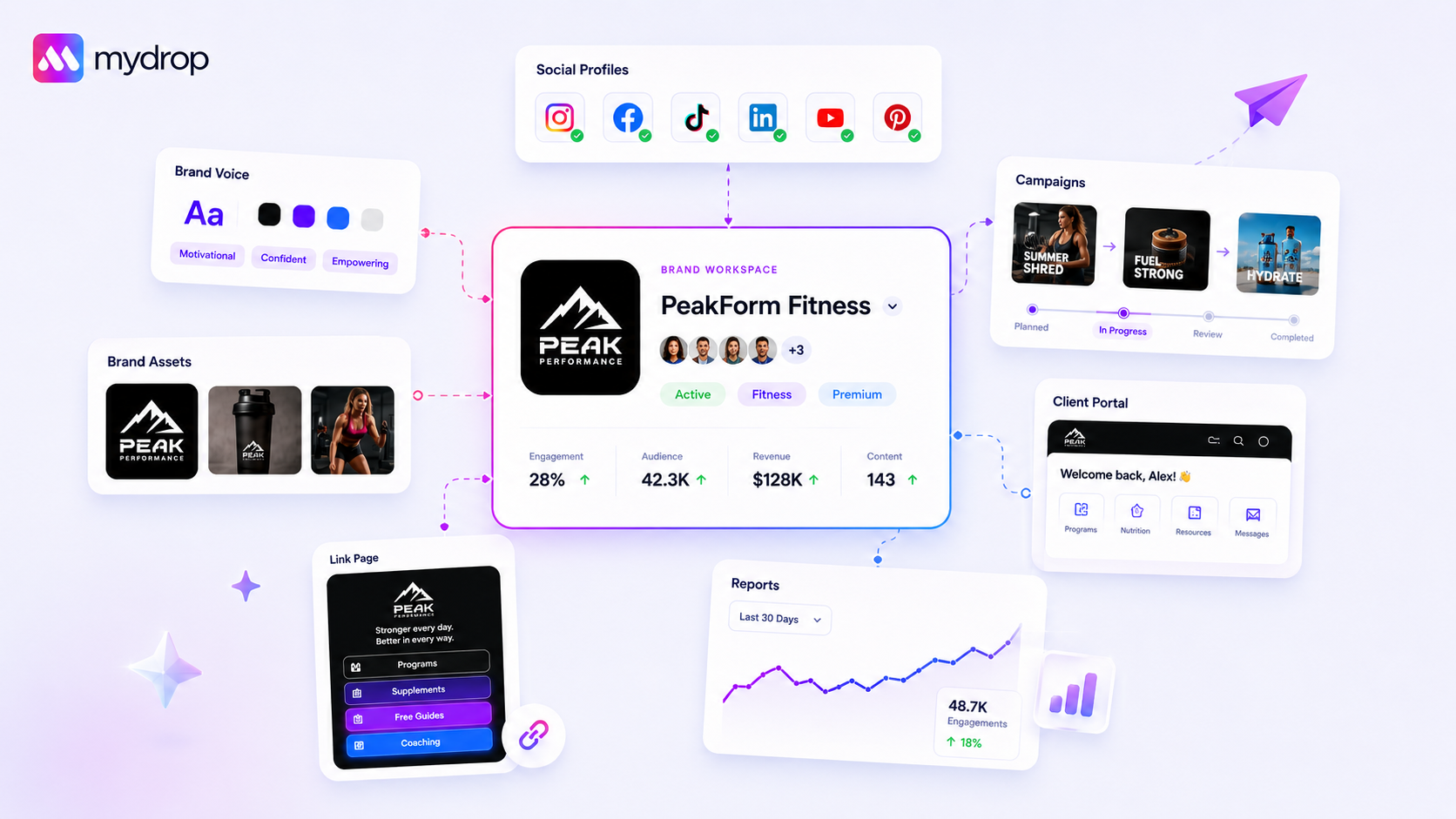
The best brand compliance tool for multi-brand agencies isn't just an asset repository. It's a unified command centre that links social profiles to live brand identity data like colours, logos, tone and prompt guidance. It makes sure every piece of content, whether a human wrote it or AI generated it, is tied to the right brand context from the moment it's created.
We know the struggle: juggling three different client voices, four colour palettes and a dozen social profiles while trying to make sure nobody posts a stale logo or strikes the wrong tone. It's messy, high-stakes and exhausting to police by hand. When you're dealing with dozens of stakeholders across several markets, "good enough" brand management usually ends in fragmented identities and slow approvals. True compliance isn't about rigid restrictions. It's about building intelligence into your workflow so that drift becomes structurally impossible.
What the best tools need to handle

Most teams don't have a content problem. They have a coordination debt problem. When your tools treat social profiles and brand assets as separate silos, your team has to keep switching contexts, and that's where mistakes creep in. You need a platform that treats a "Brand" as more than a folder of logos: a live, intelligent configuration that shapes everything from AI-driven drafts to final publication.
At a minimum, your compliance tech has to meet these three operational requirements:
- Centralised Identity Context: Every profile must be mapped to a single "source of truth" that includes its colour palette, font family, tone guidelines and AI prompt guidance. When someone generates a post, the tool should already know which brand they're working for, without anyone typing it in.
- Asset Linking: Your logo, media and specific campaign assets should be available right in the composer. If a team member has to download a file from a shared drive and re-upload it to a social tool, you've already lost.
- Dynamic Intelligence Updates: Brand guidelines change. If you update a brand's tone or hashtag list, the change must reach all active AI prompts, reporting dashboards and link-in-bio pages straight away.
Here's how to audit your current stack. If you can't tick these boxes, you're probably running with real compliance risk.
| Capability | Why It Matters | Risk of Failure |
|---|---|---|
| Profile Grouping | Maps social channels to one brand context. | Posting on the wrong account or using the wrong voice. |
| Brand Intelligence | Stores tone, hashtags, and goals for AI usage. | Generic, off-brand AI content that sounds like a robot. |
| Asset Repository | Links brand media directly to the composer. | Using outdated logos or unapproved marketing graphics. |
| Website Import | Auto-extracts colours and assets from your site. | Manual entry errors and time spent setting up. |
| Campaign Sync | Ties brand identity to specific initiatives. | Inconsistent messaging across cross-channel campaigns. |
When these elements are disconnected, you're relying on human memory, and human memory gives way under the pressure of a 6pm publishing deadline. The best compliance workflow is one where the tool acts as a guardrail, not a hurdle, by keeping the right context front and centre at all times.
Where basic tools start to break

Here's where it gets messy. You're probably using a mix of a social scheduler, a shared drive for assets and a chaotic spreadsheet to track client preferences. It works, until it doesn't. The moment you manage several brands with different tones, colour palettes and social profiles, that setup turns into a "coordination debt" machine.
The most common failure point? Silos. When your social scheduler lives in a completely different universe from your logos and fonts, your team is forced to keep switching contexts. They jump from a browser tab to a file folder, pull the right version of a logo, and then (if they're lucky) remember which hex codes were approved for this particular client.
It sounds small, but it's the main driver of brand drift. People make mistakes under pressure. When the client wants a post out at 5pm on a Friday, someone will inevitably grab a stale logo or guess the brand colour. And once that wrong colour becomes the "new normal" for one team member, you have a compliance problem that's incredibly hard to unwind.
Common mistake: Treating "Brand" as a static file folder. Real brand compliance needs to be dynamic, with profiles linked to assets, not just stored next to them.
Mydrop pricing check, September 2026: the entry paid plans of the eight tools most often compared with Mydrop run from $6 per channel (Buffer) and $25 a month (Later) to $99 per user (Hootsuite) and $199 per seat (Sprout Social), read on each vendor's pricing page. Mydrop is free to start, then $19 a month flat, not per seat. Full table on Mydrop's compare pages.
Even worse is the "AI Disconnect". If your team uses AI to write captions but the AI isn't tightly locked to the brand's tone guidelines, hashtags and prohibited words, they're not producing brand content. They're producing generic content that sounds like everyone else's. If your tool doesn't explicitly tie that AI generation to a verified brand configuration, you're not managing brands; you're managing chaos at scale.
The buying criteria that matter
To stop the bleeding, stop looking for "scheduling tools" and start looking for a "Brand Intelligence" system. You need a platform that treats a Brand not as a tag but as a command centre. By the time your team sits down to build content, the brand configuration (the colours, the approved media, the AI tone guides) should already be "in the room".
Here's how to score your current setup and see whether you're managing a brand or just waiting for a compliance disaster.
Brand Drift Scorecard
| Capability | Low Maturity (Disconnected) | High Maturity (Brand Intelligence) |
|---|---|---|
| Asset Linking | Manual upload per post | Profiles are permanently tethered to approved asset folders |
| Palette Management | "Eye-balling" colours or hex copy-paste | Palette is locked to the brand; AI picks from approved colours only |
| AI Content Context | Generic prompts; manual rewriting | AI reads from a pre-defined Brand Group intelligence field |
| Setup/Churn | Re-connecting dozens of profiles | Add/remove profiles from a Brand Group instantly |
| Governance | None (approval relies on eagle-eyed humans) | Automated asset/config limits at point of creation |
If your current tool scores mostly on the left, you're carrying too much coordination debt. You need to move to a workflow where Context Comes Before Creation.
In our experience, teams managing hundreds of brand profiles need a structure like the Mydrop "Brand Groups and Assets" feature. It lets you group social profiles under a single brand entity and, crucially, attach all the "intelligence" to that group: colours, logos, tone and prompt guidance.
The real benefit isn't just saving 30 seconds on a logo search. It's the peace of mind of knowing that when someone opens the composer to post for Brand X, the AI already knows the tone, the hashtags and the palette limits. The tool is no longer just a pipe for posting; it's a structural barrier against brand drift.
A simple rule to guide your next buying decision: if the tool doesn't make the creator pick a Brand Group before they start, it isn't a brand compliance tool. It's just a megaphone.
How Mydrop supports this workflow
When you shift from "managing assets" to "governing Brand Groups", the whole operational friction changes. At Mydrop, we built Brand Groups precisely to bridge the gap between social profile management and identity enforcement. Instead of just parking a logo in a folder, you link your social profiles straight to a structured brand record. That record is the source of truth for your colour palettes, font families and crucial AI prompt guidance: the intelligence layer that tells your team and AI tools exactly how to represent the brand.
For example, our website import tool can automatically extract brand colours and assets from a client's site, so your team doesn't have to chase files or hunt for hex codes in outdated PDFs.
With Mydrop's Brand Groups, you don't just store assets; you set guardrails. When a designer or a social lead creates a new campaign, the platform draws directly on that brand's specific context. If the brand tone is "witty but professional", that instruction is baked into the AI prompt generator. If the palette is muted earth tones, the composer won't suggest neon accents. You build compliance into the creative process instead of relying on a frantic final review.
This solves the core pain of disconnected tools. You're no longer jumping between a shared drive, a scheduler and a blank prompt window. Everything you need is anchored to the profile itself, so your team stays focused on execution instead of hunting for the right version of a logo.
A simple shortlist checklist
Before you commit to a platform, run this checklist against your current workflow. If you can't tick these boxes without a second tool or a spreadsheet, your compliance strategy has a structural flaw.
- Unified Identity Mapping: Can you link social profiles to a dedicated brand record that enforces specific colours, fonts and assets?
- AI Context Tethering: Does your AI generation tool pull from a central repository of brand-specific tone, hashtags and goals, or are you pasting prompts in every time?
- Asset Portability: Can your team pull approved logos, images and media straight from the brand record without leaving the publishing workflow?
- Dynamic Updates: If you change a brand colour or update a logo in the central record, does the change reach all active campaigns and publishing tools?
- Role-Based Governance: Can you restrict access to these brand records so that only authorised stakeholders can update identity assets, while everyone else has read-only access for content creation?
Conclusion
Most teams don't have a content problem. They have a decision bottleneck.
When your process relies on memory, manual checks or a complicated spreadsheet that's turned into a crime scene, compliance will always be a struggle. True brand consistency at scale means moving intelligence closer to the point of creation. It means ending the habit of "publish first, audit later" and making sure the context needed to stay on-brand is already there when your team starts work.
If you'd like to see how this looks in practice, Mydrop can help you automate the initial setup by extracting brand context straight from your clients' websites. It's a small step, but it instantly clears the clutter and lets your team get back to what they do best: creating content that actually resonates.
Stop policing your team and start empowering them with the right tools.



 Google review
 Trustpilot review
 Product Hunt comment




