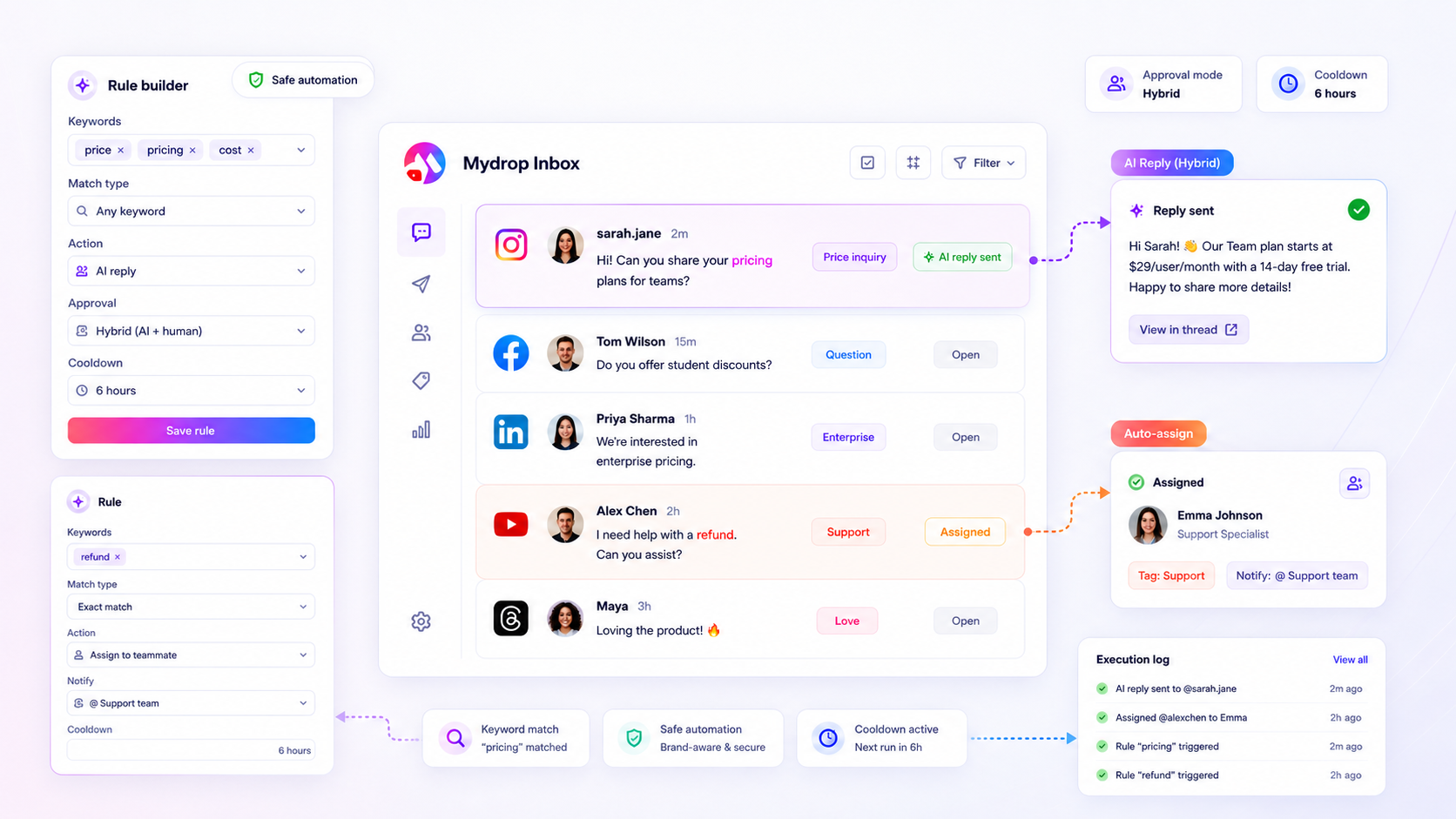
Standardizing social media triage for a large team starts with one uncomfortable truth: you cannot "eyeball" your way to scale. If your current workflow relies on a human being reading every single comment to decide if it matters, you aren't running an operation; you're running a manual sorting facility. True standardization means moving to a rule-based logic matrix that routes messages based on intent, not just arrival time.
We've all been there. You survive a chaotic campaign week only to wake up to a "Friday Night Price Request" that sat in unassigned limbo for 48 hours because it was buried under 500 "thanks for sharing" emojis. It feels like being a firefighter in a city where every lit match is treated like a five-alarm fire. It's exhausting, and frankly, it's where your senior talent goes to burn out.
The real cost here isn't just the slow response time. It's the Invisible Bottleneck. Every time a moderator has to pause, process a message, and decide which department it belongs to, they pay a "decision tax." Across thousands of workflows, we have seen teams lose over 30 hours a week simply to the friction of context switching. By automating the triage of the repetitive 80%, you free your team to actually solve the 20% that drives revenue.
The operating problem this solves

Most enterprise teams think they have a volume problem. In reality, they have a decision problem. When triage is manual, every inbound message requires a micro-judgment: Is this a support ticket? Is this a sales lead? Is this a PR crisis? When you have five platforms across three time zones, those micro-judgments turn into coordination debt.
The "human tax" of manual sorting creates a lag that enterprise brands can't afford. High-intent signals, like a customer asking "Do you have this in blue?", often get the same priority as a bot tagging three friends. Without a rule-based model, the spreadsheet used to track these "rules" eventually becomes a crime scene of outdated instructions and "check with Sarah" notes.
Here is how that logic looks when you move from intuition to a standardized matrix:
| Signal Type | Trigger Keywords | Automated Action | Guardrail |
|---|---|---|---|
| Purchase Intent | "how much," "price," "discount" | Tag #Sales + Notify Team | 2-hour delay; cancel if human replies |
| Support Issue | "broken," "missing," "refund" | Assign to Support + Tag #High | Manual approval for public reply |
| Brand Praise | "love this," "awesome," 🔥 | Tag #Community + Log | Cooldown: 1 reply per 24h per user |
| Crisis Signal | "legal," "scam," "lawsuit" | Notify PR + Internal Alert | No auto-reply; immediate escalation |
Operator rule: If a decision can be expressed as a repeatable "If/Then" statement, it should not be a manual task for a human.
This framework eliminates the "unassigned limbo" where messages sit while everyone assumes someone else is handling it. It turns your inbox from a pile of chores into a prioritized queue of actions. By the time a human enters the workflow, the sorting is done, the tags are applied, and the right stakeholder is already looking at the screen.
The minimum system that works

The minimum system that works is essentially a simple logic matrix that eliminates the "human tax" of sorting. You do not need an enterprise-grade AI to tell you that a customer asking "How much is shipping?" is more important than a bot posting a "nice pic" comment. You just need a way to make that decision once, then automate it forever.
We have seen this across hundreds of brands; the goal is not to automate every single interaction, but to shield your senior talent from the 80% of inbound noise that doesn't require a creative brain. If your team is still manually tagging "thanks" messages, you are effectively paying senior operator wages for digital filing.
At Mydrop, we usually see this start with three or four core rules in the Inbox Rules builder. By mapping high-intent keywords to specific assignments and tags, you create a "triage floor" that catches revenue opportunities before they sink to the bottom of the feed.
The Triage Logic Matrix
| Signal Type | Keywords (Contains Any) | Automated Action | Guardrail / Approval |
|---|---|---|---|
| Sales Intent | price, cost, buy, link, discount, shop | Tag #Lead + Assign to Sales | Manual: Rep reviews and sends link |
| Urgent Support | broken, error, refund, cancel, login | Tag #Critical + Email Notify | Hybrid: AI drafts reply; human edits |
| Crisis / Risk | sue, lawyer, scam, [competitor-name] | Tag #Alert + Slack Notify | Manual: Immediate hold for PR/Legal |
| Brand Love | love, amazing, best, favorite, emoji | Tag #Engagement | Auto: No reply or Cooldown reply |
Decision check: If a message contains both a "Sales Intent" and "Urgent Support" keyword, the rule with the higher priority filter (usually Support) must take precedence to ensure the fire is put out before the sale is made.
Where teams overbuild the process
Here is where it gets messy. We have all been there; you spend four hours in a meeting, the spreadsheet has become a crime scene, and you have designed a system with 45 different tags and 12 levels of escalation. You've overbuilt the process, and now the system is the bottleneck.
When you over-complicate your triage rules, you run into the "Everything is a Priority" trap. If you set up notifications for every single mention across five platforms, your team will eventually develop notification fatigue and start ignoring the alerts that actually matter. The hidden cost here is the 2-minute "context switch" every time a teammate has to look at a notification only to realize it's a false positive.
The "God Rule" problem is another common pitfall. This happens when a team tries to create one giant rule that covers "everything." In our experience, this leads to overlapping logic where a "price" inquiry gets tagged as "General Feedback" because the rule was too broad.
This is where Mydrop's cooldown and delayed execution settings become your best friends. Instead of firing off an immediate, robotic response to every mention, use a 30-minute delay. This gives your team a "grace period" to handle things manually if they are already in the inbox, while the automation acts as a safety net if they are busy.
Signs your triage system is overbuilt:
- You have more than 15 active inbox tags for a single brand.
- Your "Unassigned" folder is empty, but your "Assigned" folders are a week behind.
- The team spends more time disputing an automated tag than they would have spent replying to the original message.
- You are using
contains_alllogic for basic inquiries, making your rules so specific they never actually trigger.
Standardizing triage is about trusting the logic to handle the easy stuff so you can stay human for the hard stuff. Keep your rules crisp, your tags few, and your guardrails high.
How to run the cadence
Standardizing your triage isn't a "set it and forget it" project. Even the most sophisticated rules need a human in the loop to ensure the logic still matches the reality of the inbox. We have seen this across brands and agencies: the teams that win are the ones that treat their triage rules as a living organism, not a static filter.
We recommend a simple 15-minute weekly audit. It sounds like just another meeting, but it is the only way to prevent "logic drift" where your rules start missing new slang, emerging product issues, or a sudden spike in a specific type of inquiry. If you don't audit, you'll eventually find that your "automated" system is either letting fires burn or, worse, replying to a serious complaint with a generic "Thanks for the feedback!" emoji.
The Weekly Triage Tune-up
- Scan the "Unmatched" pile: Look at the messages that hit the general inbox without any tags or assignments. If more than 20% of your volume is unmapped, you have a gap in your keyword logic.
- Audit the "False Positives": Check a sample of threads where a rule was triggered. Did the "Price" tag actually land on a price inquiry, or was someone just complaining about the "price of doing business"?
- Refine the Exclusion list: If a specific phrase is constantly triggering the wrong rule, add it to your "Exclude Keywords" list. This is the fastest way to sharpen your accuracy.
- Check the Cooldowns: Are your rules firing too often on the same thread? Adjust your cooldown hours to ensure you aren't spamming a customer who is sending three messages in a row.
At Mydrop, we usually see operators use the Rule Execution Logs to spot these patterns. If a rule has zero executions in a week, it is either too narrow or the topic has cooled off. If it has thousands, it might be too broad and needs a "contains_all" filter instead of a "contains_any" logic to keep the signal clean.
The proof that the habit is working
You will know the system is working when the "vibe" in your internal comms changes from frantic to focused. The goal isn't just to be faster; it is to eliminate the decision debt that exhausts your senior talent. Success is when a high-intent message from a VIP customer on a Saturday night is automatically tagged, assigned, and greeted with a delayed AI reply that buys your team 12 hours of breathing room without losing the lead.
Triage Performance Rubric
| Metric | The Manual Mess | Standardized Flow | The Decision Rule |
|---|---|---|---|
| Triage Velocity | 2 to 6 hours | Under 2 minutes | Goal: 90% of messages tagged on arrival. |
| Decision Debt | High (Human must read all) | Low (Logic routes 80%) | Success: Senior staff only see "Escalated" tags. |
| Missed Intent | Frequent during spikes | Rare (Rules never sleep) | Check: Zero "Price" tags left unassigned for >1 hour. |
| Response Quality | Inconsistent (Stressed staff) | High (Guarded templates) | Guardrail: 100% of public AI replies require approval. |
Workflow check: If a human has to "decide" where a message goes more than three times a day, that decision belongs in a rule, not a brain.
When you hit this level of standardization, you aren't just managing social; you are running an operations pipeline. You'll see the "unassigned" count stay near zero even during a product launch or a viral moment. That is the point where the workflow stops being a bottleneck and starts being a competitive advantage.
Conclusion
Standardizing social media triage is the difference between a team that is constantly "catching up" and a team that is actually in control. It is about acknowledging that while social media is creative, the plumbing that supports it must be industrial.
By moving away from manual "eyeballing" and toward a logic-based system of trigger words, automated assignments, and smart guardrails, you give your team the gift of focus. You protect your brand from the "Friday night trap" and ensure that every high-intent signal gets the attention it deserves.
The mess of the modern social inbox isn't going away, but your need to sort it manually should. Start small: pick your five most common inbound signals, map them to a rule, and watch the coordination debt start to melt away. Scale doesn't come from working harder; it comes from building a system that works while you are busy doing the work that actually matters.