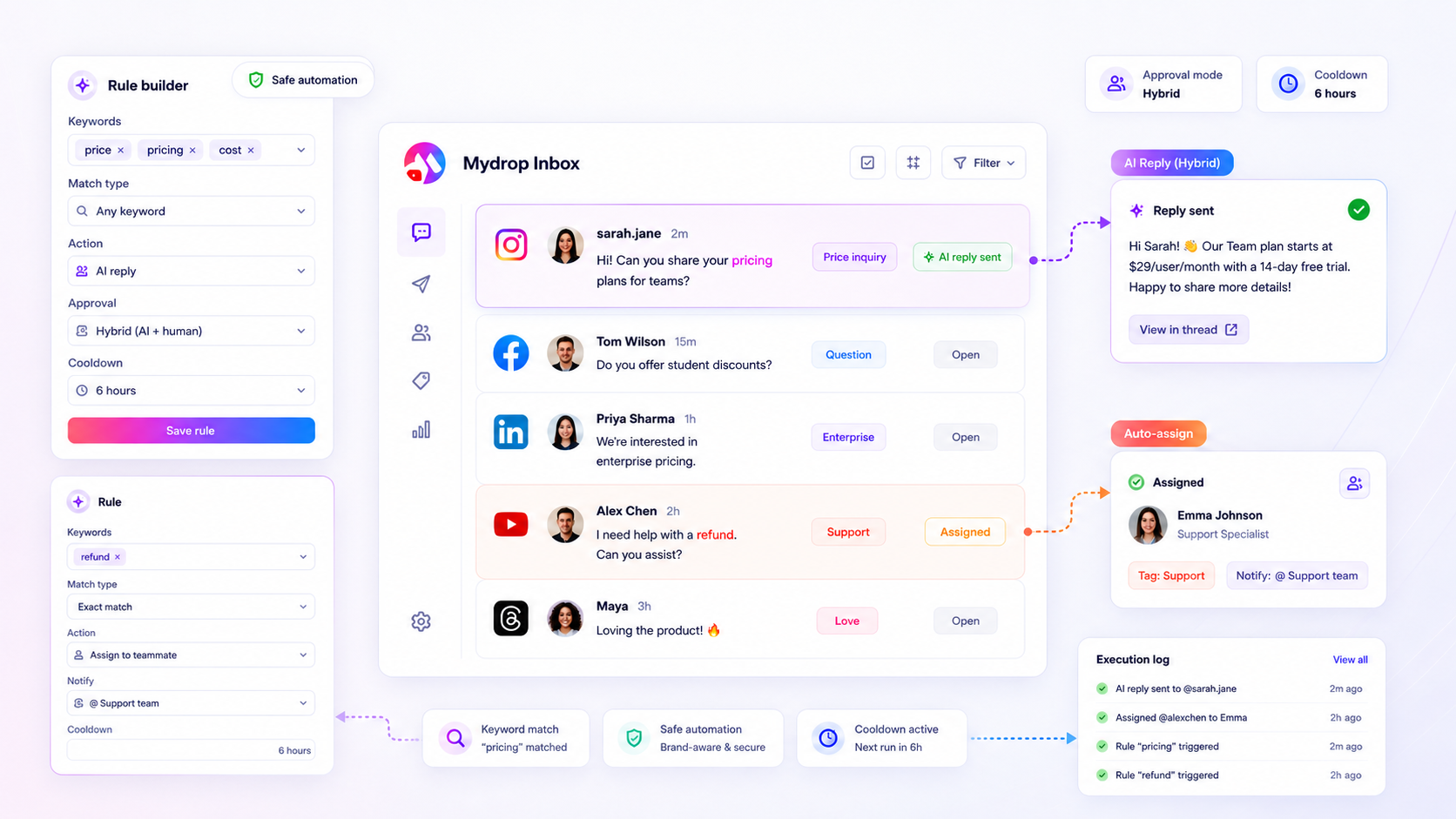
Support delays usually aren't a staffing problem; they are a triage problem. By shifting from manual sorting to rule-based trigger words, you can automate routine responses while reserving your team’s cognitive bandwidth for complex, high-stakes customer interactions.
We get it-your inbox is a firehose that never truly turns off. Trying to manually triage every mention, DM, and comment is a recipe for burnout and inconsistent brand voice. You end up constantly apologizing for being slow, all while your highest-value leads are ignored in the noise. The promise here is simple: you can build a repeatable, guardrailed system to route, tag, and intelligently reply to common inbound social activity automatically.
The operating problem this solves

The real risk in enterprise social support isn't automation-it is the massive, unmanaged delay that occurs while a human manually reads a "Where is my order?" ticket for the hundredth time. When you handle dozens of brand profiles across multiple markets, your support team is often paralyzed by Coordination Debt.
This debt stems from a simple, flawed operating principle: the "Human-Only" trap. Many teams avoid automation because they fear robotic responses, yet they force their best people to perform robotic tasks.
If your workflow looks like this, you have a triage bottleneck:
- Intake: A customer asks an FAQ in a comment.
- Sorting: A community manager manually reads it, identifies the category, and flags it.
- Bottleneck: The response waits for a manager’s approval because the brand voice must be protected.
- Delay: By the time the reply is approved and posted, the customer has already moved on.
You aren't just losing engagement; you are losing trust. The 80/20 Triage Rule dictates that you should automate the delivery of answers for known patterns while gating high-risk or ambiguous interactions behind an approval-only workflow. With Mydrop’s Inbox Trigger Words, you move from a reactive, manual inbox to a deterministic routing system.
Instead of treating every comment as an emergency that requires human attention, you create a rule-based layer that instantly handles the routine. You tag, assign, and draft replies based on logic that lives in your inbox rules, not in a staffer's head. When you gate the high-risk responses behind manual approval and use automated cooldowns to prevent spam, you keep the safety of a human-led brand without the operational cost of a human-led queue.
Teams using this model see an immediate drop in response latency because the system-not the staff-is doing the heavy lifting of categorization. You’re no longer managing a firehose; you’re managing a pipeline.
The minimum system that works

You do not need an army of bots to fix your response times. You need a deterministic filter. The goal is to move from reactive "firefighting" to a proactive system where high-intent signals are instantly routed to the right person, and low-stakes noise is handled automatically-without you ever needing to log into the platform.
A functional system starts with a Rule Configuration Matrix. Instead of viewing every inbound mention as a new task, you map known customer behaviors to specific actions.
| Trigger Condition | Action Logic | Approval Mode |
|---|---|---|
| "Pricing", "Cost", "Quote" | Tag: Sales Lead, Notify: Account Mgr | Hybrid |
| "Broken", "Error", "Support" | Tag: CS_Priority, Auto-Reply: Template A | Manual |
| "Great", "Thanks", "Love" | Tag: Brand_Sentiment, No Action | Auto |
| "Complaint", "Worst" | Tag: Critical, Notify: Crisis Lead | Manual |
The beauty of this setup is that it removes the "decision tax" from your community managers. They stop guessing whether a comment needs a manager's eyes or a canned response. The rule handles the triage.
Operator rule: If your team spends more than 30 seconds deciding how to route a specific pattern, you do not have a training problem. You have a missing trigger word. Create the rule, test it, and move on.
To get started, follow this simple cadence:
- Inventory the noise: Look at your last two weeks of inbound messages. Group the repetitive 20% that take up 80% of your team's time.
- Define the trigger: Set your
contains_anyorcontains_alllogic to capture those specific inquiries. - Guardrail the action: Always set a cooldown period. You do not want to trigger three automated replies to the same customer in ten minutes.
- Test in manual mode: Run the rule with manual approval enabled first. Watch how the inbox fills up for two days to ensure your logic is not accidentally tagging a "thanks for the refund" comment as a "new sales lead."
Where teams overbuild the process
Here is where the "automation enthusiast" mindset backfires. Many teams try to build a "closed-loop" machine that automatically handles everything from "Where is my order?" to "I want a custom enterprise contract."
This is a dangerous trap. The moment you lose the human element in high-stakes interactions, you start bleeding brand equity.
Common mistake: Automating responses for ambiguous, high-intent queries. An AI-generated reply to a frustrated enterprise client asking for a contract renewal is not a solution; it is an insult.
Teams usually overbuild in three specific ways:
- The AI Over-Correction: Trying to replace all human replies with an AI agent. AI should be a drafter for your team, not a replacement for them. If your rule fires an AI reply, ensure it goes through a manual approval check before it ever touches the public feed.
- The "One-Size-Fits-All" Cooldown: Applying a universal 24-hour cooldown to everything. You need short cooldowns for urgent support and longer, more conservative windows for marketing announcements to avoid looking like a broken record.
- The Log-Ignoring Trap: Configuring rules and never auditing them. Rule executions should be treated like financial transactions. If you do not audit your
inbox-ruleslogs weekly, you will eventually find that an outdated rule is routing your high-value enterprise leads to an inactive support queue.
Remember, the goal is not to remove humans from your social inbox. The goal is to ensure that when a human does engage, they are focusing on the conversations that actually move the needle for your brand. Automation is the filter, not the final word.
How to run the cadence
The biggest danger in auditing inbox trigger rules isn't the setup-it is the drift. When you automate triage, your rules will eventually clash with evolving customer behavior, new product launches, or seasonal volume spikes. You cannot "set and forget" your inbox; you have to treat your rules like a living product that needs weekly maintenance.
In our experience, teams managing dozens of profiles fall into the trap of updating rules only when a support disaster occurs. Instead, build a weekly 30-minute rule audit into your operations.
Decision check: If a rule has a 0% match rate for three consecutive weeks, delete it. If a rule triggers more than 50 times in a day, move it to the "Review Required" approval mode immediately.
Here is the weekly cadence that keeps your guardrails tight and your automation effective:
- Log Review: Pull the
rule-executionslog. Look for "near misses" where a query was almost caught by a trigger word but slipped through. - Cooldown Adjustment: If you see users spamming the same trigger word to bait your auto-replies, increase the
cooldownHoursfor that specific rule to prevent repetitive, robotic engagement. - Approval Audit: Review the
manual_approvalqueue for hybrid-mode rules. If 90% of those replies are being approved without edits, the rule is safe enough to move to auto-approval mode. - Keyword Refresh: Add new variations to your
contains_anylists based on what your team actually saw in the inbox this week.
The proof that the habit is working
You are not looking for more engagement; you are looking for more controlled engagement. The success of this habit isn't measured by how many replies you send, but by how many "high-intent" signals your team captures without manual sorting.
Use this scorecard to track if your inbox rules are actually reducing coordination debt.
| Metric | Goal | What it reveals |
|---|---|---|
| Auto-Triage Rate | > 70% | The percentage of inbound noise handled without human intervention. |
| Approval Latency | < 2 hours | The average time spent waiting for a human to review a "risky" reply. |
| Rule Collision Rate | < 5% | The number of threads where multiple rules tried to act simultaneously. |
| Handoff Quality | Increasing | Rate of auto-tagged leads that resulted in a private sales conversation. |
If your Auto-Triage Rate climbs while your Approval Latency stays low, you are winning. You are effectively shifting your team from reactive sorting to proactive selling. When you catch "where is my refund" and route it instantly to the CS lead, you aren't just saving time-you are preventing the churn that starts the moment a customer feels ignored.
Conclusion
Effective social support isn't about automating everything, but about building a deterministic "routing and response" framework that keeps humans in the loop where it matters. Your inbox shouldn't be a firehose that you pray you can keep up with; it should be a well-tuned pipeline that separates routine noise from high-stakes opportunities.
By using Inbox Trigger Words to handle the predictable, you earn back the hours needed to actually talk to your customers. Whether you are managing five brands or fifty, the principles remain the same: define your guardrails, automate the routing, and gate the high-risk interactions behind human approval.
At Mydrop, we see teams move from overwhelmed to optimized the moment they stop treating social support as a manual chore and start treating it as a governed operational process. Stop apologizing for the delay, and start building the system that prevents it.