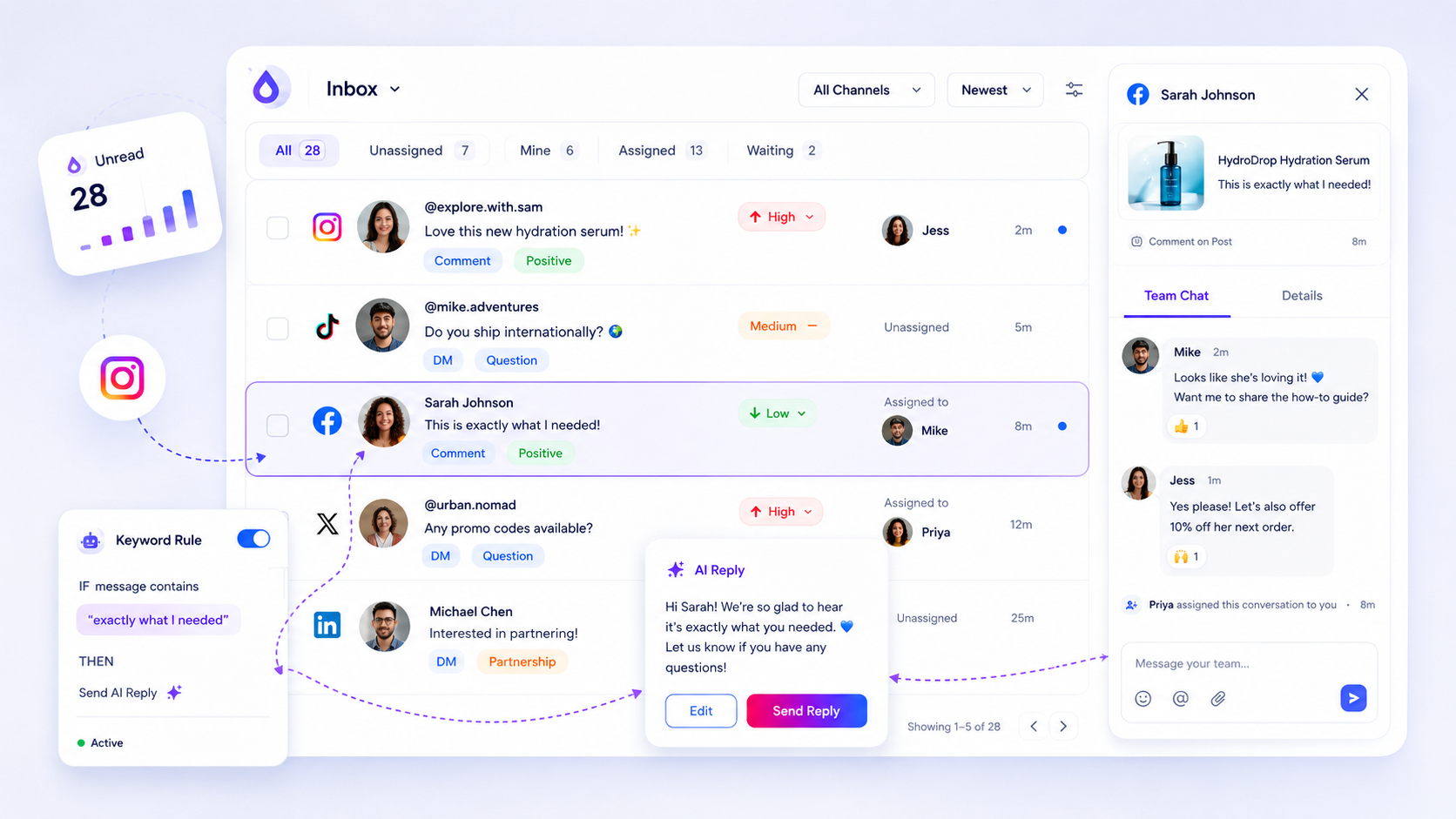
Your response time SLA does not fail because an agent is slow to tap the reply button; it fails the moment a new inbound comment or DM hits your queue and nobody knows who is responsible for it. Effective support isn't about clearing a queue faster; it is about eliminating the "assignment lag" where threads sit in limbo because ownership is ambiguous.
We get it: your shared inbox often feels like a digital fire drill. Between the cross-platform noise and the pressure to stay "always on," it is easy for critical DMs to get buried in the shuffle, leaving your team feeling reactive rather than in control. We have all been there-scrolling through native platform notifications at 6 p.m., wondering if the other person on the team already handled that frustrated message from a key account. The good news is that you can turn this chaos into a predictable, high-speed engagement hub by rethinking your routing logic.
Operator rule: If a thread stays in your inbox for more than 15 minutes without an assignee, you have already broken your SLA. Ownership must be assigned at the point of ingestion, not at the point of action.
The decision teams usually frame too broadly

Most teams waste energy trying to measure "average reply speed," treating their entire social inbox like a single, giant bucket. They obsess over how many minutes it takes to fire off a response, assuming that if everyone just types faster, the engagement will stay healthy. But in our experience, measuring reply speed in a vacuum is a distraction. It masks the real killer: coordination debt.
When you treat your inbox as a single bucket, you create a "first-in, first-out" trap. You rely on agents to self-triage, which inevitably leads to the "Double-Reply" problem-where two people jump into the same thread simultaneously-or, worse, the "DM Limbo," where a high-priority customer message is ignored because the team is busy clearing low-priority public comments.
The decision you actually need to make isn't about speed; it is about visibility. You need to distinguish between "newly arrived noise" and "actionable work." At Mydrop, we see teams struggle because they force humans to do the heavy lifting of routing that software should handle. When you shift your focus from "how fast did we reply" to "how fast was this thread owned," you stop managing a fire drill and start managing an operational queue.
| Metric | Why it fails | The alternative |
|---|---|---|
| Average Reply Speed | Measures effort, not efficiency. | Time-to-Assignment |
| Total Inbox Count | Ignores complexity/priority. | Needs-Reply Queue |
| Manual Triage | High error rate, slow, inconsistent. | Automated Rule-Based Routing |
If you are currently jumping between native apps to see who is handling what, you aren't working an inbox; you are just refreshing pages. The moment you consolidate that activity into a single view-where threads have clear status, priority, and assigned owners-you stop losing hours to coordination and start actually solving customer problems.
What should stay manual and what can move faster

The golden rule for scaling your social inbox is simple: Automate the routing, but humanize the response. You want your systems to handle the "boring" logistics-routing, tagging, and priority flagging-so your team can spend their cognitive load on the one thing that matters: the actual conversation.
Teams often make the mistake of trying to automate everything at once, only to end up with robotic, off-brand replies that need massive editing anyway. Instead, let your tools do the heavy lifting of sorting the queue. If a customer mentions "billing" or "refund," your inbox should automatically tag it as high-priority and route it to your specialized support pod. That is mechanical work, and it should happen in milliseconds.
The manual work starts the moment the thread reaches the right pair of eyes. This is where you need the human nuance of tone, empathy, and brand voice. At Mydrop, we see teams achieve the best balance by using AI to generate a first draft that captures the policy context, then requiring a human to review, polish, and send it.
Decision check: If the response requires an apology, a high-stakes escalation, or deep product knowledge, it never skips human review. If it is a routine inquiry, trust your triage rules to get it to the right person, then use an AI draft to accelerate their first step.
The tradeoff matrix
Every decision in your support flow is a trade between speed and nuance. When you prioritize speed at all costs, you risk missing the context of a thread. When you prioritize pure human nuance for every single interaction, you will inevitably hit a volume ceiling where your response times collapse.
The following matrix helps you decide where to apply effort versus automation in your inbox operations.
| Scenario | Response Strategy | Primary Risk |
|---|---|---|
| Routine FAQ | Auto-tag/AI draft for human review | Missing a unique edge case |
| Urgent/Crisis DM | Manual priority/Dedicated agent | Delayed initial acknowledgment |
| General Feedback | Batch routing/Periodic review | Customer feeling ignored |
| Product Bug | Escalate to expert/Internal note | Lost context in the handoff |
This is the part most teams underestimate: Context transfer is the biggest source of hidden work. If an agent has to spend five minutes re-reading a thread because the previous person didn't leave an internal note or set a status, you have already lost.
In our experience, the teams that win aren't just the ones who reply the fastest-they are the ones who make the most efficient handoffs. By keeping your internal notes inside the thread and using status updates to signal "in progress" versus "waiting for customer," you prevent the double-reply disaster that plagues larger teams.
Ultimately, your goal is to reduce the friction between "new inbound" and "ownership claimed." If your team is still clicking through individual native app notifications to see if someone else already replied, you aren't managing an inbox; you are playing a high-stakes game of whack-a-mole. You need one unified queue where ownership is settled the second the message arrives.
How to pilot the workflow safely
Trying to overhaul your entire social support engine overnight is a recipe for chaos. The smartest way to move is to pick one high-volume, low-risk channel to serve as your testing ground. Instagram DMs are usually the perfect candidate because they demand quick responses but offer clear, threaded context that is easy to audit.
Start by routing just that single stream into Mydrop. Spend one full week with your core team where the only rule is: no one touches a DM unless it is already assigned in the queue. Use that time to observe where the friction lives. Are your product specialists actually faster at answering technical questions, or are they getting bogged down by simple order status requests?
Use this simple Pilot Audit Checklist to track your progress during the first week:
- Assignment Time: Note the timestamp of the inbound message vs. the timestamp of the first assignment. Target: Under 10 minutes.
- Resolution Gap: Compare how long it takes to move from "Assigned" to "Replied."
- Internal Noise: Count how many times team members had to ask "who is handling this" in Slack or via DMs.
- AI Draft Accuracy: Track how often an AI draft requires minimal vs. major edits.
Once you see the "Assignment Lag" drop, you can confidently roll this out to your other platforms. If you try to do everything at once without a pilot, you will likely just port your existing coordination debt into a new tool without fixing the underlying habit.
The operating rule to keep
If there is one principle that separates "always-on" enterprise teams from those constantly running in circles, it is this: ownership is an active state, not a passive one.
A thread left unassigned is not "waiting"; it is a silent leak in your brand's reputation. At Mydrop, we see hundreds of teams struggle because they view the inbox as a shared bucket where anyone can grab anything. That sounds collaborative, but in practice, it leads to the "bystander effect," where everyone assumes someone else is handling the urgent request.
Workflow check: If a message arrives, it must be claimed by a human or a rule within 15 minutes of ingestion. If it cannot be claimed, the lead gets an automatic notification to re-allocate capacity.
When you treat assignment as a hard, non-negotiable step-just as important as the reply itself-you stop chasing people down and start managing a predictable flow of work.
Conclusion
The goal of your social inbox should not be to make your team work faster; it should be to make the work itself more predictable. By moving from a "scramble-to-reply" culture to an "assign-first" workflow, you eliminate the invisible lag that kills your SLAs and leaves customers feeling ignored.
Your team already puts in the effort to engage, but that energy is often wasted in the cracks between notification pings and context-switching. Secure that time by defining ownership, utilizing automated routing, and treating the inbox as an operational queue rather than a digital pile of tasks. Start with one channel, audit the lag, and build the habit. Your customers will notice the difference, and your team will finally stop feeling like they are fighting a losing battle against the clock.