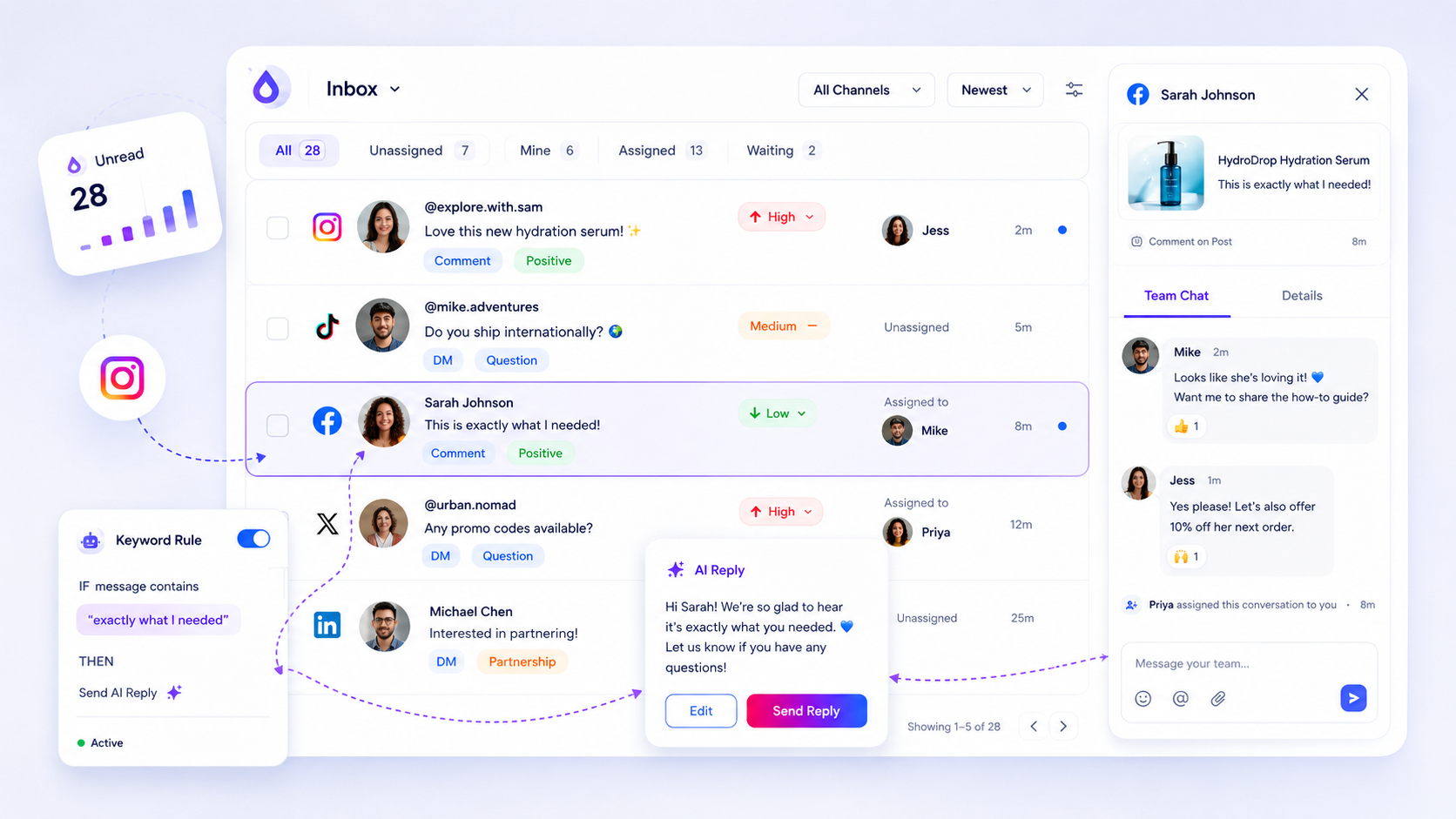
You should stop managing social media in native apps the moment your team exceeds a two-person relay or manages more than two brand channels. If you find your team constantly toggling between Instagram, LinkedIn, and Facebook just to check for mentions, you are not engaging with your community; you are busy navigating a digital labyrinth that was never built for professional throughput.
We get it. It feels safer to "stay native." There is a comforting, tactile sense of intimacy in replying directly from the app where the conversation happened. But we have seen this play out thousands of times across agencies and enterprise brands: that intimacy is a mirage. In reality, you are creating massive, hidden coordination debt. You are likely missing high-priority leads while wasting hours on generic noise, all because your inbox is scattered across five different tabs that do not talk to each other.
The decision each metric should trigger

Most teams wait for a crisis to centralize. They wait until a PR disaster, a missed customer service SLA, or a panicked manager asking why no one replied to a VIP comment from three days ago. Instead of waiting for the fire, use this diagnostic framework to decide when your workflow has officially outgrown the "native" approach.
| Decision Metric | Stay Native (Decentralized) | Centralize (Operational Queue) |
|---|---|---|
| Active Profiles | 1 to 2 | 3+ |
| Response Volume | Under 50 interactions/week | 50+ interactions/week |
| SLA Threshold | Discretionary (Anytime) | Formal (e.g., < 4 hours) |
| Ownership | One individual manager | Shared team queue |
If you hit even one of these thresholds, your current workflow is likely already failing. When you rely on native push notifications, you are betting that every team member will be online, attentive, and able to distinguish between a casual heart emoji and a frustrated customer complaint-simultaneously, across every platform.
Operator rule: If you need to use a spreadsheet to keep track of who is replying to which comment, you have already lost the thread.
The shift to a centralized queue-what we at Mydrop call an auditable stream-is not about removing the human touch. It is about removing the friction that makes humans slow. By normalizing incoming comments and DMs into a single operational view, you stop chasing ghosts and start managing a pipeline. You gain the ability to assign threads, apply priority tags, and use AI-assisted drafts to ensure your team is consistent, even when the volume spikes. The goal is to turn social support into a predictable, high-quality habit rather than a frantic exercise in platform-hopping.
The scorecard that keeps reporting useful

If you are still pulling data manually from native app analytics just to prove you are doing your job, you are wasting the best hours of your week. You need a scorecard that connects the actual volume of support threads to your team output. Otherwise, you end up reporting on vanity metrics like "total likes" instead of the stuff that matters to the business, such as average response time and team resolution capacity.
When your inbox is centralized, your reporting stops being a scavenger hunt. You can finally see the gaps in your coverage. Use this rubric to audit your current operation:
| Metric | Why it matters | Watch-out for |
|---|---|---|
| Response Time (SLA) | Tracks speed between inbound message and your first reply. | High spikes suggest your team is overwhelmed or under-resourced. |
| Resolved vs. Pending | Shows your backlog health at a glance. | A rising "Pending" count without a "Resolved" spike is a red flag. |
| Assignment Coverage | Measures if every message has an owner. | Unassigned threads mean "ghost" conversations that no one is tracking. |
| AI Utilization Rate | Tracks how often AI drafts are used to accelerate replies. | Low usage could mean the AI isn't trained on your brand tone yet. |
Decision check: If your team spends more than 15 minutes per day manually counting or exporting threads for a weekly report, stop. That is a clear sign your data is not structured for the scale you are trying to reach.
At Mydrop, we often see teams try to optimize for "reply count" while ignoring "resolution time." That is like celebrating how many phone calls you answered without checking if you actually solved the customer's problem.
What to stop measuring by default
Most managers are drowning in data they never actually use. You do not need to track every single emoji reaction or every minor comment thread in your high-level dashboard. When you try to measure everything, you end up measuring nothing that actually moves the needle.
Stop defaulting to these three metrics:
- Raw follower growth: It tells you if you have reach, but it says absolutely nothing about how well your team supports your existing community.
- Aggregated "all-platform" reach: This is a vanity number that ignores the reality that a LinkedIn lead is worth infinitely more to your B2B brand than an Instagram comment from a bot.
- Generic "engagement" scores: These are usually black-box formulas provided by social platforms that don't account for your internal business context or priority tags.
Instead, prioritize actionable health. Use your inbox health checks to see if your webhooks are firing and your profile connections are stable. If you aren't sure if a platform is actually passing through all the messages, nothing else on your report matters.
The goal isn't to look like you're working hard on social media. The goal is to provide a reliable, auditable, and fast response for the people who actually want to talk to your brand. Once you have a centralized queue, you stop worrying about the noise and start paying attention to the signals.
How to connect metrics to next actions
Most teams collect data like they are hoarding souvenirs, but the only metrics that matter are the ones that force a change in behavior. If your average response time is trending upward, do not just flag it in a slide deck. Use it as a trigger for a resource shift.
When you centralize your workflow, you stop guessing why a thread is lingering. You can map your metrics to immediate operational levers:
| Metric | Threshold | Action |
|---|---|---|
| Response Latency | > 4 hours | Enable AI draft assistance for common queries. |
| Backlog Depth | > 50 threads | Trigger team-wide shift to "triage" mode (status tagging). |
| Assignment Lag | > 2 hours | Audit team capacity or adjust routing rules. |
| Health State | Sync Error | Run manual backfill/health check to verify visibility. |
At Mydrop, we see teams fail not because they lack people, but because they lack a common definition of "done." If one agent marks a thread as assigned while another is still drafting in a native app, you have created a phantom queue. Your metric should reflect the shared state of the thread, not the individual’s perception of it.
Workflow check: If you cannot export a CSV of your current support backlog and assign owners to every row, you do not have a queue. You have a pile of work.
The review cadence that makes the model stick
A centralized queue is a living organism. If you ignore it for a week, it becomes a graveyard of stale conversations and missed opportunities. You need a rhythm that keeps the team aligned without feeling like a surveillance state.
1. Daily Triage (15 minutes) Start the morning by checking the inbox health dashboard. Verify that your webhooks are firing and that your profile connections haven't expired. Prioritize the day based on the oldest unassigned threads, not just the newest notifications.
2. Mid-week Audit (30 minutes) Review a random sample of resolved threads. Look for where the conversation broke down or where the response felt robotic. This is the perfect time to update your internal notes and refine your AI draft prompts to better match the brand voice.
3. Monthly Performance Review Skip the vanity metrics. Focus on Resolution Quality. Are we answering the right questions? Did we actually resolve the user's issue, or did we just provide a link and move on? If the thread counts are climbing, it is time to reassess your team size or invest in better automation.
Conclusion
The transition from native apps to a unified operational queue is rarely about buying software. It is about deciding that your team’s time is worth more than the illusion of manual engagement.
Staying native feels authentic until the volume hits. Then, it just feels like drowning.
Stop managing social media as a collection of notifications and start managing it as a business function. When you treat your inbox as a shared, auditable asset, you stop chasing ghosts and start building a real, measurable feedback loop with your audience. The tools you choose-like Mydrop-should be the plumbing that makes this possible, but the discipline to maintain the queue? That belongs to you.