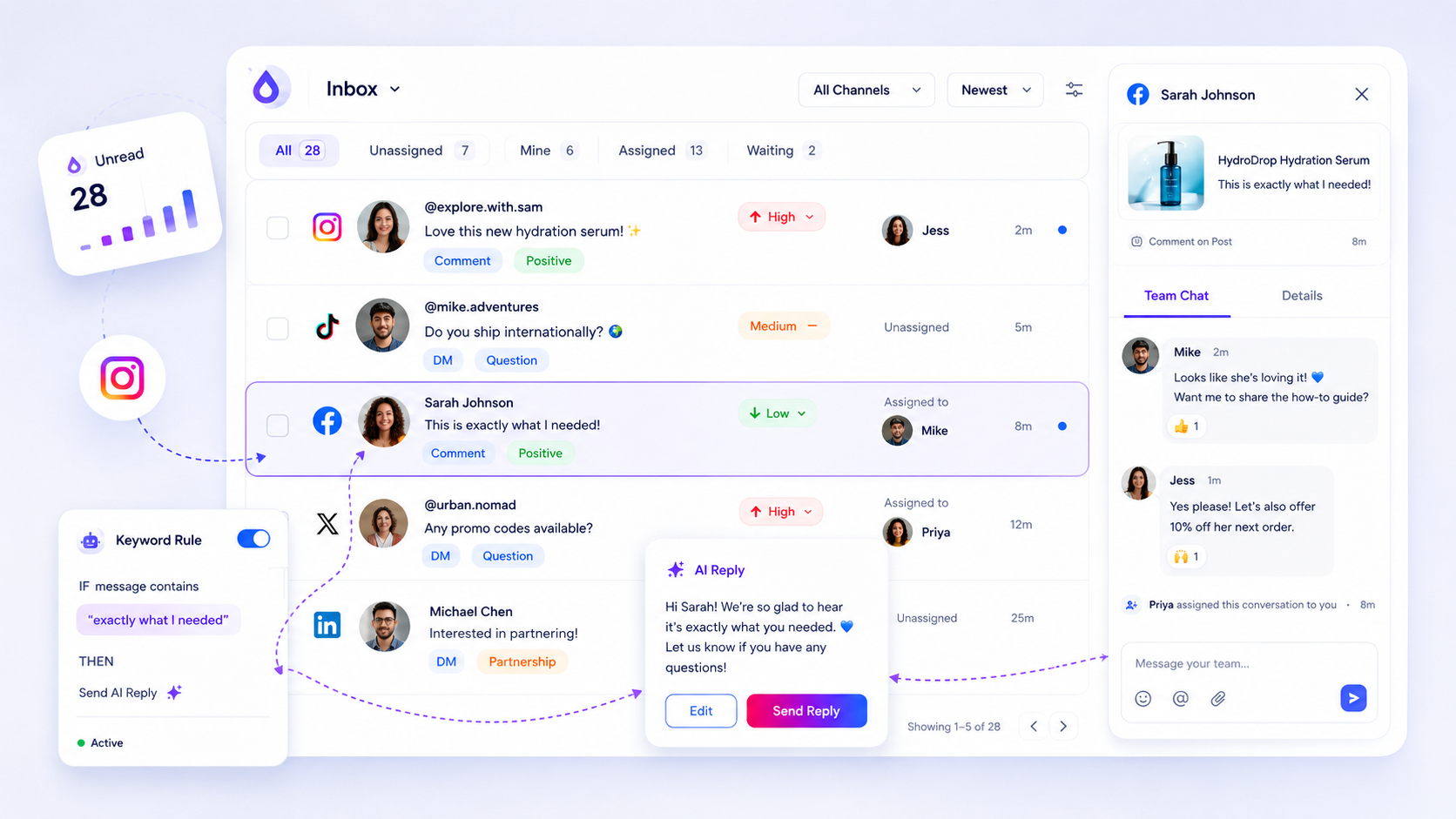
Standardizing your social inbox across multiple client brands is the only way to scale an agency without losing your sanity to notification fatigue. The real bottleneck is not the volume of messages; it is the fragmented visibility caused by toggling between native apps or relying on email-based support tickets. If you cannot track ownership, priority, and resolution status in one place, your team is simply firefighting, and your SLA compliance is effectively a coin toss.
We have all been there: the 6:00 p.m. realization that a high-priority customer comment on a client's Instagram post went unanswered for three days because no one knew who was supposed to check that account. It is exhausting, high-stress, and it turns your community management team into professional notification-chasers rather than brand advocates. The solution is to force every interaction-whether a DM or a comment-into a shared, audit-ready operational queue.
What the best tools need to handle

When you move away from native apps, you need a system that does more than just aggregate text. You need an operational engine. At Mydrop, we see agencies struggle most when their tools treat social interactions as static messages rather than active business tasks.
To stop the fire-drilling and start managing, any tool you choose must master these three pillars of social support:
| Feature | Why it matters for agencies |
|---|---|
| Normalized Threads | Takes fragmented comments/DMs from Instagram, LinkedIn, and others and puts them into a single, consistent workflow. |
| Operational Metadata | Allows you to assign owners, set priority, use tags, and track read/unread status across all client accounts. |
| Auditability | Creates a log of internal notes, replies, edits, and deletions so you can prove SLA compliance during client reviews. |
Operator rule: If your tool does not allow you to assign a specific team member to an incoming conversation, it is not an inbox; it is a broadcast feed. You will always end up with "reply collisions" where two people try to answer the same person, or worse, both assume the other person is handling it.
Beyond just organization, look for native support for AI-assisted drafting. In a high-volume multi-brand environment, the goal is not to have a bot reply automatically; it is to have an AI draft that is pre-populated with the brand voice, the specific thread context, and your internal "must-include" guidelines. This reduces the cognitive load on your team by 70% for standard inquiries, allowing them to focus on the nuanced issues that actually require a human touch.
Finally, check for export-ready health reporting. You need to be able to pull a client-safe CSV that shows response times and volume trends without spending your Friday afternoon manually copy-pasting from social platform insights. If you cannot prove your performance with data, the client will eventually ask why they are paying for support services they cannot see.
Where basic tools start to break

Most teams reach a breaking point when the volume of incoming noise-comments, DMs, @mentions-exceeds what a single human can track in a browser tab. When you move from "community management" to "social operations" across five or ten brands, relying on native apps is effectively choosing to remain blind.
The toggle tax is real. If your team has to switch between Instagram, Facebook, and LinkedIn apps to see if a comment was answered, you have already created an accountability silo. No one knows who is working on what, critical requests get buried, and the "read" state is purely local to whoever happened to log in last.
Common mistake: Treating DMs and comments like email. They are not. They are fragmented, real-time conversations that require immediate status markers and internal context to prevent double-replies or, worse, being ignored entirely.
At Mydrop, we see teams that have essentially turned their spreadsheets into crime scenes trying to track who owns which conversation. Without a centralized queue, you lack the most basic layer of enterprise hygiene: auditability. You cannot tell a client how fast you are responding if you cannot even export a clean list of the conversations that happened last week.
The buying criteria that matter
When you are ready to stop firefighting, look for a tool that forces normalization. You need a platform that consumes the raw chaos of platform webhooks and renders it into a unified, team-owned operational queue.
Use this scorecard to evaluate whether your current setup-or any tool you are considering-can actually support agency-level scale.
| Criteria | The "Native" Way (Avoid) | The "Enterprise" Way (Look For) |
|---|---|---|
| Visibility | Siloed by app/login | Unified multi-platform queue |
| Assignment | Verbal or manual pinging | Explicit thread assignment |
| Tone Control | Copy-pasting from docs | AI-assisted drafts via brand context |
| Auditing | Impossible / Manual screenshots | Exportable CSV records by status |
| Sync Status | Manual refresh / Hope | Real-time webhooks + Health checks |
If a tool does not give you a Health page to monitor webhooks and sync status, run the other way. You need to know immediately if a client profile has disconnected so you can fix it before the client complains about missed messages.
Decision check: If your team spends more than 5 minutes a day asking "did anyone reply to this?", you do not have a resource problem. You have a tooling problem.
The goal is to transition your team from inbox-surfing-manually checking 20 tabs-to queue-clearing, where you simply work through a sorted, prioritized list of items that have already been cleaned and formatted for your team. You want a system where an AI draft is already waiting for your approval, based on the specific brand guidelines for the account in question. This turns social support from an unpredictable cost center into a predictable, high-value service you can actually report on.
When you get this right, you aren't just faster; you are finally in control of the conversation.
How Mydrop supports this workflow
If you are currently juggling a half-dozen browser tabs and three native mobile apps just to keep up with client inboxes, you are fighting a losing battle. The goal of a centralized inbox is to strip away that friction. At Mydrop, we built the Inbox specifically to move your team from "firefighting mode" to a structured, audit-ready operational queue.
Instead of hunting for mentions, you treat every inbound message as a data point in a unified pipeline.
When a DM or comment lands in your Mydrop Inbox, it is automatically normalized into a thread. You don't have to worry about whether it came from Instagram, LinkedIn, or Threads; the metadata-status, priority, and assignee-looks the same across every platform. This is the foundation of your SLA compliance. By using assignment and status tracking, your team knows exactly who owns which conversation, and more importantly, which ones need a response before the end of the shift.
We also know that "drafting" is where most teams get stuck. When your junior community manager is staring at a complex technical support request, they often freeze, leading to delays. Our AI draft feature builds responses based on the full thread context and brand guidelines you have already set up. It provides a starting point that feels human and on-brand, so your team isn't starting from a blank page every time.
A simple shortlist checklist
Use this checklist to pressure-test whether your current tool is actually helping you scale or just adding another layer of "coordination debt."
- Cross-Platform Normalization: Does the tool pull comments, DMs, and threads into one view, or do you still have to toggle to native apps for certain actions?
- Operational Accountability: Can you assign a thread to a specific teammate and track the "Needs Reply" state?
- Internal Context: Does the tool allow for private internal notes directly on the conversation thread, or does your team have to move to Slack or Email to discuss the lead?
- SLA Readiness: Does the inbox show "unread by" status or priority levels, ensuring you never miss a critical client question?
- Data Portability: Can you export your interaction history to a CSV for your monthly client report, or are you stuck manually counting replies?
If you cannot check all of these, your "inbox" is essentially a blind spot. An enterprise tool must turn these conversations into trackable assets, not just noise.
Conclusion
Standardizing your inbox workflow is rarely about technology. It is about discipline. The teams we see succeeding across multiple brands and markets have one thing in common: they stopped treating social interactions as individual chores and started treating them as a collaborative, team-owned operational queue.
The "Inbox Problem" isn't a volume issue; it is a structural one. If you are still relying on native apps for enterprise-scale engagement, you are leaving pipeline on the table and running a massive compliance risk.
Moving your team to a centralized, audit-ready hub like Mydrop changes the game. You gain the ability to assign, prioritize, and AI-draft your way through the noise, turning those fragmented pings into a professional, scalable social support operation. Stop chasing the notification bell. Start building the system that allows your brand to show up consistently, reliably, and profitably, every single time.