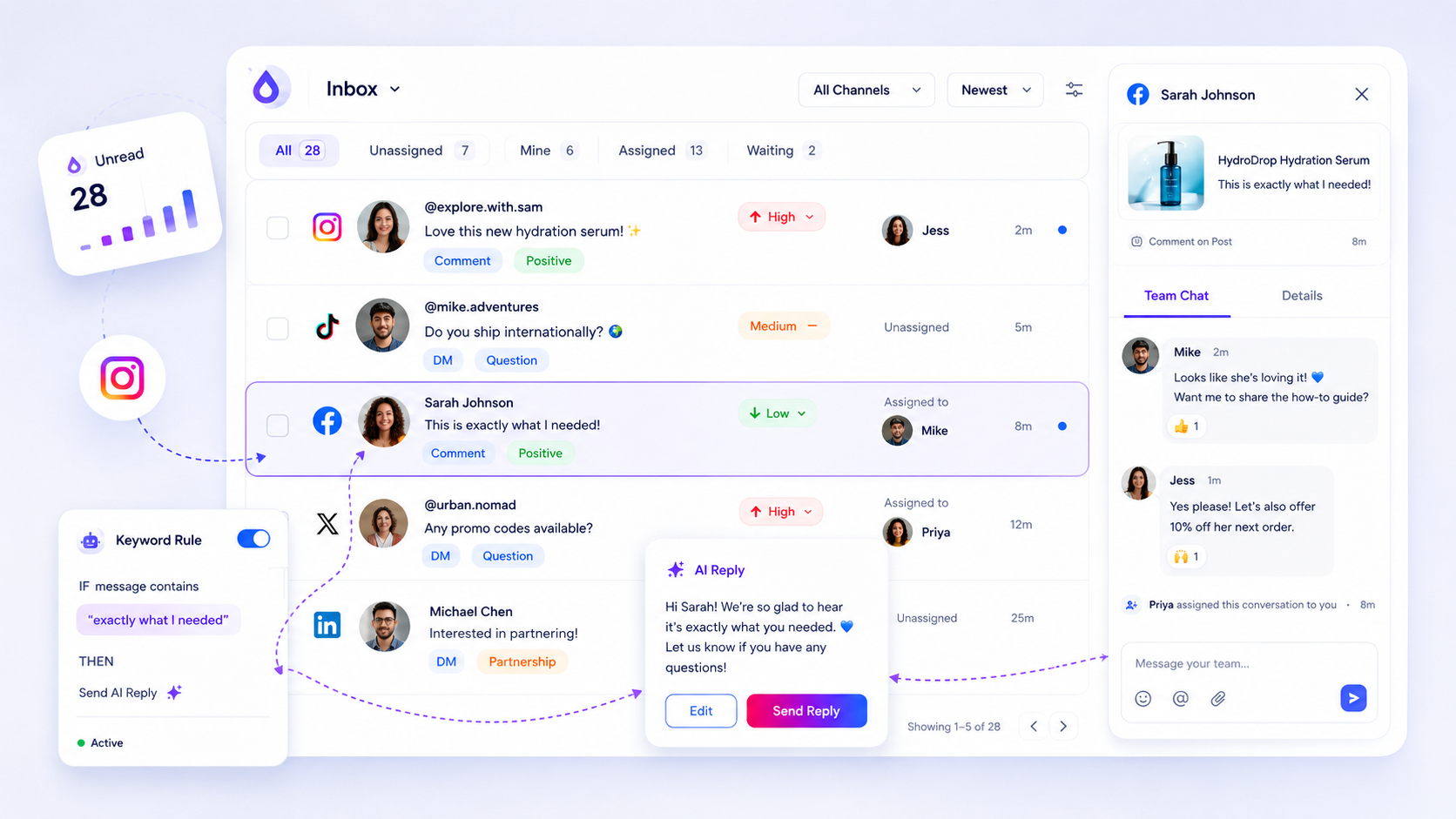
The best inbox software for a scaling agency is one that transforms chaotic, fragmented notifications into a single, auditable support queue. If your team is still toggling between app tabs on their phones or desktop browsers, you have already outgrown your toolset. True scaling doesn't come from working faster; it comes from eliminating the coordination debt that happens when every DM and comment lives in a different silo.
We know the feeling of the "notification burnout." The sinking dread of a red badge that represents five platforms, a high-value client expecting an instant answer, and an intern who just replied to a sensitive DM from their personal profile. It is not just busy work; it is a high-stakes operational bottleneck that keeps your team in a constant state of firefighting, leaving no time for actual community building.
Moving away from native platform apps feels like a leap, but it is necessary. Native apps are designed for individual creators, not for agency operations. They lack the visibility, security, and context-sharing that large teams need to handle volume safely.
What the best tools need to handle

The shift from "monitoring social media" to "managing an operational queue" requires specific capabilities. You need a system that normalizes disparate data from Instagram, LinkedIn, and others into a unified stream so your team can triage, assign, and resolve threads without losing context.
If your current setup is failing, check it against this maturity scorecard.
The Scaling Agency Scorecard: 5 criteria for inbox maturity
| Criterion | What you need | Why it matters |
|---|---|---|
| Normalization | Data from all platforms looks the same | Stops context switching between UI layouts |
| Accountability | Explicit assignment and read status | Prevents "ghost replies" or double-work |
| Auditability | Internal notes and edit/delete history | Essential for client compliance and training |
| Context | AI-assisted drafting using brand context | Ensures tone consistency across agents |
| Health | Real-time webhook/backfill monitoring | Detects broken connections before clients do |
Most agencies hit a wall because they rely on basic tools that treat every inbound message as a standalone event rather than part of a larger conversation. When you support hundreds of profiles, you cannot afford to have threads scattered across the ether.
A serious agency inbox must move the work away from the "platform-hop" loop. At Mydrop, we see that teams failing to scale are usually suffering from a coordination bottleneck. They have the headcount to answer, but they lack the operational visibility to know who answered what and how it aligns with their client's brand guidelines.
The goal isn't just to reply; it is to create a repeatable, auditable response workflow. If a tool doesn't support structured internal notes or thread assignment, you are effectively leaving your agency's reputation to chance.
Where basic tools start to break

Your team might handle a few dozen comments a week fine on native apps, but once you cross into "agency territory"-managing hundreds of profiles across five different platforms-the wheels don't just wobble; they fall off.
The biggest red flag is the "Context Gap." When you rely on native platforms, every reply is an island. Your support agent can see the incoming DM, but they cannot see the brand guidelines, the previous conversation history with that customer, or whether a teammate is already drafting a response. You are essentially asking your team to operate a global communications network using a collection of disconnected personal devices.
The fallout is rarely just "missed DMs." It is high-stakes operational chaos:
- Ghost Replies: Two agents reply to the same angry customer from different devices, making the brand look erratic.
- The Approval Bottleneck: An agent needs to clear a sensitive response with legal or a client, but they have to copy-paste the message into an email or Slack, breaking the thread and adding 30 minutes of lag.
- Audit Blindness: When a client asks "Why did we take 12 hours to address that PR crisis?", you have no data to show the volume, the priority, or the hand-off.
If your team is spending more time managing the inbox than responding to the customers, you are suffering from coordination debt.
The buying criteria that matter
Stop looking for "more features." Start looking for a unified operational queue. You need a tool that treats every DM and comment as a task that can be assigned, tagged, and tracked, rather than just a notification to clear.
Use this scorecard to stress-test your current setup or any tool you are evaluating.
The Scaling Agency Inbox Scorecard
| Criterion | Why it matters | Agency Threshold |
|---|---|---|
| Thread Normalization | Converts disparate platform data into one consistent format. | Must support 4+ major platforms natively. |
| Assignment Workflow | Allows granular delegation by agent, market, or team. | Must allow manual and rule-based assignment. |
| Operational Metadata | Tracks status, priority, and internal notes. | Must support multi-stage custom status labels. |
| Audit/Export Path | Provides a CSV export for client reporting. | Must allow filtering by date and brand asset. |
| AI Triage/Drafting | Reduces repetitive cognitive load for agents. | Must offer context-aware draft suggestions. |
Operator rule: If a tool does not let you tag a conversation or add an internal note that the customer cannot see, it is a consumer app, not an enterprise inbox. Do not run your business on it.
Before you commit, check if the tool handles "Manual Backfill." When the API connection inevitably blips, you need the ability to manually trigger a sync to pull in missing messages. If you have to wait for the platform to "eventually" show you a message, you have already lost the thread.
At Mydrop, we designed the inbox specifically to solve this. By normalizing threads from Instagram, LinkedIn, and others into a single queue, we let teams move from "fire-fighting" to "governance." The value isn't just in seeing the messages-it is in having a record that you can actually manage, audit, and improve as your agency scales.
Most agencies do not have a volume problem. They have a coordination bottleneck that makes their volume feel impossible to manage.
How Mydrop supports this workflow
At Mydrop, we see teams move from firefighting to actual strategy once they stop viewing social messages as isolated pings and start treating them as an operational queue. We built our Inbox to normalize the noise across Instagram, LinkedIn, Facebook, and others. Instead of bouncing between native mobile apps-where you lose visibility the moment you close the tab-you get a unified stream where every DM and comment is treated like a support ticket.
When a message hits your queue, it arrives with context. You can see the thread history, assign it to a specific agent, set a priority level, and add internal notes that stay attached to that specific conversation. If a thread gets complex, you can trigger an AI draft that pulls from your brand voice and the thread history, saving your team from typing the same response for the hundredth time. Because we normalize these activities, you can even export your data to CSV to track volume, sentiment, or response time trends across your entire agency. It is about moving from "who is watching the app right now?" to "what is the status of our queue?".
A simple shortlist checklist
Before you commit to a new tool, run your current setup through this filter. If you cannot check these boxes, your team is likely incurring massive coordination debt.
| Capability | What to look for | Why it matters |
|---|---|---|
| Normalization | Can it map DMs and comments from different platforms into one view? | Eliminates the need to switch app context. |
| Collaboration | Does it allow internal notes and direct assignment? | Stops the "who is answering this?" scramble. |
| Auditability | Is there a history of status changes and replies? | Essential for brand safety and compliance. |
| Intelligence | Does it suggest drafts based on specific thread context? | Scales human output without sacrificing tone. |
| Health Checks | Can you verify if a profile connection is actually live? | Prevents "silent failures" where messages are missed. |
Decision check: If your team spends more than 10 minutes a day just checking if notifications are working or manually syncing threads, you have a tool problem, not a capacity problem.
Conclusion
The transition from native apps to a professional support queue is rarely just about the software; it is about reclaiming your team’s focus. When your workflow is scattered across five different logins, your agents are constantly performing "context switches" that drain their energy and increase the chance of a missed message or a tone-deaf reply.
Stop measuring your success by how fast an intern can tap "like" on a comment. Start measuring it by the consistency of your response, the clarity of your audit trail, and the ease with which your team can handle a sudden spike in inbound volume. The right inbox won't just hold your messages; it will act as the operational spine for your entire agency’s social engagement. Find the platform that gives you that visibility, and you will find the bandwidth you have been looking for.