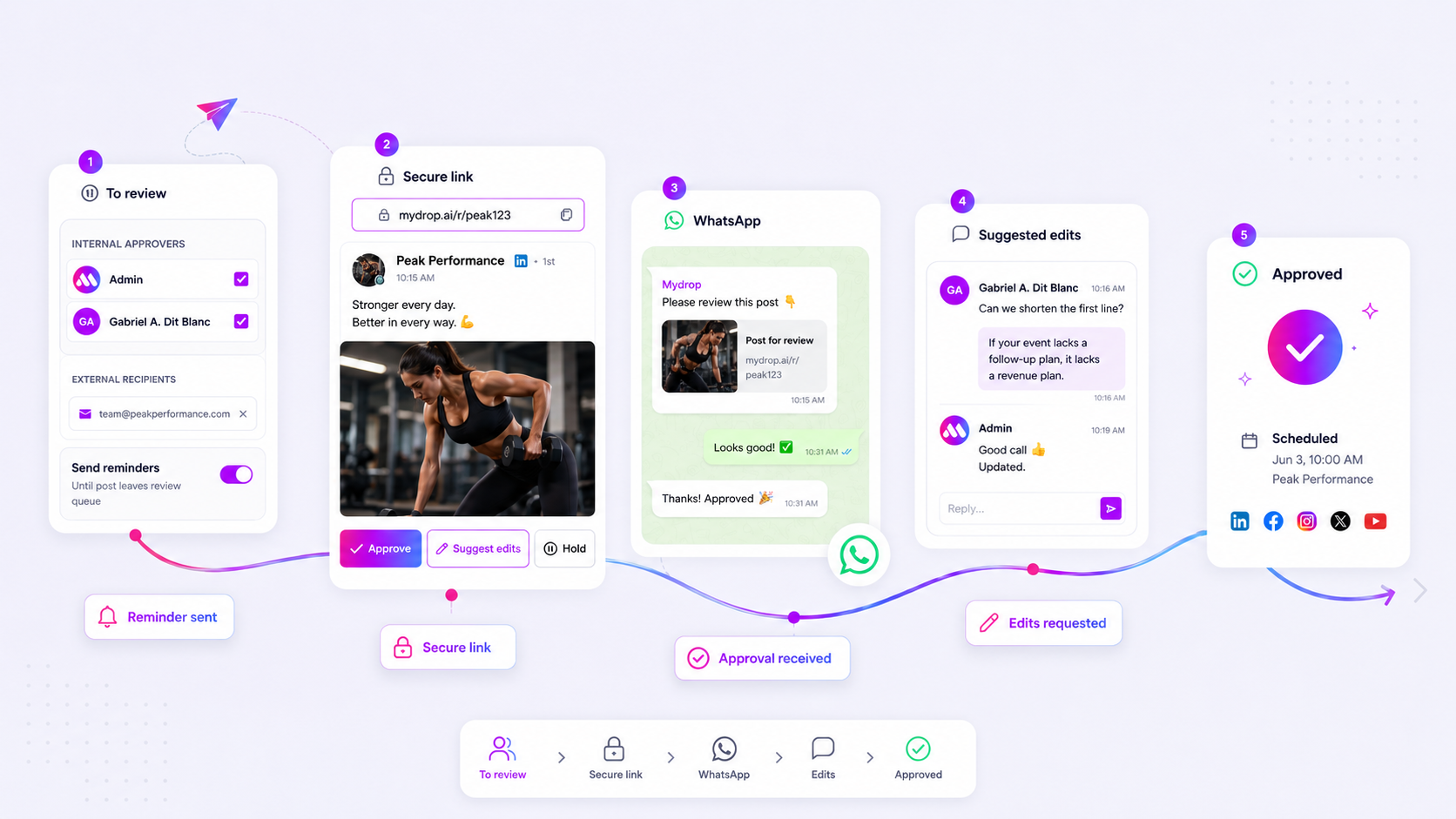
The most effective way to eliminate client approval bottlenecks is to abandon traditional login-required dashboards in favor of tokenized, direct-access portals that enable instant, one-click feedback. For social media agencies, client friction is a growth killer caused by antiquated, login-gated approval workflows. We get it. You have spent hours perfecting a post, only to have it sit for days because a client could not remember a password or felt overwhelmed by a complex dashboard. That is the kind of invisible, soul-crushing friction that keeps your agency grinding out manual work instead of scaling strategy. You need to swap that friction for a seamless, secure, tokenized review experience that lets clients act in seconds, not hours.
What the best tools need to handle

Most approval tools were built for the internal team, not the external stakeholder. They assume your client has a dedicated seat, knows your platform, and has the time to navigate a UI they only see once a month. This is the login-required fallacy. The reality is that the best approval workflows should feel more like a frictionless message thread than a project management system.
When auditing tools to handle your approval process, look for these non-negotiable capabilities:
- Instant Access via Tokens: If a client has to remember a username or password to approve a post, your process has already failed. Look for secure, tokenized URLs that drop the client directly into a branded, context-aware preview.
- Multi-Channel Interaction: Your clients live in email, WhatsApp, and Slack. If they cannot approve a post directly from the communication channel they are already using, they will not do it. Native WhatsApp actionability is no longer a luxury; for fast-moving campaigns, it is a requirement.
- Contextual Conversation: Do not force feedback into a separate, disconnected email chain. The review and the conversation about the review must live in the same place. If an edit is suggested, it needs to be immediately visible to the creator, not hidden in a secondary application.
- Automated Chasing: Never manually chase a client for an approval again. The best systems have native, automated reminder loops that trigger based on your specific launch timing.
Common mistake: Using tools that require clients to log in just to view a single post preview. This single decision consistently adds 24 to 48 hours to any production cycle.
Across thousands of posts, we have seen that coordination debt-not a lack of creative ideas-is what kills social media scaling. When your approval process requires a login, you are essentially asking your client to perform a maintenance task before they can give you the creative green light.
In our experience at Mydrop, moving away from login-gated portals allows agencies to pivot from manual chasers to strategic partners. By providing an interface that requires zero setup for the reviewer, you remove the barrier to entry, increase feedback velocity, and ultimately regain hours of lost time every single week.
Where basic tools start to break

When you force a client to log into a portal, you aren't protecting the content. You are simply creating a barrier. In our experience, teams managing hundreds of brand profiles often see the same failure pattern: a client forgets their password, cannot find the invitation email, and eventually gives up.
The result is entirely predictable. They default to sending feedback via email or messaging apps, leading to fragmented, disorganized threads where version control disappears. The "official" portal sits empty, while the actual review happens in a chaotic inbox.
This isn't just annoying. It is a massive hidden cost. You are spending billable hours chasing down feedback that exists in three different email chains, a screenshot, and a verbal comment from a phone call.
Most agencies believe asking a client to log in is "professional." In reality, it is a barrier that encourages clients to abandon the review entirely or default to unmanageable email feedback chains. The platform has essentially become a graveyard for approved posts that never actually get published because the approval loop was too cumbersome.
At Mydrop, we see teams struggle most when the approval interface assumes the client has the same technical bandwidth as the creator. When a client just wants to see the post and give a thumbs up, a login screen is a conversion killer.
The buying criteria that matter
If you are evaluating tools to fix this, stop looking for "enterprise" features that only add complexity. Look for how the tool treats the client's time. A truly effective approval portal should make the client feel smarter, not burdened.
Here is a scorecard to help you evaluate if your next approval platform will actually solve your coordination debt or just add to it.
| Evaluation Metric | The "Login-Gated" Trap | The Tokenized Portal Standard |
|---|---|---|
| Accessibility | Requires password, MFA, and account setup. | Instant access via unique, secure token. |
| Feedback Loop | Feedback sent to email, siloed from the post. | Context-aware comments attached to the asset. |
| Action Latency | High; requires switching between tools. | Low; one-click approval or edit requests. |
| Automation | Manual follow-ups required. | Automated reminders based on pending state. |
| Multi-Channel | Limited to web UI. | Native support for email and messaging (e.g., WhatsApp). |
Your selection checklist
Before signing a contract, ensure the tool passes these functional tests:
- Direct-Access Review: Does the client see the exact preview of the media, profile, and copy without needing to authenticate?
- Conversation-Based Edits: When a client suggests an edit, is that feedback captured directly against the post object, or does it require you to manually copy-paste it into your composer?
- Automated Persistence: If a post is stuck in the approval queue, does the system automatically trigger a reminder job, or are you manually chasing the client again?
- Actionable Messaging: Can the client approve or request changes through a direct messaging channel (like WhatsApp), or must they click a link and return to a browser?
Most teams do not have a content problem. They have a decision bottleneck. If your approval tool forces clients into a complex, login-required dashboard, you are effectively paying the platform to slow your team down. Choose a tool that meets the client where they are, not where your infrastructure wants them to be.
How Mydrop supports this workflow
At Mydrop, we realized that the fastest way to kill a campaign is to force a client to remember their password at 5 p.m. on a Friday. We built our approval flow around the idea that the review experience should be as frictionless as the social media content itself. Instead of forcing your clients to hunt down an invite email, create an account, and navigate a complex dashboard, our system generates a unique, tokenized URL for every single post.
When your client opens that link, they see exactly what the post will look like on the platform, whether it is a carousel, a video, or a simple text update. They can click "Approve," "Hold," or "Suggest Edits" right there, with no login required. If they suggest an edit, that feedback lands directly back in your content conversation, not as a vague reply-all email thread that loses context. For teams dealing with high-velocity requirements, we even built native WhatsApp approval prompts. Your client gets a ping on their phone, taps the button, and the post moves into the schedule. No extra steps, no "where do I find that again" messages, and no lost momentum.
A simple shortlist checklist
Before you commit to a new workflow tool, run it against this checklist. If it fails on any of these points, you are just buying yourself a new set of problems.
| Requirement | Why it matters |
|---|---|
| No-login public portal | Removes the password hurdle and instant-abandonment risk. |
| Context-aware feedback | Keep edits attached to the specific asset, not separated by email. |
| Multi-channel alerts | Native integration (Email/WhatsApp) so reviewers do not miss the ping. |
| Automated follow-ups | Chasing clients is a waste of your senior staff's time. |
| Public-link security | Tokenization should be secure and invalidatable if a link leaks. |
Decision check: If you find yourself asking "did they see the email?" more than once a week, your tool is failing you. Automation should handle the follow-up, not your account managers.
Conclusion
Most agencies do not have a content problem. They have a coordination bottleneck. Every time you ask a client to log into a system, navigate a UI they rarely use, or find an email you sent three days ago, you are adding friction that actively works against your production schedule.
The transition to tokenized, one-click approvals is not just a technical upgrade; it is a shift in how you value your own team's time. When your review process becomes invisible, the focus shifts back to what actually matters: strategy, creative quality, and getting the right message in front of the right audience at the right time.
Stop chasing approvals. Build a process that makes approval the path of least resistance for everyone involved. Your clients will be happier, your team will be less stressed, and most importantly, your content will actually go live on time. When you remove the friction, you stop being a bottleneck and start being a partner who ships consistently. That is the difference between a team that is just keeping up and a team that is actually scaling.