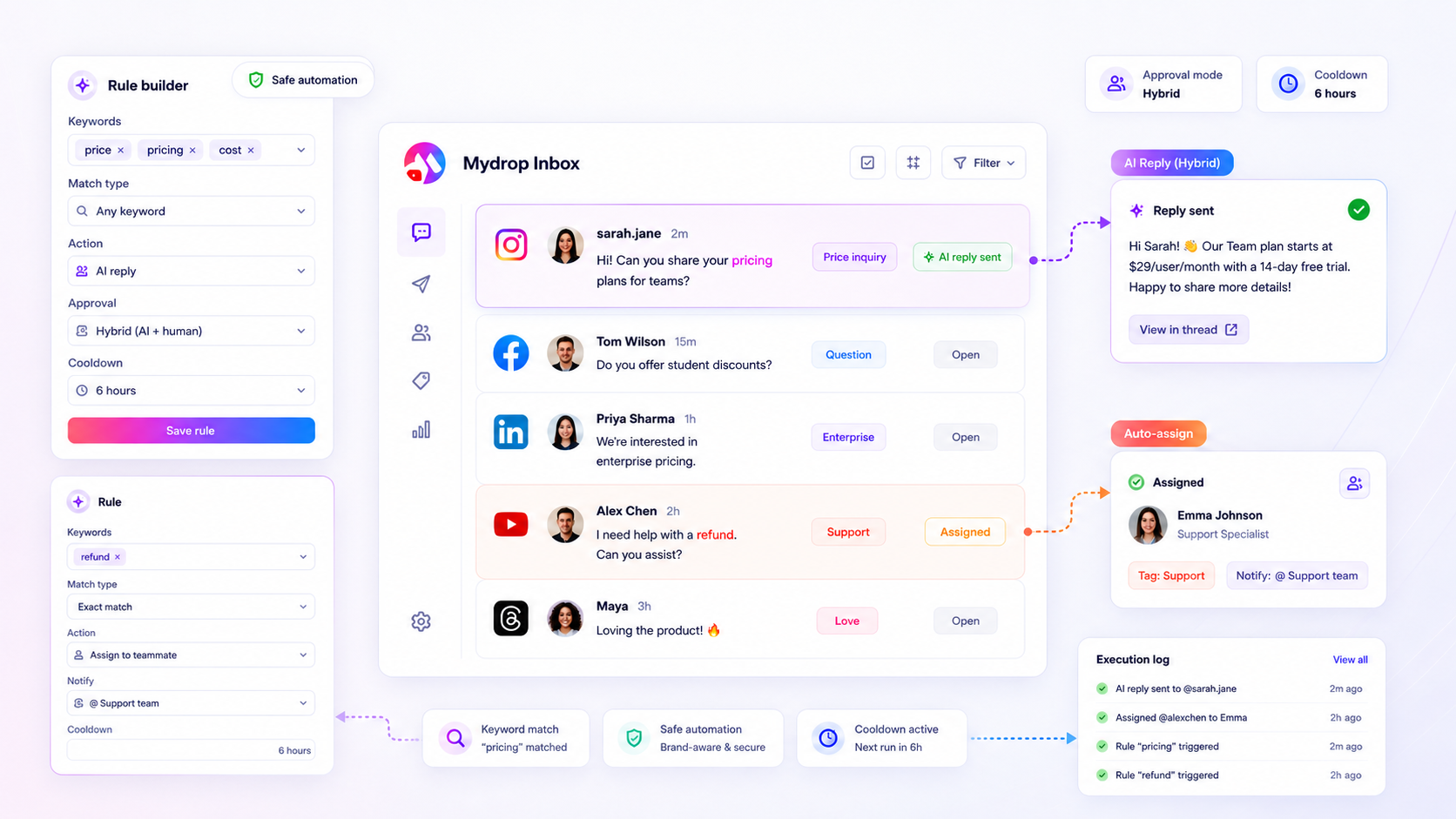
True scaling in agency social support isn't about replacing your team with an army of bots; it’s about automating the triage noise while ruthlessly protecting your brand through hybrid approval gates. When your inbox volume jumps from dozens to thousands of messages, the "all hands on deck" manual strategy doesn’t just break; it becomes a genuine liability.
We’ve all been there: it’s 6 p.m. on a Friday, the inbox is overflowing, and the fear that a generic, misinterpreted bot reply might ignite a PR firestorm keeps you glued to your screen. You need to keep the high-touch human response where it matters, but you shouldn't be wasting your best people’s time manually tagging shipping status queries or routing generic feedback. The goal is to move from reactive firefighting to a structured, predictable operation.
What the best tools need to handle

Most tools are fine at sorting messages by date. But when you’re supporting multiple enterprise brands, "sorting" is not enough. You need the ability to build granular rules that understand context, urgency, and brand voice-without needing a software engineer to update them every time a campaign changes. Scaling fails when your tools require constant manual intervention for routine tasks. The best tools treat incoming messages not as single tickets, but as triggers for automated workflows. When evaluating a tool, look past the basic "keyword match" functionality. Real operational efficiency comes from what happens after the rule matches.
Here is a diagnostic checklist to see if your current setup is built for scale or if it is just adding to your coordination debt:
| Capability | Why It Matters for Scale |
|---|---|
| Keyword + Exclusion Logic | Prevents false positives by filtering out noise (e.g., matching "broken" but excluding "not broken"). |
| Hybrid Approval Gates | Allows your team to set rules for "safe" replies while forcing human review on risky sentiment. |
| Delayed Execution | Prevents "robot-speed" replies that feel impersonal and gives a buffer to cancel if a human intervenes. |
| Cooldown Controls | Ensures you aren't spamming the same user twice in an hour, preserving brand dignity. |
Common mistake: Many teams set up "auto-reply" and forget it. If your rule doesn't have a cooldown or a cancellation check, you are just waiting for a customer to get frustrated by a repetitive, robotic interaction.
In our experience, teams find that the most effective inbox rules are the ones that are boring. They handle the predictable, high-frequency triage-assigning tickets to the right team, tagging sentiment, or sending a standard shipping update-while keeping the nuanced, critical brand interactions under a strict manual review process. If your tool forces you to choose between "full manual" and "all-in automation," you are missing the middle ground that actually keeps large-scale social operations alive.
Where basic tools start to break

Most teams have enough volume to justify automation, but lack the maturity to handle the risk. If your tool treats every inbound comment like an FAQ waiting for a canned response, you are running on borrowed time. The breakdown usually happens when a team tries to solve a complex communication problem with a blunt instrument.
The "Automation Trap" is exactly this: relying on simple triggers without understanding the context of the thread. A basic tool might see a common keyword like "ship" and instantly blast out a shipping policy template. But if that message was attached to a complaint about a broken item, or a critical public safety issue, that automated reply looks tone-deaf at best and negligent at worst.
When you manage dozens of brand profiles across multiple time zones, you cannot manually review every single interaction. Yet, you also cannot trust a basic bot to operate without guardrails. In our experience, teams hit a wall because their tools force them into a binary choice: either manually respond to every single comment and burn out, or automate and accept the inevitable PR disaster. You need a middle ground that allows you to automate the triage without giving up the final say on the response.
Watch out: Enabling auto-replies on all threads without setting up keyword exclusions for sensitive topics like "lawsuit," "unsafe," or "fraud."
The buying criteria that matter
True scaling requires a shift in how you evaluate platform capabilities. Forget about raw speed; start measuring your tool's ability to maintain safety at volume. When looking for the right fit, you need granular controls that act as filters before any response actually hits the public web.
Here is a Decision Matrix to help you grade your current stack against what you actually need for enterprise-level safety:
| Criteria | Basic Tool (The Risk) | Enterprise Tool (The Requirement) |
|---|---|---|
| Matching Logic | Simple keyword trigger | Combined logic (contains_all/exclude/exact) |
| Approval Flow | None (All or nothing) | Configurable: Auto/Manual/Hybrid gates |
| Safety Layers | None | Cooldowns, cancellation on reply, audit logs |
| Triage Ability | Just replies | Auto-tag, route, and alert specific teams |
You should be looking for three specific capabilities that turn a standard inbox into a managed support engine.
First, granular keyword management is non-negotiable. You need more than just a list of trigger words. You need the ability to combine contains_any and contains_all logic, but more importantly, you need a robust exclude keyword list. This prevents common words from triggering replies in dangerous contexts.
Second, configurable approval modes are the heart of a hybrid workflow. At Mydrop, we designed our inbox rules specifically because teams need to separate the trivial from the critical. You should be able to set some rules to "auto-approve" for common, low-risk queries, while forcing a "manual-approve" gate for any thread tagged with high-priority status or sensitive topic keywords.
Finally, protection mechanisms like cooldown periods and cancellation logic save your reputation. A cooldown prevents a bot from spamming the same user twice in an hour, while cancellation checks ensure that if a human agent has already replied, or the thread has been marked as resolved, the scheduled automated reply is scrapped before it fires.
In our experience, teams find that inbox rules become the most powerful part of their stack when these guardrails are active. It changes the role of your community managers from "manual responders" to "strategy reviewers," allowing them to focus on the threads that actually need human empathy while trusting the system to handle the high-volume noise safely. The goal is to move from reactive firefighting to proactive, structured support.
How Mydrop supports this workflow
At Mydrop, we designed our inbox rules specifically to move teams away from the "all hands on deck" manual chaos that burns out community managers. Instead of treating every comment as an emergency, our rules allow you to build a structured hybrid workflow that automates the mundane while keeping human eyes on the high-stakes.
Think of it as setting up a smart filter for your chaos. You can define triggers based on specific keywords-think of these as your "handle with care" topics-and then apply logic that fits the risk.
- For the routine: Use automated templates or AI-generated drafts that send immediately, taking the repetitive work off your plate instantly.
- For the sensitive: Force a human approval gate. Even if the rule perfectly matches a trigger, the reply stays in a draft state until someone on your team taps "approve."
- For the noisy: Set a cooldown period. If the same user spams your inbox with twenty identical messages in ten minutes, the rule fires once and then ignores them for the next hour, protecting your team from alert fatigue.
This is where teams usually get unstuck: they fear that automation will make them sound robotic. The real secret is using delayed execution. If a rule triggers a reply but the thread is resolved or handled manually before the delay finishes, Mydrop cancels the scheduled action automatically. It is a simple, effective safety net that lets you automate without losing the human touch when it matters.
A simple shortlist checklist
Before committing your team to a platform, run this quick check. If your potential tool cannot handle these three pillars, you are going to find yourself building manual workarounds within six months.
| Pillar | Requirement | Why it matters |
|---|---|---|
| Visibility | Does it log rule execution separately? | You need to debug why an auto-reply didn't fire without hunting through thread history. |
| Safety | Does it offer hybrid approval modes? | You should never allow public-facing AI responses without a configurable human circuit-breaker. |
| Control | Can it handle cooldowns & cancellations? | Prevents accidental spam and ensures you aren't sending obsolete replies to resolved issues. |
Conclusion
Scaling agency support isn't about out-working the volume; it is about out-organizing it. The most successful teams we see aren't the ones with the largest staff-they are the ones with the clearest governance. They have shifted from a reactive, manual posture to a proactive, rules-based system where automation handles the triage and humans handle the connection.
Take the time to map your most common inbox threads this week. Identify the top three categories that drain the most time, set up your first set of guardrailed rules, and watch the bottleneck loosen. Your team will thank you, and your clients will appreciate the consistency. Stop chasing messages, and start managing the conversation.