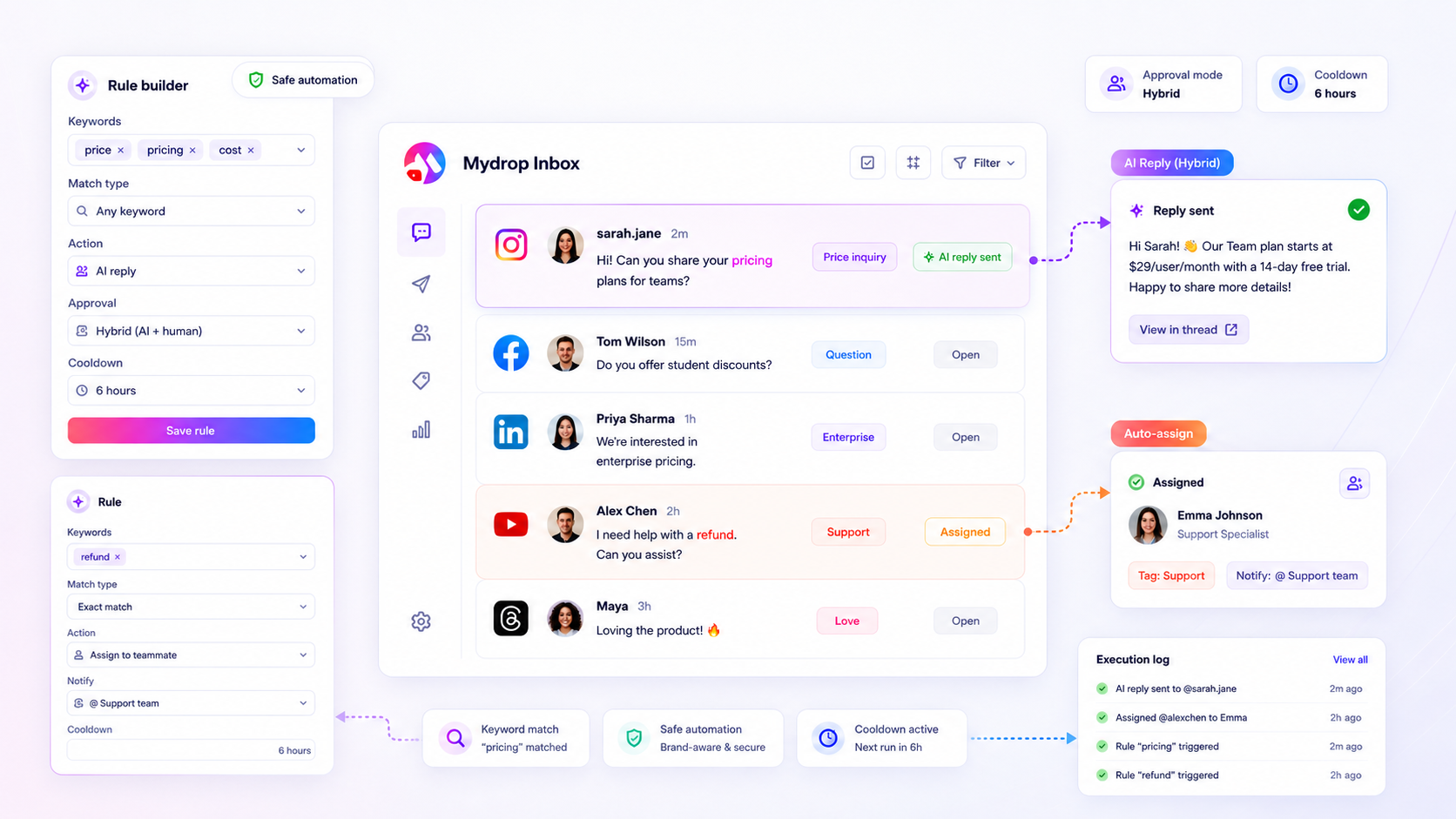
You do not have to choose between a flooded inbox and robotic, off-brand replies. By implementing a sensitivity-based decision matrix, you can automate repetitive triage and standard inquiries while ensuring high-stakes interactions are always routed through a human approval layer.
We get it. You are stuck between the rising tide of inbound social volume and the paralyzing fear of a public PR disaster. The "messy middle" of manual triage feels safe until it becomes the bottleneck that burns out your entire team. You are not alone in this; we have seen this across brands and agencies where the pressure to publish more creates a silent, mounting coordination debt.
True brand safety in social support is not about avoiding automation; it is about architecting a Sensitivity-Gated workflow that matches the risk profile of each inbound message to the appropriate level of human oversight.
The operating problem this solves

Most teams do not have a volume problem. They have a decision bottleneck. When every incoming comment or DM requires a human to read, tag, and manually type a response, you are paying for cognitive labor that a machine can handle reliably.
The real failure mode here is "all-or-nothing" automation. Teams often jump to either extreme: total manual effort that leads to burnout, or raw AI-generated replies that feel cold and eventually trigger a public backlash.
Here is where teams usually get stuck: they treat a customer asking for a shipping update exactly the same way they treat a sensitive complaint about a brand value. One requires speed and consistency; the other requires nuance and human empathy.
When you lose the ability to differentiate these, you stop being a support team and start being a glorified copy-paste machine. This leads to:
- Inconsistent Governance: Different community managers interpret brand voice through their own personal filters.
- The Approval Trap: A legal or senior reviewer gets buried under hundreds of routine tickets, making it impossible for them to spot the one high-stakes interaction that actually needs their eyes.
- Response Decay: During peak volume or after-hours, your response time drops, and frustration builds.
Common mistake: Applying a blanket rule to all inbound activity, such as "auto-reply to every DM with a template." This is the fastest way to turn an automated support system into an accidental PR nightmare when the bot tries to thank a critic for their feedback.
Instead of fighting the tide, you need a way to filter the noise so your team can focus on the signals. A simple, repeatable triage habit is the difference between a team that thrives under pressure and a team that is constantly in reactive crisis mode.
The minimum system that works

You start gaining control the moment you stop treating every inbound message as a unique event that requires a human brain to open, read, and interpret. Most of the noise in your social inbox is actually repetitive: status updates on orders, repeated feature questions, or standard "how do I contact support" queries.
The minimum viable system for regaining your sanity is a tiered triage setup. You do not need complex AI agents on day one. You need three functional pillars: keyword matching to catch intent, automatic assignment to clear the queue, and a cooldown period to prevent your brand from spamming the same user twice in an hour.
Think of this as a digital receptionist that knows when to pass a note and when to handle a guest on its own.
| Message Sensitivity | Intent Example | Primary Action | Approval Mode |
|---|---|---|---|
| Low | "Where is my order?" | Auto-reply with tracker link | Auto |
| Medium | "How does the API work?" | Tag & Assign to Eng-Support | Hybrid |
| High | "Your service is down!" | Notify Manager & Tag | Manual |
When you set up these inbox rules, you are essentially defining the boundaries of your brand voice. A simple rule that tags messages containing "help" or "broken" and routes them to a specific team saves your humans from the tedious task of reading 500 messages just to find the 20 that actually need a senior response.
Operator rule: If your team spends more than 30 minutes a day sorting tags, you have a coordination debt problem, not a volume problem. Automate the triage; keep the human for the conversation.
Where teams overbuild the process
The most common trap we see in enterprise teams is trying to force 100% of the inbox into an automated pipeline. This is where the magic dies and the PR disasters start.
Teams often start by mapping out every possible permutation of customer complaints. They build massive, nested rule structures, chain together five different AI triggers, and add complex logic to account for every edge case. This "hyper-automation" attempt almost always fails because language is inherently messy. When you try to force a nuanced, human-to-human apology through a rigid automated template, you lose the very brand equity you are trying to protect.
The overbuild trap usually looks like this:
- Over-relying on automated sentiment analysis to trigger public replies.
- Chaining too many delayed actions, making it impossible to audit why a post went live three days after the interaction.
- Ignoring the "human in the loop" for any message containing a threat or severe frustration.
At Mydrop, we see teams succeed when they treat automation as a triage assistant, not a replacement for their community team. The best teams build rules for the mundane-the repetitive tracking updates, the standard hours of operation queries-and leave the complex human interactions to the humans.
When you overbuild, you stop being a brand that cares and start being a bot that responds. If you cannot explain your automation logic to a new intern in under two minutes, it is likely too complicated for the platform to execute reliably. Keep the rules granular, keep the approval loops clear, and never, ever automate a reply to an angry customer without a hard stop for a human to review the tone.
How to run the cadence
Automation without a review loop is just a fancy way to make mistakes at scale. Once your rules are active, you need a rhythm that balances speed with sanity.
Most teams we see handle this through a simple "Triage-and-Audit" weekly cadence. It prevents your inbox from turning into a black box where you lose track of what the system is doing on your behalf.
- Monday Morning Sync (15 mins): Review the
rule execution logsfor the past week. Look specifically for where AI-drafted replies triggered or were held back by your approval mode. Did the bot stay in character? - Wednesday Check-in (10 mins): Identify high-volume keywords. Are you seeing new variants of "Where is my order?" or "How do I return this?" If yes, update your
Inbox Trigger Wordsimmediately. - Friday Retrospective (30 mins): Analyze any threads where the automated reply felt off. Adjust your
cooldownHoursor tweak theexclude keywordsto prevent future friction.
Decision check: Treat your rule execution logs like a project management board. If a rule consistently requires manual intervention after it triggers, it is not an automation-it is a broken workflow.
The proof that the habit is working
You know your system is mature when you stop measuring success by "messages cleared" and start measuring it by "human focus time gained." The goal isn't to reply to everything instantly; it's to ensure your team is only working on the 20% of inbound messages that actually require human empathy and judgment.
Consider this scorecard for your first 30 days of guardrailed automation:
| Metric | Target | Why it matters |
|---|---|---|
| Automation Coverage | 30% - 50% | Too low means you are still drowning; too high means you risk brand disconnect. |
| Human Override Rate | < 10% | If you are constantly overriding your own rules, your trigger logic is too broad. |
| Mean Response Time | Stable/Down | Automation should cut the "waiting time" for common questions, not speed up the wrong ones. |
| Execution Errors | Zero | Your logs should show successful actions, not failed calls or blocked replies. |
If your numbers are far off these marks, don't panic. Scaling social support is a game of continuous refinement. If your Human Override Rate is climbing, your team is signaling that the automation is becoming an obstacle rather than a tool.
Conclusion
Most teams do not have a volume problem; they have a coordination problem. The pressure to stay "always-on" doesn't mean you need to sacrifice your team's sanity or your brand's voice on the altar of speed.
By building a sensitivity-gated system, you finally reclaim the ability to distinguish between a customer needing a quick shipping update and a high-stakes conversation that requires your full, human attention. Stop manually triaging the noise and start focusing on the signal. You will find that when your team is no longer drowning in the mundane, they are surprisingly good at handling the meaningful.
If you're using Mydrop, start by auditing your inbox rules this week. Set your high-risk interactions to manual approval, turn on the cooldowns, and let the system handle the rest. Your team-and your community-will thank you for the consistency.