The secret to scaling social media across multiple brands is not more content. It is a robust governance process. If your team relies on scattered Slack messages, email threads, or "just checking" WhatsApp pings to sign off on posts, you are not managing an agile strategy. You are managing a ticking liability.
We know the feeling. You are juggling a dozen brand voices, endless stakeholders, and a relentless publishing cadence. When the approval loop is broken, the work feels opaque, messy, and frankly, dangerous. You are not just pushing pixels; you are defending your brand under a microscope. It is time to stop chasing approvals at 6 p.m. and start building a secure, permission-based machine that scales with you, not against you.
What the best tools need to handle

For enterprise-grade teams, an approval platform is not a nice-to-have. It is your primary defense against brand inconsistency and compliance failures. The baseline for any tool worth your time is not just showing a post. It is about orchestrating the handoff between creators, legal reviewers, and brand leads without creating bottlenecks.
At a minimum, your approval workflow must handle these four pillars:
- Permission-based state assignment: Creators should never have the keys to the castle. Posts must land in a "pending" state by default, completely isolated from publishing queues until an authorized approver gives the green light.
- Context-accurate previews: If a stakeholder is reviewing a post in a spreadsheet or a generic email, they are not reviewing the actual content. You need a live, platform-accurate view including media, profile data, and formatted text so they see exactly what the audience sees.
- No-login stakeholder access: Requiring your busy legal lead or a client to create an account just to click "approve" is a non-starter. Use tokenized, secure access that lets them review and act instantly from a browser or a message thread.
- Multi-brand separation: Your workflow must enforce strict silos. An agency or a central team should not be able to accidentally mix up assets or approval loops between a premium skincare brand and a retail hardware account.
Governance Health Checklist
How does your current process stack up?
| Checkpoint | Risk if absent |
|---|---|
| Pre-defined Approvers | Inconsistent brand oversight |
| Permission Gates | Unvetted content goes live |
| Feedback Loop | Misunderstandings and re-work |
| External Review | Slow, broken agency handoffs |
The reality is simple: if your platform allows a user to publish without a pre-configured approval gate, you are operating on luck, not strategy.
Where basic tools start to break

Most teams start with what they have-a shared spreadsheet, a tangle of email chains, or a dedicated Slack channel for "urgent approvals." It works until the day it doesn't. When you manage a dozen brands, the sheer volume of "just checking" requests creates a coordination debt that eventually bankrupts your team's sanity and your brand's reputation.
The cracks start appearing in predictable places:
- Contextual blindness: Your legal reviewer is looking at a copy-pasted caption in an email while the creative team is obsessing over a pixel-perfect preview. They are reviewing two different things.
- The "black hole" effect: A post is approved in a thread, but the person responsible for hitting "publish" misses the note buried under twenty other messages.
- Version chaos: Stakeholders leave feedback on "Draft 1," but someone already pushed "Draft 3" to the live preview link. No one knows which version is the actual source of truth.
Common mistake: Treating approval as a notification event rather than a state change. If an "approved" status doesn't automatically unlock the scheduling gate, your team is still doing manual, error-prone heavy lifting.
The buying criteria that matter
Stop evaluating tools based on "ease of use" and start auditing them based on governance maturity. If you are tired of chasing approvals at 6 p.m. on a Friday, your new platform needs to handle the heavy lifting of enterprise scale.
Use this Brand Governance Scorecard to separate toy tools from enterprise infrastructure.
Governance Maturity Scorecard
| Criterion | What to demand | Why it matters |
|---|---|---|
| Preview Fidelity | Native-look previews with full media/profile context. | Prevents "it looked better on my phone" feedback loops. |
| Stakeholder Access | Tokenized, no-login links for external clients. | Eliminates account management and seat-cost overhead. |
| Feedback Loop | In-place editing/commenting on the post itself. | Keeps the conversation anchored to the creative asset. |
| Automation | Conditional reminders based on pending states. | Stops posts from dying in the "awaiting review" queue. |
| State Rigidity | Hard blocks on publishing without explicit approval. | The only way to truly mitigate brand risk at scale. |
Decision check: Does the tool allow a user to bypass approval if they have "administrator" rights? In a high-risk enterprise environment, permission should override hierarchy. If your platform allows a single human to skip the process, you have a vulnerability, not a workflow.
Look for platforms that treat the approval token as a sensitive, secure key to the kingdom. You want a system where external agencies can suggest edits directly on the post, but only authorized internal team members can trigger the final "approve and schedule" action.
This is where teams usually get stuck: they choose a platform that is great for a solo creator but fails to provide the granular permission-based state management required for a multi-brand, multi-market enterprise structure. If your tool doesn't treat "Pending" as a mandatory stoplight, you aren't governing your brand; you're just suggesting a speed limit.
How Mydrop supports this workflow
At Mydrop, we built our approval workflow around the idea that governance shouldn't just be a wall you run into. It should be the foundation that lets you move faster. When you manage hundreds of profiles across multiple markets, "waiting for email" is not a strategy. It is a coordination debt that grows exponentially.
We see teams struggle when they try to mirror their internal approval structure with external tools. In Mydrop, we solve this by treating the approval portal as a first-class citizen, not a secondary link.
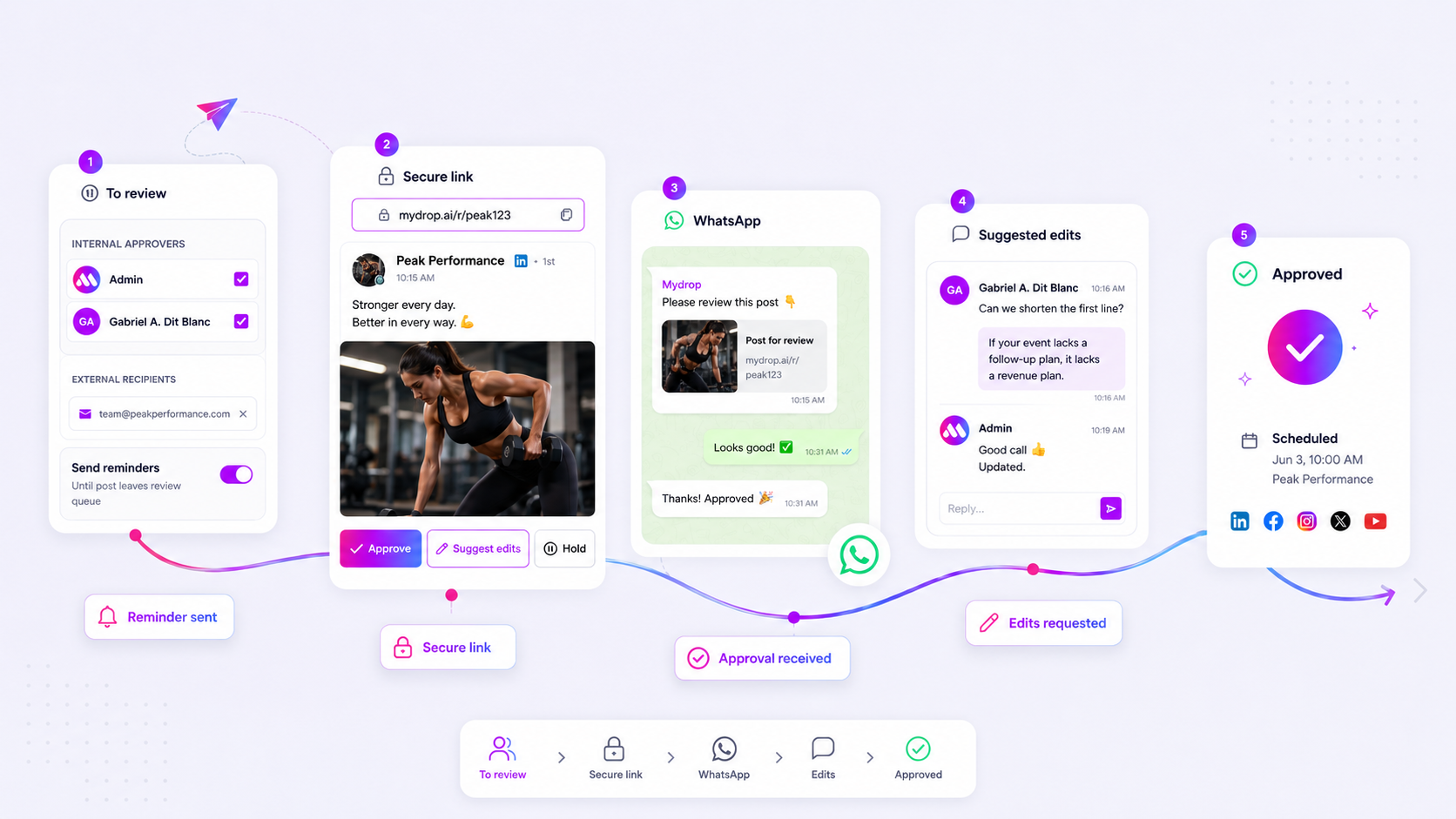
For internal stakeholders or agency clients who do not need full access, our tokenized public approval portals provide a secure, no-login environment. The reviewer sees exactly what the audience will see. They can approve the post, send it back for edits, or put it on hold. All feedback attaches directly to the post conversation thread, so the creator knows exactly what needs changing without digging through Slack logs.
We also know that you are rarely at your desk when an urgent approval request lands. We brought the approval process to your pocket with WhatsApp-based feedback. A reviewer can approve a post or suggest edits directly from their phone. This closes the loop in seconds rather than hours.
Perhaps most importantly, we enforce safety through state management. If a team member lacks permission to publish, their posts are stored as pending. They cannot accidentally push a post to live without a designated approver signing off. This isn't just about control; it is about ensuring that every piece of content-from a brand tweet to a multi-market campaign-has passed the required gate.
A simple shortlist checklist
When you evaluate a social media platform, do not just look at the feature list. Look at how they handle the "ugly" parts of the job: the forgotten approval, the misread creative, and the last-minute change.
Use this checklist to audit your current workflow or evaluate a new tool. If a tool fails more than two of these, you are buying a creator toy, not an enterprise platform.
| Capability | What to look for | Why it matters |
|---|---|---|
| Review Fidelity | Preview renders exactly as it will publish. | Prevents "it looked better in the spreadsheet" errors. |
| External Access | Secure, tokenized links for non-user review. | Removes login friction for stakeholders and clients. |
| Feedback Loop | Feedback attaches to the specific post. | Keeps conversation history inside the workflow. |
| Safety Gates | Permissions-based publishing states. | Prevents accidental publishing by non-approvers. |
| Mobile Speed | In-app or WhatsApp approval support. | Prevents workflow stall-outs when people are away. |
| Reminder Logic | Automated nudges for pending tasks. | Removes the manual labor of "checking in" on status. |
If you find that your current tool requires you to export your data into a separate spreadsheet just to track who has seen what, you are already losing.
Conclusion
Most teams do not have a content problem. They have a decision bottleneck.
When you look at your social media operation, stop asking how to produce more. Start asking how you can remove the friction in your approval loop. If your governance process relies on manual tracking, scattered messages, or the hope that everyone remembers to check their inbox, you are leaving your brand reputation to chance.
Scaling social media across multiple brands is a test of your governance infrastructure. The goal is to move from reactive chaos to structured, predictable throughput. Choose a platform that makes "no" a safe and easy option, and that makes "yes" a fast, transparent process. Your team will appreciate the clarity, and your brand will thank you for the consistency.