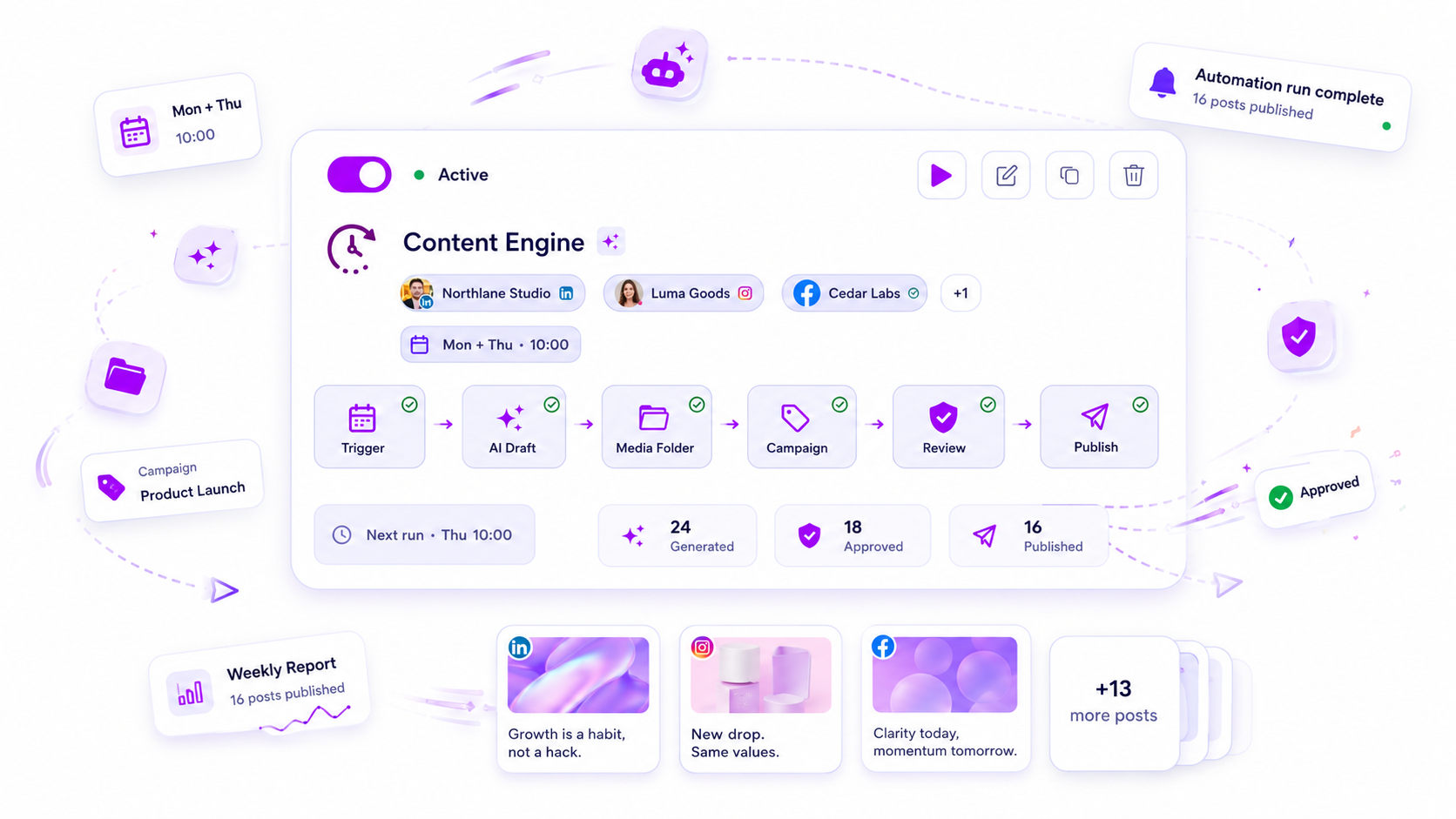
You should only automate the "gate" for routine, low-risk content-never the approval for your brand’s reputation. If you are treating every social post like it’s a high-stakes campaign launch, your team is drowning in unnecessary coordination debt. The goal is to separate your high-volume, repeatable content from the work that requires executive sign-off, moving from a manual "push" model to a risk-based automated pipeline.
We get it. The space between a client’s vision and a live post often feels like a black hole where your best talent goes to die, one status update at a time. Nobody goes into social media management to spend their Friday evening chasing approvals for a recurring weekly tip. You are stuck because you are using a manual process for content that should be moving through a system. When the cost of managing the approval loop exceeds the value of the content itself, you have a classic coordination problem, not a creative one.
The operating problem this solves

The bottleneck in your agency isn't content creation. It is the persistent "approval loop" that keeps your senior strategists tethered to low-stakes tasks, manually clicking buttons for content that rarely changes.
When your team manages dozens of brand profiles across multiple markets, the manual oversight of every caption, asset, and schedule becomes the primary failure point. You aren't just losing time; you are losing consistency. Without a clear framework for what gets automated, teams default to "manual everything" to stay safe, which inevitably leads to missed deadlines and burnout.
We see this across hundreds of agency workflows: the spreadsheet becomes a crime scene of v1, v2, and FINAL_REAL_FINAL labels, and the legal reviewer gets buried under a mountain of low-impact, evergreen content.
This is where the risk-based automation framework comes in. By categorizing content by its potential business impact, you can build a predictable content machine. At Mydrop, we use this simple matrix to help teams stop babysitting drafts and start scaling operations:
| Content Risk | Trigger Type | Post State Target |
|---|---|---|
| High (Sensitive/Brand) | Form-Submission | Draft/Review |
| Medium (Product/News) | Time-Scheduled | Review/Waiting |
| Low (Evergreen/Engage) | Full-Auto AI | Publish-Now |
Operator rule: If a post requires an apology when it goes wrong, it must never be set to
Publish-Now. Automate the production, but keep theApproval-Requiredgate active for every high-stakes asset.
The real shift happens when you move the production into a repeatable Mydrop automation while keeping the gating in the hands of the right human. You don't need fewer approvals; you need fewer unnecessary approvals. Once you categorize your content, you can set your routine, low-risk posts to Publish-Now and let your team focus their energy where it actually moves the needle.
The minimum system that works

The secret to a scalable operation is realizing that automation is just a factory floor, not the foreman. You need a setup that produces the work automatically but forces the hand-off to a human for the final judgment call.
At Mydrop, we usually see teams get this wrong by trying to automate the final output and the decision simultaneously. If you aren't careful, you end up with a high-velocity production line that dumps low-quality, off-brand content into your social feeds.
A functional, risk-aware system looks like this:
| Step | Owner | System Action | Goal |
|---|---|---|---|
| 1. Intake | Agency | Form submission maps to draft | Capture structured input |
| 2. Production | Mydrop Engine | AI fills templates from input | Assemble assets and text |
| 3. Gate | Human | Review status triggered | Stop/Adjust/Approve |
| 4. Dispatch | Mydrop Engine | Scheduled to channel | Execute with confidence |
The goal isn't to remove the human. It is to ensure the human only ever sees a near-finished post. When your team stops spending their Tuesday morning copy-pasting client notes into a post editor and starts spending it reviewing 20 pre-formatted, AI-generated drafts, your approval throughput naturally climbs.
In our experience, teams that make this shift see roughly a 40% reduction in manual draft time. The rejection rate rarely spikes because the human still acts as the final sanity check.
Decision check: If a human isn't required to change the substance of the post, the automation is just a nuisance. Only route to "Review" when the stakes involve brand compliance, legal sign-off, or high-budget visual fidelity. Everything else should land in a "Ready" state or hit the feed directly.
Where teams overbuild the process
The most common trap is process perfectionism. This happens when teams assume that because they have an automation tool, they should automate every single channel, every post type, and every stakeholder update.
They start building massive "If-This-Then-That" trees that try to account for every possible edge case-like what happens if the client sends a blurry image at 11 p.m. or if the marketing lead is on vacation. They essentially turn their social strategy into a complex coding project.
Here is the awkward truth: Your workflow is probably already too heavy.
When you overbuild, you create "coordination debt." You end up with so many approval gates and automated notifications that your team stops paying attention to them. If every post needs three approvals, none of them actually get the focus they deserve. The legal reviewer gets buried in low-stakes tweets, and eventually, they start rubber-stamping everything to clear their queue-including the one post that actually was a liability.
We have seen this across dozens of brands. The teams that scale aren't the ones with the most complex automation builders. They are the ones who identified the two or three routine content types that were eating up all their time and built a "straight-to-publish" path for them.
Stop trying to build a bulletproof system. Build a "good enough" system for 80% of your volume and reserve your team’s brainpower for the remaining 20% that actually moves the needle.
How to run the cadence
Getting your automated workflow into a steady rhythm requires moving from "firefighting mode" to "governance mode." You are no longer reacting to a single post; you are managing a pipeline.
In our experience, teams managing hundreds of brand profiles often fail because they treat every automation run as a new event. Instead, you need to sync your automations with your existing planning cycle.
1. The Weekly Sync-up: Use the first hour of your week to review the "Review" posts generated by your automations. If your Automations builder is configured to land content in a review state, you effectively create a predictable, consolidated bucket of work for your senior team.
2. The 80/20 Audit: Every two weeks, spot-check the posts that were set to "Publish-Now." If your AI-generated captions are consistently needing manual polish, your prompts are too loose. Tighten the constraints in your automation configuration to ensure brand voice alignment.
3. The Feedback Loop: When a client rejects an automated post, do not just manually rewrite it. Ask: Was this a strategy mismatch or a prompt error? If it was a strategy mismatch, disable the automation for that profile. If it was a prompt error, refine your brand context or field mappings.
Workflow check: Never treat a rejected automated post as a one-off error. It is a configuration signal that your automation is out of sync with your client's current goals.
The proof that the habit is working
How do you know if you are actually scaling or just building a more complex machine for yourself? You should see a tangible shift in how your team spends their day.
When the system is tuned, you should see a 40% reduction in manual draft creation time, combined with a stable or decreasing approval rejection rate. If your rejection rate climbs, you have traded quality for speed, and your "gate" is not tight enough.
| Metric | "Firefighting" State | "Scalable" State |
|---|---|---|
| Manual Draft Time | 60% of total hours | 20% of total hours |
| Approval Rejections | High / Unpredictable | <5% (Stable) |
| Senior Review Effort | Deep editing (Rewrite) | Quick scan (Confirm) |
| Publishing Cadence | Erratic / Batch-heavy | Consistent / Always-on |
If you are currently at the "Firefighting" level, focus on moving your low-risk evergreen content into the "Full-Auto" flow. Once that is locked in, shift your more sensitive product announcements into the "Review/Waiting" states.
Conclusion
The goal of a mature social media operation is not to reach total automation. It is to reach total control with minimal effort.
When you get this right, you stop being a manual gatekeeper and start being a systems architect. You stop chasing down stakeholders for captions and start monitoring the performance of your automated pipeline. If you find your team still manually building every draft from scratch, you aren't just losing time; you are paying a high tax in coordination debt.
Pick one low-risk campaign this week, set it to generate drafts automatically in Mydrop, and watch your team's focus shift from production to strategy. That is how you stop babysitting the content and start growing the brand.