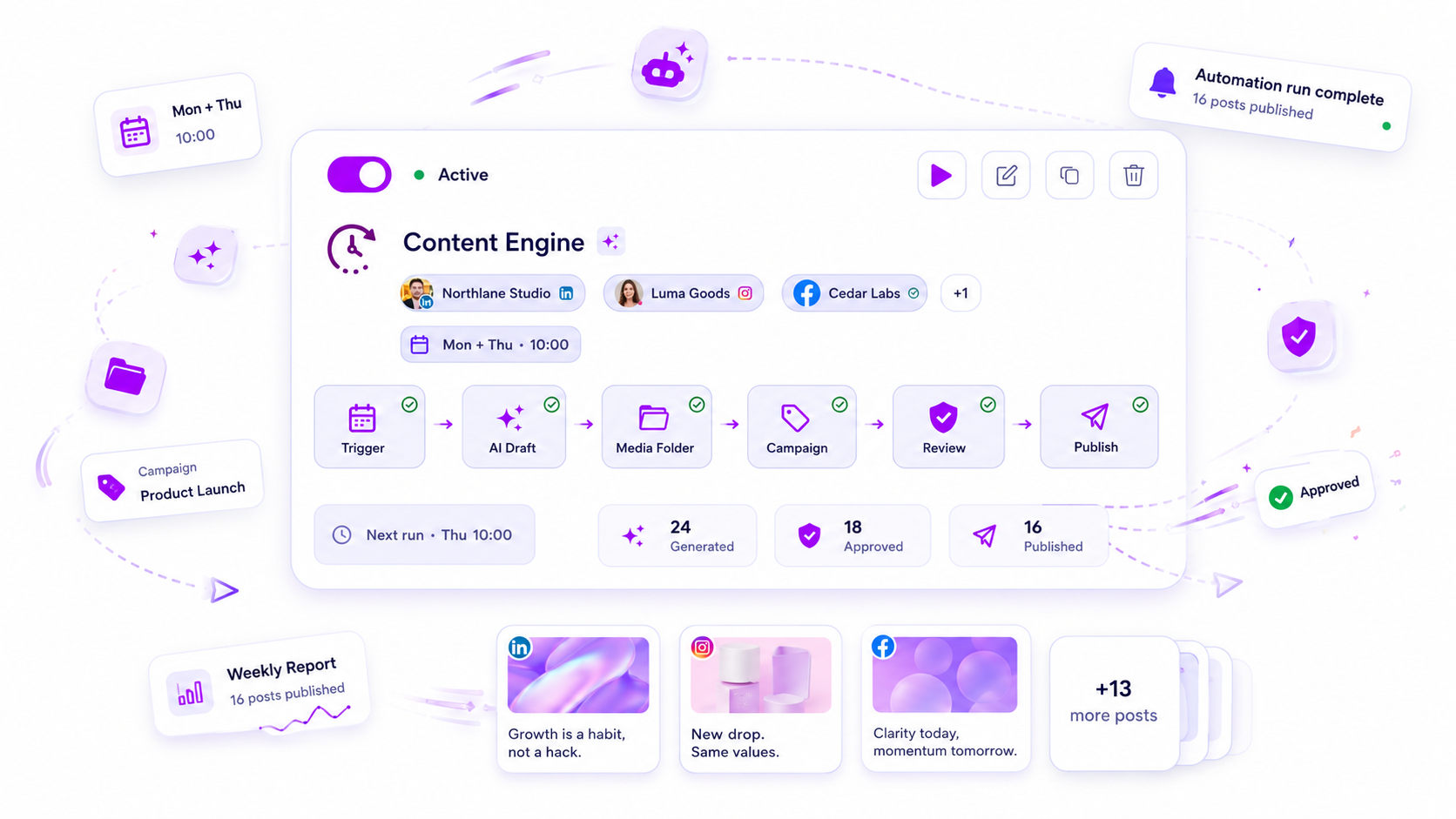
When your automated publishing workflows stop delivering results, skip the creative review and head straight to your operational plumbing. Your triggers, media source freshness, and field mapping logic are likely misaligned with your current brand context.
We get it. You built these flows to regain control over a chaotic social calendar, but now you find yourself spending more time nursing broken posts than you would have spent doing them manually. That "set it and forget it" promise hits a wall when a trigger fires, but the assets are stale or the approval route gets stuck in a loop. It is frustrating, messy, and far too common when you are managing hundreds of brand profiles across multiple time zones.
The operating problem this solves

The issue is rarely the quality of the content itself. Instead, it is usually a form of operational friction we call "Automation Debt."
When you first launch an automated series, everything is clean and mapped perfectly. But as your team shifts priorities-swapping out campaign folders, changing brand guidelines, or renaming form fields-those original settings stay static. The system continues to execute based on legacy instructions, leading to a disconnect between what you expect to see and what actually hits the feed.
Teams often fall into the trap of thinking they need more content. They ramp up the frequency, which only exacerbates the underlying errors. At Mydrop, we have seen this across thousands of brand profiles: the more efficient the system, the less frequently teams check under the hood, until the day you realize you have been pushing mismatched campaign assets for three weeks.
Operator rule: If your automated workflow requires daily emergency edits to fix formatting or mismatched media, the system is no longer an asset. It has become a liability.
The path forward isn't to kill the automation, but to treat it as a living component of your tech stack. You need a standard, repeatable way to verify that the "input" side of your pipeline still matches the "output" reality. To diagnose why your workflow has stalled, check your current setup against this health scorecard.
| Audit Category | What to Check | Failure Symptom |
|---|---|---|
| Trigger Logic | Does the cadence match your current team capacity and platform activity? | Posts firing too fast for human review; "Empty" content slots. |
| Media Freshness | Are you pointing at dynamic folders or static usedDocIds that have run dry? |
Repetitive or broken image links; blank media slots. |
| Mapping Logic | Do form-field mappings align with current client-intake or template requirements? | Missing captions; broken link placeholders. |
| Approval Flow | Is the review path creating a bottleneck for the generation speed? | "Waiting for Approval" queues that never clear. |
| Campaign Link | Are the generated posts mapped to active, current marketing campaigns? | Posts floating without reporting or attribution metadata. |
The minimum system that works

The secret to avoiding a stalled workflow is not adding more complexity, but ruthlessly enforcing a single, mandatory stop-sign: human-in-the-loop review. When you automate production, you are effectively trading human effort for speed. If you remove the human from that loop entirely, you are eventually going to publish something that makes the brand team sweat.
We see teams try to go "full auto" on everything-captions, imagery, posting times-only to realize they have lost control of their voice. The most stable systems we have encountered across thousands of brand profiles use a tiered state approach. They let the engine generate the work, but they force every output into a review-only state by default.
This creates a necessary "pause" in your distribution. It ensures that before a single post reaches the public, a human eye has confirmed the tone is right and the brand context hasn't shifted overnight.
Decision check: If your automated workflow doesn't allow for a one-click rejection and edit, it is not an enterprise tool-it is a liability.
Where teams overbuild the process
The biggest mistake is the urge to map every single field to an AI prompt or a complex form variable. Teams often spend hours building intricate logic to fill every metadata box, only to find that 80% of those fields never change. When you over-map, you create a rigid structure that breaks the moment a campaign needs a slight pivot.
The reality is that your audience doesn't care about the 15 hidden data fields you mapped; they care about the headline, the visual, and the timing. We advise teams to map only the essential variables that fluctuate, such as the specific offer or the primary visual asset, while keeping the rest as fixed, brand-approved templates.
Automation Health Scorecard
Use this to audit your current workflows. If you find a "Red" in any column, your system is likely experiencing operational drag.
| Audit Category | Green Status | Red Status |
|---|---|---|
| Trigger | Cadence aligns with current marketing goals. | No one remembers why it triggers when it does. |
| Media | Folder slots always have fresh, unused assets. | System is recycling 3-month-old images. |
| Mapping | Only core variables (offer, date) are mapped. | AI is writing content based on empty form fields. |
| Approval | Every generated post hits a review desk. | Posts are going live without human sign-off. |
| Campaign Link | Posts roll up to active campaign reports. | Output is "orphaned" with no metadata link. |
How to use: If any row is Red, pause the workflow and manually verify the inputs. A Red status in Approval is an immediate "stop-work" event.
When you reduce your setup to the essentials, your system becomes far more resilient. You stop spending your afternoons chasing down broken post payloads and start spending your time actually reviewing the quality of your output. It is better to have three perfectly aligned, approved posts than a dozen automated ones that look like they were written by a stranger.
How to run the cadence
You cannot expect a complex set of workflows to stay aligned without a recurring pulse check. Most teams make the mistake of waiting for a total system collapse before looking under the hood. Instead, bake a 15-minute "automation hygiene" meeting into your Friday schedule.
Use this simple workflow to stay ahead of the drift:
- Review Execution Logs: Check if any triggers failed to fire this week. If a cron job missed its slot, look for changes in your configuration.
- Media Audit: Check your folder-slot availability. If your automation is consuming assets from a specific folder, ensure there is enough fresh media to last through the next week.
- Approval Loop Sync: Verify that your assigned reviewers are actually seeing the notifications. If they are swamped, the system stalls regardless of how well your content is mapped.
- Field Mapping sanity check: Scan the last three generated drafts. Do the captions look like they were pulled from the correct campaign context, or are they reverting to stale defaults?
If your team is managing dozens of brand profiles, trying to audit this manually is a recipe for burnout. At Mydrop, we designed our automation overview to show status toggles and run history in one view precisely to prevent this. You need to be able to see at a glance which flows are active and which are currently failing to generate output.
The proof that the habit is working
How do you know if you are actually fixing the problem? You need a way to quantify the health of your setup. A healthy system is one that produces output with minimal manual intervention. If you are constantly diving into your platform to fix broken drafts, your current configuration is likely too rigid or your inputs are too stale.
The table below provides a simple rubric for assessing your workflows.
| Metric | Green Status | Red Status (Action Required) |
|---|---|---|
| Trigger Timing | 100% of scheduled tasks fired | Missed runs; orphaned jobs |
| Media Freshness | All slots populated with new files | Automation using duplicate/stale files |
| Field Accuracy | All fields mapped correctly | Placeholders or "Default" text visible |
| Review Velocity | Approvals completed within 24 hours | Stagnant drafts; notifications ignored |
| Human Edit Rate | < 5% of posts need manual tweaks | > 20% of posts require emergency fixes |
If you find yourself consistently in the red, do not try to patch everything at once. Start by simplifying. If your mapping logic for captions is too complex, revert to a simpler, more stable prompt. If your approval chain is too long, reduce the number of stakeholders required for routine posts.
Conclusion
The goal of automating your publishing is to create space for your team to focus on strategy, not to create a new layer of technical maintenance. When a workflow stops performing, resist the urge to scrap it and start over. Most of the time, the fix is much simpler-a stale folder, a missed trigger, or an overly complex rule that was never meant to scale.
Treat your automated workflows like a living part of your team. Give them a dedicated time for maintenance, keep your expectations for human oversight high, and stop letting small technical issues turn into massive coordination bottlenecks. You have the tools to handle the volume; now, you just need to keep the pipes clean.