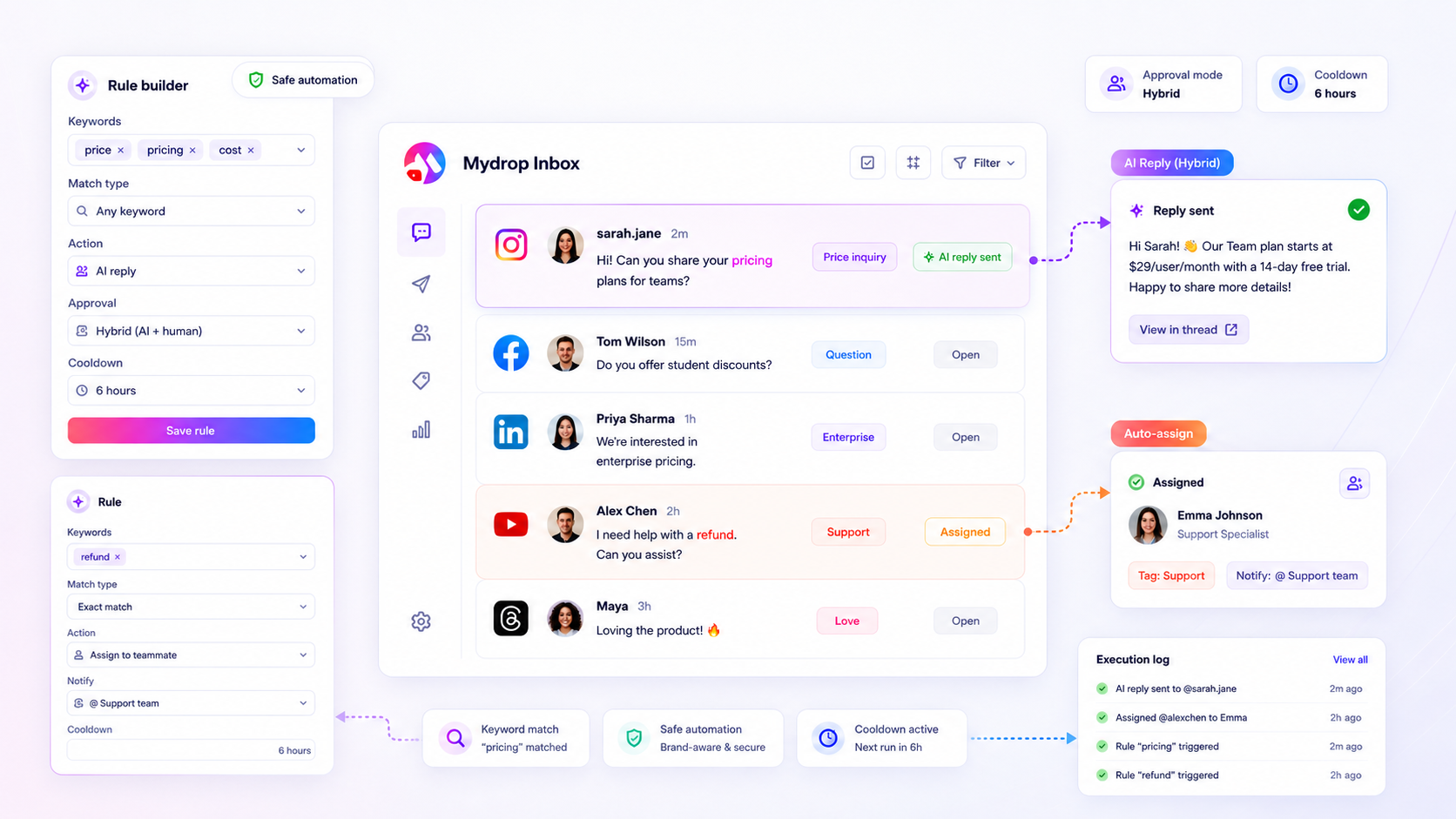
The bottleneck in your inbox isn’t a lack of staff-it’s the time spent manually identifying, tagging, and routing messages that follow predictable patterns. If a human has to read a message just to decide who should handle it, your team is paying a hidden tax on every single ticket. To fix this, you must move the triage logic out of your team’s heads and into an automated, rule-based system.
We get it. The inbox is where the noise meets the brand, and it is usually the messiest part of the operation. You are toggling between ten tabs, checking brand guidelines, and hoping no one sends a hasty reply to a VIP customer while your team is underwater. It is exhausting, prone to human error, and completely unnecessary for routine inquiries.
Where the handoff is actually breaking

The core issue is that your team is treating every incoming message as a unique event requiring manual thought. When you have multiple brands, markets, or product lines, this creates a massive friction point. A community manager sees a notification, opens the thread, verifies the brand context, tags the message, and assigns it to a specialist-all before the actual work of responding begins.
Across teams managing hundreds of brand profiles, this process adds up to massive operational drag. When volume spikes, these micro-decisions become the primary cause of missed deadlines and inconsistent tone. The real tragedy is that most of these messages are essentially duplicates of ones you have already solved dozens of times.
Common mistake: Treating every inbound message as a bespoke inquiry, even when the keywords and intent are identical to thousands of past interactions.
This is where the standard manual process fails compared to a logic-driven approach.
| Metric | Manual Triage Path | Automated Rule Path |
|---|---|---|
| Time per message | 4 to 6 minutes | Sub-second |
| Routing precision | Human error variance | Defined by rules |
| Response delay | Dependent on shift/timezone | Immediate or staged |
| Staff focus | Sorting and tagging | Complex escalations |
Formula for operational drift: Manual sorting time + Interrupt-driven context switching = Delayed response times + Decreased staff morale.
At Mydrop, we see teams install keyword-based triggers to act as a filter. Instead of a human acting as the first point of contact, you define the logic-if the message contains refund, shipping, or not working, the system automatically assigns the ticket to the support queue and applies a High Priority tag. The human only enters the thread once the message is categorized, allowing them to focus entirely on resolution rather than categorization.
Moving decisions to the work itself transforms the inbox from a chaotic feed into a structured, predictable pipeline. When you stop manual sorting, you stop wasting your best talent on administrative busywork.
The coordination debt checklist

If you feel like your team is playing a never-ending game of digital hot potato, you are likely carrying a heavy operational load that is completely invisible on your KPIs. Use this checklist to see if your triage system is actually a liability.
| Symptom | Evaluation Question | Severity |
|---|---|---|
| Manual Rerouting | Does someone have to read a post just to decide which brand or region owns it? | High |
| Slack Ping Fatigue | Are you sending more internal messages about the work than actually doing the work? | High |
| Approval Bloat | Does a simple reply sit in a pending state for hours because a manager has to click approve? | Moderate |
| Reply Inconsistency | Do two customers asking the same question get two different answers from two different teammates? | Moderate |
| Urgent Noise | Is your team missing critical PR or support issues because they are buried under thousands of routine comments? | Critical |
If you checked more than two of these, your current process is not just slow-it is actively preventing your team from scaling. You are effectively paying a premium for every interaction because you are using high-cost human labor to perform low-value sorting tasks.
How to move decisions closer to the work
The secret to stopping the manual churn is to stop treating every incoming message as a blank slate. Instead, you need to push decision-making logic directly into your infrastructure. At Mydrop, we help teams map out the inbound patterns they see daily-like shipping delays, password resets, or PR mentions-and build keyword-based logic that handles the sorting for you.
When you define these rules, you move the decision out of someone’s head and into the platform itself.
A sample triage rule setup
Use this structure to map your most common incoming inquiries.
| Trigger Condition | Filter Logic | Automatic Action |
|---|---|---|
| Critical PR Risk | Contains "lawsuit", "scam", or "fraud" | Assign to Crisis Lead + High Priority Tag |
| Standard Support | Contains "refund" or "track order" | Tag "Support" + Auto-Draft AI Response |
| Sales Lead | Exact match "pricing" or "demo" | Notify Sales Channel + Assign to SDR |
By configuring these rules, you gain a massive advantage: predictability. The AI or template doesn't get tired, doesn't need a coffee break, and will never "forget" to tag a high-priority ticket because it was distracted by a Slack ping.
Protecting the brand voice
The biggest fear for leaders in large organizations is an automated reply going off the rails. You can mitigate this by utilizing a hybrid approval mode.
- Define your keyword clusters: Identify the top 20% of messages that account for 80% of your volume.
- Configure the automated action: Set the system to draft a reply using your brand guidelines, but keep the
approval modeset tomanualfor sensitive channels. - Audit the execution: Use the rule execution logs to see what the system would have said. Once you trust the output, flip the switch to allow those replies to go live without human oversight.
Most teams find that after two weeks of reviewing the logs, they are ready to automate about 70% of their routine support, leaving their staff to focus on the high-empathy, complex issues that machines simply cannot touch.
Operator rule: If your team spends more time discussing how to answer a repetitive question than they do actually answering it, you have already lost the battle. Automate the baseline, and reserve your humans for the edge cases.
The roles and rules that reduce rework
The key to fixing a messy inbox isn't more people; it's defining exactly who touches what-and which parts of that process a machine can handle reliably. When you stop treating every incoming comment or mention as a unique, manual event, you stop the constant, exhausting context switching.
In our experience working with teams managing dozens of profiles, the most stable operations divide the workload into three distinct layers:
- The Automated Tier (Rules): High-volume, predictable noise like "how do I reset my password" or repetitive brand mentions. These are handled by keywords triggering predefined responses or auto-tagging.
- The Assisted Tier (AI-Draft): Complex queries where a human needs the final say. AI suggests a draft, but the message sits in an
Approvalstate until a team member clicks "Post." - The Human-Only Tier: Escalations, crisis-level sentiment, or high-value VIP interactions that skip automation entirely.
When you move logic into your workflow, you aren't just saving time. You are building a system that doesn't panic when the volume doubles. If a customer asks for a refund on a Friday afternoon, a rule can tag it Urgent, assign it to your Support-Tier-1 group, and notify them immediately. No one has to manually sort that ticket.
Decision check: If you find yourself typing the same three responses more than five times a week, that is not a customer service task. That is a configuration task.
The weekly habit that keeps the system honest
Automated systems can get stale. Keywords that worked in January might trigger false positives in June if your marketing campaign changes tone. A system is only as good as the last time someone audited it.
Set a 15-minute Rule Health Check on your calendar every Friday. It prevents the slow decay of your triage quality.
| Focus Area | Action Item | Success Threshold |
|---|---|---|
| Execution Logs | Review the last 50 rule executions. | < 5% false positives |
| Keyword Tuning | Search for high-frequency "unassigned" tags. | 0 critical gaps |
| Response Latency | Check time-to-first-reply for routine tickets. | < 2-minute average |
| Cooldown Review | Adjust timers for high-volume, low-value threads. | No repeat alerts |
If you follow this cadence, you will catch "bottleneck drift" before it turns into a team-wide emergency. You aren't just reviewing logs; you're verifying that the machine is still aligned with the brand voice you want to project across all your markets.
Conclusion
Most teams are not suffering from a lack of talent. They are suffering from an invisible tax on their attention, where the most valuable people on the team are spending their prime hours performing manual administrative sorting.
By replacing that manual friction with guardrailed, rule-based logic, you regain control over the chaos. You move from a reactive state-constantly chasing the next fire-to an intentional one where you can scale your operations without having to grow your headcount at the same rate.
Start small. Pick one repetitive category of inbound noise, build a rule to handle it, and watch how quickly your team finds the bandwidth to focus on the work that actually requires a human touch. That is how you turn a high-volume inbox from a source of dread into a predictable, high-performing part of your brand.