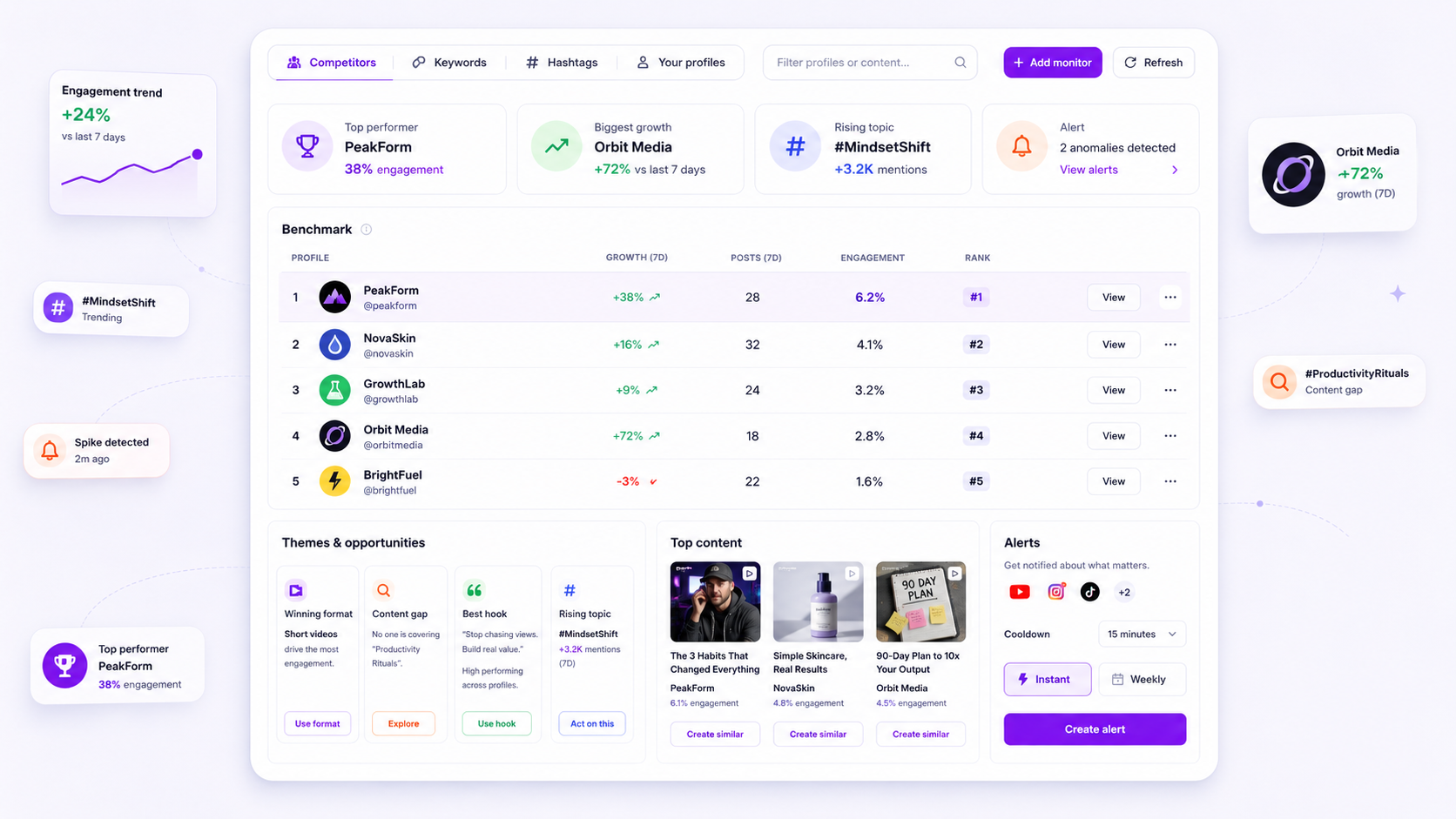
The most effective way to keep your leadership team updated isn't a flashier deck or a longer Slack thread-it's a reliable, automated delivery system that lands in their inbox before they even think to ask for it. By shifting from manual screenshotting to scheduled weekly digests and real-time alerts, you eliminate the "as-of-now" anxiety that plagues most enterprise teams. The goal is to move from being a manual librarian who catalogs old trends to a strategic operator who anticipates them.
We get it: the "Sunday Night Scramble" is a universal experience for social teams. You’re sitting there with 20 browser tabs open, desperately trying to figure out why a competitor’s reel went viral before your CMO pings you about it at 8 a.m. Monday. It’s messy, thankless work that feels more like digital archiving than actual marketing. It’s also a choice. You can keep chasing links, or you can build a system that chases them for you.
The awkward truth is that if you're manually compiling lists of links for a weekly report, you're already too late to the trend. Most teams suffer from what we call "reporting lag"--the time wasted proving you're watching the competition instead of actually reacting to them. You shouldn't have to spend half your Friday proving you did your job; the system should do that while you focus on the next campaign.
Where the handoff is actually breaking
In our experience working with teams managing hundreds of brand profiles, the breakdown rarely happens because people aren't working hard enough. It happens because the manual reporting loop is fundamentally brittle. When your competitive intelligence relies on a human being "remembering" to check a specific account and then "remembering" to email the right person, the system is one busy Tuesday away from total collapse.
The friction usually shows up in three places: the data is stale by the time it's read, the context is lost in a long email chain, or the stakeholders are buried under a mountain of irrelevant noise. If you're sending a giant spreadsheet once a month, you're not providing value; you're providing a chore.
To see if your current process is actually serving you, compare the manual effort against an automated flow:
| Phase | Manual Scraping Loop | Mydrop Automated Digest |
|---|---|---|
| Collection | 4 hours/week visiting 15+ profiles | 0 mins (Auto-tracked via Intelligence) |
| Analysis | Manual math for growth & engagement | AI-powered "Top Performer" signals |
| Packaging | Cropping screenshots and pasting links | Automated formatting and summaries |
| Delivery | Manual "Send" (often forgotten) | Scheduled delivery via Intelligence Settings |
| Total Cost | ~16 hours per month | ~40 mins per month (Review & Refine) |
The "Monday Morning Fire" usually starts when a stakeholder sees a competitor’s post in their own feed and wonders why they haven't heard about it from you. Automation doesn't just save time; it protects your professional credibility by ensuring you are always the first one to know. By setting up Intelligence Monitoring correctly, you transform competitive data from a static archive into a live feed of opportunities.
The invisible drain on your week isn't the big strategy meeting; it's the fifteen minutes you spend every morning checking a competitor's Instagram to see if they've launched that new campaign yet. Multiply that by ten competitors and five platforms, and suddenly you're a full-time private investigator instead of a marketing lead.
We’ve all seen the "Competitive Tracking" spreadsheet that looks like a crime scene-half-broken links, screenshots from three months ago, and "TBD" notes that never get updated. This is the part where your team’s creative energy goes to die. It’s messy, thankless work that feels more like digital archiving than actual marketing.
The coordination debt checklist
If you aren't sure if your reporting process is actually broken, run this quick audit. If you check more than two of these boxes, you’re paying a manual tax that is slowing down your actual execution.
- The Screenshot Scramble: Do you spend more than 30 minutes a week taking screenshots of competitor posts and pasting them into a slide deck or Slack channel?
- The "Did You See This?" Ping: Is your primary method of competitive intel a random DM from a stakeholder at 8 p.m. asking why a rival brand is trending?
- The Spreadsheet Zombie: Do you have a "Competitor Tracker" file that requires manual data entry-likes, followers, or view counts-every Monday morning?
- The Link Graveyard: Is your team’s "Inspiration" folder just a list of bookmarked URLs that no one has opened in weeks?
- The Reactive Pivot: Has your team ever changed a campaign direction after a launch because you realized a competitor did the exact same thing three days prior?
Decision check: If you're checking three or more boxes, your intelligence workflow is reactive. You’re not monitoring the market; you’re just documenting your own surprises.
How to move decisions closer to the work
The goal of automation isn't just to save time; it's to get the right signal to the person who can actually do something about it. In most enterprise teams, intel follows a "telephone game" path. The intern sees a trend, tells the manager, who tells the director, who eventually tells the creative team-usually four days too late to catch the wave.
Inside Mydrop, the Intelligence Settings allow you to bypass this friction by routing specific triggers directly to the stakeholders who need them. Instead of a generic "everything is happening" email, you can configure the system to only bark when there’s actually something to see.
Effective automation requires choosing between Instant Alerts (the fire alarm) and Weekly Digests (the smoke detector). If a competitor’s post suddenly hits 5x their average engagement, you want an instant alert sent to your content lead. If you just want to see a general benchmark of how your follower growth compares to the rest of the industry, a Friday afternoon digest is plenty.
| Alert Type | Best For... | Trigger Threshold | Primary Recipient |
|---|---|---|---|
| Instant Alert | Critical market shifts | Engagement > 300% of 30-day avg | Social Lead / Creative Director |
| Weekly Digest | Strategic benchmarking | Weekly total growth & sentiment | CMO / Brand VP |
| Topic Watch | New product launches | Keyword mention (e.g., "new", "launch") | Product Marketing / PR |
| Inspiration Row | Creative brainstorming | Top 3 performing posts in niche | Design Team / Copywriters |
By setting these parameters in the Intelligence Dashboard, you stop being the middleman. You aren't "sending the report" anymore; the system is providing the infrastructure for everyone to stay informed.
At Mydrop, we’ve seen that teams who set strict thresholds for their alerts actually have higher stakeholder engagement. When an email from the system hits a VP's inbox, they know it actually matters. It isn't just another notification to archive-it's a signal that the competitive landscape has materially changed.
The shift here is subtle but massive: you move from being a manual librarian to a strategic architect. You’re no longer the person who "finds the stuff"; you’re the person who built the machine that finds the stuff for everyone else.
The roles and rules that reduce rework
Automation is only as good as the filters you set. If your CMO gets a notification every time a competitor posts a standard product photo, they will hit the "Archive" button faster than you can explain your engagement rate. The goal is to ensure that when a digest hits their inbox, they know it contains a signal, not just noise.
In our experience, the most successful teams don't just track everyone; they group their monitored profiles by the "why" behind the tracking. You might have one group for direct rivals (to watch for product launches) and another for "Inspiration Leaders" (to watch for creative hooks and format shifts). By setting specific parameters for what triggers an alert -- such as a post performing 3x better than that account's average -- you ensure your team is only reacting to outliers.
Inside Mydrop's Intelligence Settings, you can route these different signals to different people. Your creative team might want an instant alert when a competitor drops a high-production video, while leadership only needs to see the Weekly Digest that summarizes the biggest growth and top-performing themes across the board.
Workflow check: If you're sending more than three manual links to a stakeholder per week, you're not reporting; you're just adding to their unread message count.
To help you audit your own setup, use this scorecard to see if your automated reporting is actually ready for prime time.
The "Stakeholder-Ready" Scorecard
| Checkpoint | Pass Criteria | Why it matters |
|---|---|---|
| Noise-to-Signal Ratio | Alerts only trigger on outliers (>2x avg engagement). | Prevents notification fatigue for busy executives. |
| Frequency Alignment | Digest arrives 2 hours before the weekly sync. | Gives stakeholders time to scan before the meeting starts. |
| Actionable Hooks | Digest includes "Winning Recipes" and "Content Gaps." | Moves the conversation from "Look at this" to "We should do this." |
| Recipient Hygiene | List is trimmed to people who actually make decisions. | Reduces unnecessary "reply-all" threads and administrative drag. |
The weekly habit that keeps the system honest
Automation isn't "set and forget"--it's "set and tune." We have seen dozens of teams build a beautiful monitoring dashboard, only to let it get dusty as competitors change their handles or pivot their strategies. The "Monday Morning Fire" usually happens because a team is watching last year's rivals instead of this month's rising stars.
The fix is a simple 10-minute Friday "Refine & Review" workflow. This isn't about deep analysis; it's about system maintenance. Open your Intelligence Dashboard and take a quick look at the suggestedProfiles row. These are AI-powered suggestions based on your current brand niche and bio. If a new player is gaining traction, add them with one click. If a competitor has gone dark for 30 days, drop them.
This habit ensures that when the Weekly Digest goes out on Monday morning, the data is fresh and relevant. It turns your intelligence loop into a living system that evolves as fast as the platforms do. You are no longer the "manual librarian" chasing down screenshots; you are the strategist who owns the system that does the chasing for you.
- Review Suggestions: Scan the AI-suggested industry leaders.
- Prune the Stale: Remove accounts that haven't posted in weeks.
- Verify Alert Logic: Adjust engagement thresholds if you're getting too many alerts.
- Final Sync: Ensure your "Own Connected Profiles" are showing up correctly in the benchmark ranks.
Conclusion
The shift from manual scraping to automated intelligence isn't just about saving a few hours on a Friday afternoon. It's about changing how your leadership team perceives the social department. When you provide a reliable, automated pulse on the market, you stop being a cost center that "makes posts" and start being a strategic partner that "identifies opportunities."
By using Mydrop to handle the heavy lifting of data collection and delivery, you buy back the headspace needed to actually do the creative work that moves the needle. The best competitive report is the one that lands in a stakeholder's inbox right when they need it, with exactly the information they can use. Build the system once, tune it weekly, and spend the rest of your time winning.