The best social media rule automation tool is not the one that sends the most replies-it is the one that lets you define exactly when to automate, when to escalate, and when to pause.
Managing social support for ten brands with hundreds of daily mentions is not about finding the perfect "reply all" button; it is about staying out of the headlines. We get it. You are caught between the pressure to maintain 24/7 responsiveness and the terrifying reality that one wrong bot reply can trigger a brand crisis. Most enterprise teams are not struggling because they lack ideas; they are struggling because their automation is a blunt instrument. When your tools are stuck in an all-or-nothing loop, you end up spending more time playing damage control than actually managing your community. It is exhausting, it is high-stakes, and it is entirely fixable if you stop prioritizing speed over governance.
What the best tools need to handle

Most entry-level automation tools treat social inboxes like simple email filters. They look for a keyword and fire a template. That is fine for a single creator, but for a global brand, it is a liability. You need context sensitivity that understands your specific ecosystem.
If your rule builder cannot distinguish between a high-priority customer complaint and a casual mention on a different platform, your automation will eventually fail. The best tools require granular logic that goes beyond a simple "contains" match.
| Feature Category | Why it matters for Enterprise |
|---|---|
| Nuanced Triggers | Uses contains_all or excludes logic to ignore false positives. |
| Context Filtering | Segregates rules by brand, profile, and specific thread type. |
| Priority Routing | Tags and assigns based on critical vs normal sentiment. |
| Safe Off-Ramps | Automatically cancels queued replies if a thread status changes. |
Nuanced matching is non-negotiable. You should be able to create a rule that triggers only when a message contains a specific product name and originates from a verified support channel, while explicitly excluding internal threads or known spam. Without this level of filtering, you will inevitably end up with a "reply-all" disaster.
Operator rule: Never treat an inbox rule as a "set and forget" feature. Treat it like a software deployment: test, monitor, and build in a human-in-the-loop audit requirement for every public-facing action.
Most tools start to break when they ignore the "hidden labor" of moderation. If you are not building in a cooldown period-the time during which a bot is blocked from replying to the same user or thread-you will watch your account spam the same person three times in a minute. It is the quickest way to turn a loyal user into an angry one.
When you evaluate a tool, look specifically for how it handles the "Approval/Delay" layer. This is the difference between a tool that scales your team and a tool that creates a new, more dangerous job for them.
Where basic tools start to break

Most entry-level social media tools are built for "inbox zero" speed, not for enterprise governance. When your volume hits hundreds of mentions a day across multiple brands, these tools often trigger an Automation Death Spiral.
The mechanics are simple but destructive: a basic rule detects a keyword, fires a generic automated response, and fails to recognize that the thread is already in motion. You end up double-replying, responding to resolved issues, or worse, replying to an angry customer with a tone-deaf "We hope this helps!" template. Because these tools lack cooldown periods and cancellation triggers, they keep firing until your team manually intervenes. By that point, the damage is already done, and you are no longer managing social media-you are doing damage control.
Common mistake: Treating every inbound message as an isolated trigger. Enterprise social is a continuous conversation; if your tool cannot link a new reply to an existing, active thread state, your automation is just noise.
The buying criteria that matter
If you are managing a high-stakes brand, the "send" button is your greatest risk. You need to stop asking "How many replies can this tool send?" and start asking "How many ways can this tool prevent a mistake?"
To help you audit your current setup, we have put together this scorecard. If your tool cannot pass these four gates, it is likely costing you more in manual audit time than it is saving you in response speed.
Enterprise Inbox Automation Scorecard
| Capability | What to look for | Why it matters |
|---|---|---|
| Contextual Filters | Granular filtering by brand, channel, and thread type. | Prevents cross-brand reply contamination. |
| Hybrid Approval | A "Human-in-the-loop" mode for sensitive topics. | Keeps public-facing risk under executive control. |
| State Awareness | Automated cancellation if a thread is already resolved. | Stops the "Death Spiral" of redundant replies. |
| Execution Audit | Detailed logs showing why a rule fired. | Essential for compliance and root-cause analysis. |
| Cooldown Logic | Prevents repeated actions on the same pattern. | Avoids spamming the same user during a crisis. |
The Golden Metric: Ask yourself: If this rule fires incorrectly, how long does it take for a human to see it, stop it, and delete it?
In our experience, the best teams don't actually want "full automation." They want Guardrailed Automation. They want to automate the rote, repetitive triage-like tagging common questions or routing support tickets-while keeping the high-risk, public-facing replies behind a simple, high-speed approval buffer. If your current tool forces you to choose between "manual triage for everything" and "automated replies with no off-ramp," you are working with a consumer tool pretending to be an enterprise solution.
True operational maturity isn't about removing humans from the process; it is about choosing exactly when and where their expertise creates the most value.
How## How Mydrop supports this workflow
At Mydrop, we see the same pattern across hundreds of brands: the biggest risk isn't silence, it is the accidental, automated, off-brand response that stays live for hours. We designed our inbox-rules feature specifically to turn that risk into a controlled, repeatable process.
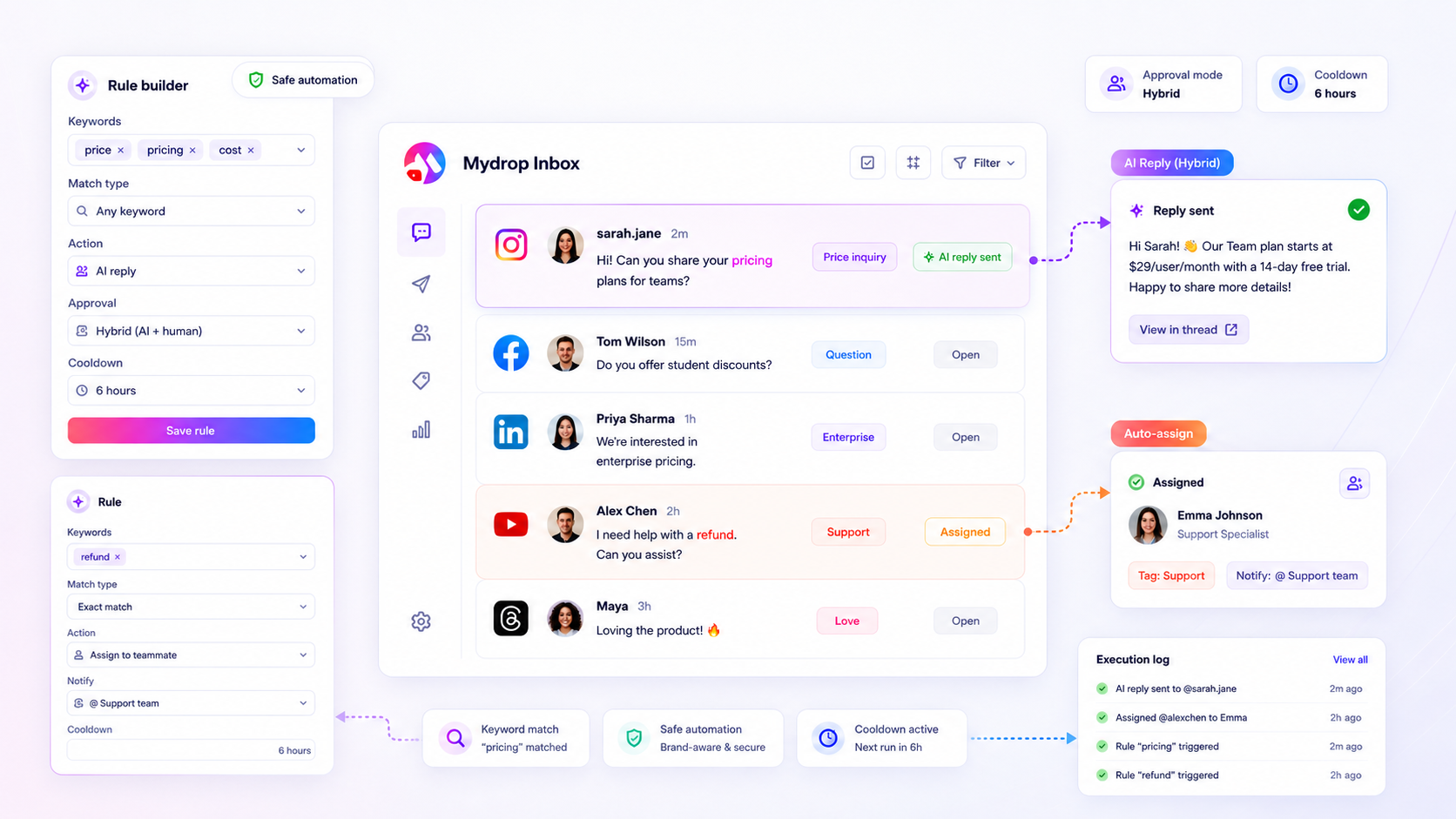
Instead of choosing between total automation (risky) or manual triage (slow), you can build hybrid workflows. You might set a rule to automatically tag all inbound mentions containing "shipping issue," assign them to a support queue, and prepare an AI-drafted reply. But-and this is the key-you leave the approval mode set to "manual." The AI does the heavy lifting of drafting, but the human retains the final "approve" click.
We also added cooldown periods to prevent the "automation death spiral." If a user sends five messages in a row, the system recognizes the pattern and stops firing redundant replies, keeping your threads clean and professional. Plus, because every rule execution is logged, your team has a clear audit trail. You can instantly see exactly why a message was tagged or why a reply was delayed, which makes fixing broken workflows a five-minute task instead of a day-long investigation.
Decision check: Never enable an automated reply rule on a high-volume brand without setting a minimum 4-hour cooldown. Your future self will thank you when a thread goes sideways.
A simple shortlist checklist
Use this checklist when evaluating if your current automation tool is ready for the enterprise, or if you are just borrowing trouble.
| Requirement | Why it matters | Pass/Fail |
|---|---|---|
| Granular Filters | Does it filter by specific brand, platform, and thread type? | |
| Hybrid Approval | Can you mix AI-drafting with human final review? | |
| Anti-Spam Cooldown | Does it stop repeating the same action on one thread? | |
| Execution Logs | Can you see the "why" behind every automated action? | |
| Smart Cancellation | Does it kill scheduled replies if the thread is resolved? |
Conclusion
The goal of social media automation shouldn't be to remove humans from the loop. It should be to remove the mundane, repetitive noise so your team can focus on the high-stakes conversations that actually define your brand reputation.
Stop treating your inbox as a fire hose that you just hope to survive. By implementing guardrailed rules, you turn your support operations into a predictable, scalable system. You aren't just saving minutes on each ticket; you are buying back the mental bandwidth to be creative, thoughtful, and strategic.
Most teams don't have a volume problem. They have a coordination bottleneck. Fix the rules, protect the brand, and let your team get back to the work they were actually hired to do.